# Create a Collection
Source: https://docs.withcortex.ai/api-reference/endpoints/collections/create-a-collection
post /apps/{app_id}/collections
Create a new collection for your app.
# Delete a Collection
Source: https://docs.withcortex.ai/api-reference/endpoints/collections/delete-a-collection
delete /apps/{app_id}/collections/{collection_id}
Remove a collection from your app.
# Get a Collection
Source: https://docs.withcortex.ai/api-reference/endpoints/collections/get-a-collection
get /apps/{app_id}/collections/{collection_id}
Fetch detailed information about a specific collection.
# Get Collections
Source: https://docs.withcortex.ai/api-reference/endpoints/collections/get-collections
get /apps/{app_id}/collections
Get a list of all collections of your app.
# Update a Collection
Source: https://docs.withcortex.ai/api-reference/endpoints/collections/update-a-collection
patch /apps/{app_id}/collections/{collection_id}
Modify an existing collection.
# Cancel File Upload
Source: https://docs.withcortex.ai/api-reference/endpoints/files/cancel-file-upload
post /apps/{app_id}/files/{file_id}/cancel
Cancel the upload processing of a specific file.
# Create a new file upload
Source: https://docs.withcortex.ai/api-reference/endpoints/files/create-a-new-file-upload
post /apps/{app_id}/files/uploads
Create a new file upload that generates an upload URL.
# Create File
Source: https://docs.withcortex.ai/api-reference/endpoints/files/create-file
post /apps/{app_id}/files
Upload a new file to the app. Optionally specify a bucket.
# Delete File
Source: https://docs.withcortex.ai/api-reference/endpoints/files/delete-file
delete /apps/{app_id}/files/{file_id}
Delete a specific file from the app.
# Delete File Upload
Source: https://docs.withcortex.ai/api-reference/endpoints/files/delete-file-upload
delete /apps/{app_id}/files/uploads/{file_upload_id}
Delete a specific file upload.
# Get File
Source: https://docs.withcortex.ai/api-reference/endpoints/files/get-file
get /apps/{app_id}/files/{file_id}
Retrieve details of a specific file.
# Get File Upload
Source: https://docs.withcortex.ai/api-reference/endpoints/files/get-file-upload
get /apps/{app_id}/files/uploads/{file_upload_id}
Retrieve details of a specific file upload.
# List File Uploads
Source: https://docs.withcortex.ai/api-reference/endpoints/files/list-file-uploads
get /apps/{app_id}/files/uploads
Retrieve a list of files for a specific app.
# List Files
Source: https://docs.withcortex.ai/api-reference/endpoints/files/list-files
get /apps/{app_id}/files
Retrieve a list of files for a specific app. Optionally filter by bucket.
# Update File Upload
Source: https://docs.withcortex.ai/api-reference/endpoints/files/update-file-upload
patch /apps/{app_id}/files/uploads/{file_upload_id}
Update details of a specific file upload.
# Upload a file
Source: https://docs.withcortex.ai/api-reference/endpoints/files/upload-a-file
post /public/apps/files/uploads/{file_upload_id}
Uploads a file to the specified file upload ID placeholder
# Cancel a Record Run
Source: https://docs.withcortex.ai/api-reference/endpoints/records/cancel-a-record-run
post /apps/{app_id}/collections/{collection_id}/records/{record_id}/cancel
Cancel the ongoing execution of a record.
# Create a Record
Source: https://docs.withcortex.ai/api-reference/endpoints/records/create-a-record
post /apps/{app_id}/collections/{collection_id}/records
Create a new record in the specified collection.
# Delete a Record
Source: https://docs.withcortex.ai/api-reference/endpoints/records/delete-a-record
delete /apps/{app_id}/collections/{collection_id}/records/{record_id}
Delete a specific record by its ID.
# Download Record Report
Source: https://docs.withcortex.ai/api-reference/endpoints/records/download-record-report
get /apps/{app_id}/collections/{collection_id}/records/{record_id}/download
Generate and download a PDF report of a specific record.
# Get a Record
Source: https://docs.withcortex.ai/api-reference/endpoints/records/get-a-record
get /apps/{app_id}/collections/{collection_id}/records/{record_id}
Retrieve a specific record by its ID.
# Get Record Status
Source: https://docs.withcortex.ai/api-reference/endpoints/records/get-record-status
get /apps/{app_id}/collections/{collection_id}/records/{record_id}/status
Retrieve the current status of a specific record.
# Get Records
Source: https://docs.withcortex.ai/api-reference/endpoints/records/get-records
get /apps/{app_id}/collections/{collection_id}/records
Retrieve a list of records of a specific collection.
# Reset Record
Source: https://docs.withcortex.ai/api-reference/endpoints/records/reset-record
post /apps/{app_id}/collections/{collection_id}/records/{record_id}/reset
Reset the record status and rules.
# Run a Record
Source: https://docs.withcortex.ai/api-reference/endpoints/records/run-a-record
post /apps/{app_id}/collections/{collection_id}/records/{record_id}/run
Execute the rules associated with a specific record and get the report.
# Update a Record
Source: https://docs.withcortex.ai/api-reference/endpoints/records/update-a-record
patch /apps/{app_id}/collections/{collection_id}/records/{record_id}
Update an existing record by its ID.
# Update Record Rules
Source: https://docs.withcortex.ai/api-reference/endpoints/records/update-record-rules
post /apps/{app_id}/collections/{collection_id}/records/{record_id}/update-rules
Update the rules associated with a specific record.
# Cancel Test
Source: https://docs.withcortex.ai/api-reference/endpoints/tests/cancel-test
post /apps/{app_id}/workflows/{workflow_id}/tests/{test_id}/cancel
Cancel a running workflow test by its ID.
# Cancel Tests
Source: https://docs.withcortex.ai/api-reference/endpoints/tests/cancel-tests
post /apps/{app_id}/workflows/{workflow_id}/tests/cancel
Cancel all running workflow tests for a specific workflow.
# Create a Test
Source: https://docs.withcortex.ai/api-reference/endpoints/tests/create-a-test
post /apps/{app_id}/workflows/{workflow_id}/tests
Create a new workflow test for a specific workflow.
# Create a Test Expectation
Source: https://docs.withcortex.ai/api-reference/endpoints/tests/create-a-test-expectation
post /apps/{app_id}/workflows/{workflow_id}/tests/expectations
Create a new workflow test expectation for a specific workflow.
# Delete Test
Source: https://docs.withcortex.ai/api-reference/endpoints/tests/delete-test
delete /apps/{app_id}/workflows/{workflow_id}/tests/{test_id}
Delete a specific workflow test by its ID.
# Delete Test Expectation
Source: https://docs.withcortex.ai/api-reference/endpoints/tests/delete-test-expectation
delete /apps/{app_id}/workflows/{workflow_id}/tests/expectations/{expectation_id}
Delete a specific workflow test expectation by its ID.
# Get Test
Source: https://docs.withcortex.ai/api-reference/endpoints/tests/get-test
get /apps/{app_id}/workflows/{workflow_id}/tests/{test_id}
Retrieve a specific workflow test by its ID.
# Get Test Expectation
Source: https://docs.withcortex.ai/api-reference/endpoints/tests/get-test-expectation
get /apps/{app_id}/workflows/{workflow_id}/tests/expectations/{expectation_id}
Retrieve a specific workflow test expectation by its ID.
# Get Tests
Source: https://docs.withcortex.ai/api-reference/endpoints/tests/get-tests
get /apps/{app_id}/workflows/{workflow_id}/tests
Retrieve a list of workflow tests for a specific workflow.
# Get Tests Expectations
Source: https://docs.withcortex.ai/api-reference/endpoints/tests/get-tests-expectations
get /apps/{app_id}/workflows/{workflow_id}/tests/expectations
Retrieve a list of workflow test expectations for a specific workflow.
# Get Tests Stats
Source: https://docs.withcortex.ai/api-reference/endpoints/tests/get-tests-stats
get /apps/{app_id}/workflows/{workflow_id}/tests/stats
Retrieve statistics of workflow tests.
# Run Test
Source: https://docs.withcortex.ai/api-reference/endpoints/tests/run-test
post /apps/{app_id}/workflows/{workflow_id}/tests/{test_id}/runs
Run a specific workflow test by its ID.
# Run Tests
Source: https://docs.withcortex.ai/api-reference/endpoints/tests/run-tests
post /apps/{app_id}/workflows/{workflow_id}/tests/runs
Run all workflow tests for a specific workflow.
# Update Test
Source: https://docs.withcortex.ai/api-reference/endpoints/tests/update-test
patch /apps/{app_id}/workflows/{workflow_id}/tests/{test_id}
Update a specific workflow test by its ID.
# Update Test Expectation
Source: https://docs.withcortex.ai/api-reference/endpoints/tests/update-test-expectation
patch /apps/{app_id}/workflows/{workflow_id}/tests/expectations/{expectation_id}
Update a specific workflow test expectation by its ID.
# Create App Variable
Source: https://docs.withcortex.ai/api-reference/endpoints/variables/create-app-variable
post /apps/{app_id}/variables
Create a variable for a specific app.
# Delete App Variable
Source: https://docs.withcortex.ai/api-reference/endpoints/variables/delete-app-variable
delete /apps/{app_id}/variables/{key}
Delete a variable for a specific app.
# Get App Variables
Source: https://docs.withcortex.ai/api-reference/endpoints/variables/get-app-variables
get /apps/{app_id}/variables
Fetch all variables for a specific app.
# Rename App Variable
Source: https://docs.withcortex.ai/api-reference/endpoints/variables/rename-app-variable
patch /apps/{app_id}/variables/{key}
Rename a variable for a specific app.
# Update App Variables
Source: https://docs.withcortex.ai/api-reference/endpoints/variables/update-app-variables
patch /apps/{app_id}/variables
Update variables for a specific app.
# Create a Webhook
Source: https://docs.withcortex.ai/api-reference/endpoints/webhooks/create-a-webhook
post /apps/{app_id}/webhooks
Create a new webhook for a specific app.
# Delete a Webhook
Source: https://docs.withcortex.ai/api-reference/endpoints/webhooks/delete-a-webhook
delete /apps/{app_id}/webhooks/{webhook_id}
Delete an existing webhook for a specific app.
# Get Webhooks
Source: https://docs.withcortex.ai/api-reference/endpoints/webhooks/get-webhooks
get /apps/{app_id}/webhooks
Retrieve a list of webhooks for a specific app.
# Update Webhook
Source: https://docs.withcortex.ai/api-reference/endpoints/webhooks/update-webhook
patch /apps/{app_id}/webhooks/{webhook_id}
Update an existing webhook for a specific app.
# Cancel a Discoverable Workflow Run
Source: https://docs.withcortex.ai/api-reference/endpoints/workflows/cancel-a-discoverable-workflow-run
post /apps/{app_id}/workflows/discover/{workflow_id}/runs/{run_id}/cancel
Cancel a workflow run that is currently running.
# Cancel a Workflow Run
Source: https://docs.withcortex.ai/api-reference/endpoints/workflows/cancel-a-workflow-run
post /apps/{app_id}/workflows/{workflow_id}/runs/{run_id}/cancel
Cancel a workflow run that is currently running.
# Discover Workflows
Source: https://docs.withcortex.ai/api-reference/endpoints/workflows/discover-workflows
get /apps/{app_id}/workflows/discover
Retrieve a list of discoverable workflows for a specific app.
# Get a Workflow
Source: https://docs.withcortex.ai/api-reference/endpoints/workflows/get-a-workflow
get /apps/{app_id}/workflows/{workflow_id}
Retrieve a specific workflow by its ID.
# Get a Workflow Run
Source: https://docs.withcortex.ai/api-reference/endpoints/workflows/get-a-workflow-run
get /apps/{app_id}/workflows/{workflow_id}/runs/{run_id}
Retrieve details of a specific workflow run.
# Get a Workflow Version
Source: https://docs.withcortex.ai/api-reference/endpoints/workflows/get-a-workflow-version
get /apps/{app_id}/workflows/{workflow_id}/versions/{version_id_or_version_number}
Retrieve a specific workflow version by ID or version number.
# Get Discoverable Workflow
Source: https://docs.withcortex.ai/api-reference/endpoints/workflows/get-discoverable-workflow
get /apps/{app_id}/workflows/discover/{workflow_id}
Retrieve a specific discoverable workflow by its ID.
# Get Discoverable Workflow Version
Source: https://docs.withcortex.ai/api-reference/endpoints/workflows/get-discoverable-workflow-version
get /apps/{app_id}/workflows/discover/{workflow_id}/versions/{version_id_or_version_number}
Retrieve a specific version of a discoverable workflow by ID or version number.
# Get Workflow Runs
Source: https://docs.withcortex.ai/api-reference/endpoints/workflows/get-workflow-runs
get /apps/{app_id}/workflows/{workflow_id}/runs
Retrieve a list of runs for a specific workflow.
# Get Workflow Versions
Source: https://docs.withcortex.ai/api-reference/endpoints/workflows/get-workflow-versions
get /apps/{app_id}/workflows/{workflow_id}/versions
Retrieve a list of workflow versions for a specific workflow.
# Get Workflows
Source: https://docs.withcortex.ai/api-reference/endpoints/workflows/get-workflows
get /apps/{app_id}/workflows
Retrieve a list of workflows for a specific app.
# Replay a Workflow Run
Source: https://docs.withcortex.ai/api-reference/endpoints/workflows/replay-a-workflow-run
post /apps/{app_id}/workflows/{workflow_id}/runs/{run_id}/replay
Replay a specific workflow run.
# Run a Workflow
Source: https://docs.withcortex.ai/api-reference/endpoints/workflows/run-a-workflow
post /apps/{app_id}/workflows/{workflow_id}/runs
Run a specific workflow by its ID.
# Run Discoverable Workflow
Source: https://docs.withcortex.ai/api-reference/endpoints/workflows/run-discoverable-workflow
post /apps/{app_id}/workflows/discover/{workflow_id}/runs
Run a specific workflow by its ID.
# Update Run Data Retention Configuration
Source: https://docs.withcortex.ai/api-reference/endpoints/workflows/update-run-data-retention-configuration
patch /apps/{app_id}/workflows/{workflow_id}/runs/{run_id}/retention
Update the data retention configuration for a specific workflow run.
# File Uploads
Source: https://docs.withcortex.ai/api-reference/getting-started/file-uploads
Learn how to use the File Uploads API to securely collect files from users without authentication.
The File Uploads API allows you to create pre-signed URLs that users can use to upload files directly to Cortex without requiring an API key. This eliminates the need to implement authentication proxies for file uploads, making it easier to collect files from end-users securely.
## Use Cases
* Collecting document uploads from users via your application
* Enabling file uploads in public-facing forms
* Gathering user-submitted files for processing in workflows
## How It Works
1. Your application requests a pre-signed upload URL from Cortex
2. Cortex returns the upload URL and a future file ID
3. Your application shares the upload URL with the end-user
4. The user uploads their file directly to this URL
5. The file becomes available in Cortex and can be referenced using the file ID
## Creating a Pre-signed URL
```javascript Node.js SDK
import { Cortex } from '@cortex-ai/sdk';
const cortex = new Cortex({
apiKey: process.env.CORTEX_API_KEY,
});
const uploadInfo = await cortex.apps.files.uploads.create();
// Share uploadInfo.upload_url with your users
// Store uploadInfo.future_file_id to reference the file later
```
```bash cURL
curl -X POST "https://api.withcortex.ai/apps/c/files/uploads" \
-H "Authorization: Bearer YOUR_CORTEX_API_KEY" \
-H "Content-Type: application/json" \
-d '{}'
```
The response includes:
* `upload_url`: URL where users can upload files
* `future_file_id`: ID that will be assigned to the file once uploaded
## Uploading to the Pre-signed URL
Once you have the upload URL, you upload files to it:
```javascript Upload Local File
const formData = new FormData();
formData.append('file', fileObject); // fileObject from input[type="file"]
// Upload the file
await fetch(uploadInfo.upload_url, {
method: 'POST',
body: formData
});
// Upload a file from a URL
await fetch(uploadInfo.upload_url, {
method: 'POST',
body: JSON.stringify({ file_url: 'https://example.com/files/document.pdf' })
});
```
```bash cURL
# Upload a local file
curl -X POST "https://api.withcortex.ai/public/apps/files/uploads/fupl_xxxx" \
-F "file=@/path/to/local/document.pdf"
# Or upload from a URL
curl -X POST "https://api.withcortex.ai/public/apps/files/uploads/fupl_xxxx" \
-H "Content-Type: application/json" \
-d '{
"file_url": "https://example.com/files/document.pdf"
}'
```
## Using Uploaded Files in Workflows
After a file is uploaded, The uploaded file is now available using the future\_file\_id and can be referenced wherever the upload URL was created, such as when running a workflow that requires a file input, for example:
```javascript Node.js SDK
import { Cortex } from '@cortex-ai/sdk';
const cortex = new Cortex({
apiKey: process.env.CORTEX_API_KEY,
});
// Run a workflow with the uploaded file
const run = await cortex.apps.workflows.runs.create('YOUR_WORKFLOW_ID', {
input: {
documents: [uploadInfo.future_file_id]
}
});
```
```bash cURL
curl -X POST "https://api.withcortex.ai/apps/c/workflows/YOUR_WORKFLOW_ID/runs" \
-H "Authorization: Bearer YOUR_CORTEX_API_KEY" \
-H "Content-Type: application/json" \
-d '{
"input": {
"documents": ["afile_xxxx"]
}
}'
```
Complete API documentation including all available parameters and response
fields
{' '}
# Introduction
Source: https://docs.withcortex.ai/api-reference/getting-started/introduction
Understand general concepts, response codes, and authentication strategies.
### Base URL
The Cortex API is built on **REST** principles. We enforce **HTTPS** in every request to improve data security, integrity, and privacy. The API does not support **HTTP**.
All requests contain the following base URL:
```
https://api.withcortex.ai
```
### Authentication
To authenticate, you need to add an Authorization header with the contents being `Bearer YOUR_API_KEY`.
```
Authorization: Bearer YOUR_API_KEY
```
Go to the [API Keys page](https://withcortex.ai/c/settings/api-keys) and create a new API key.
### Response codes
Cortex uses standard HTTP codes to indicate the success or failure of your requests.
In general, `2xx` HTTP codes correspond to success, `4xx` codes are for user-related failures, and `5xx` codes are for infrastructure issues.
| Status | Description |
| ------ | --------------------------------------- |
| `200` | Successful request. |
| `400` | Check that the parameters were correct. |
| `401` | Check that the API key is correct. |
| `404` | The resource was not found. |
| `429` | The rate limit was exceeded. |
| `5xx` | Indicates an error with Cortex servers. |
### Rate limits
Cortex enforces rate limits to ensure fair usage of the API. If you exceed the rate limit, you will receive a `429` status code.
The rate limit is currently set at **500 requests per minute per IP address**.
We are working on a more flexible rate limit system.
# Pagination and Filtering
Source: https://docs.withcortex.ai/api-reference/getting-started/pagination-and-filtering
Learn how to paginate and filter responses from the Cortex API.
### Pagination
When endpoints return large datasets, such as collections, pagination helps manage the response. Use the `page` and `take` query parameters to control pagination:
* **`page`**: Specifies the page number to retrieve. Default is `1`.
* **`take`**: Specifies the number of records per page. Default is `100`.
To retrieve the first 50 collections in an organization, use the following query parameters:
```bash
curl --request GET \
--url 'https://api.withcortex.ai/apps/{app_id}/collections?page=1&take=50'
```
### Filtering
Endpoints may support filtering to refine responses. Filtering parameters vary by endpoint. For example, the `/collections` endpoint supports the following filters:
* **`search`**: Search for a specific term within the response.
* **`visibility`**: Filter collections by visibility status.
* **`tags`**: Filter collections by associated tags.
To search for collections with the term "Debt," visibility "PUBLIC," and tags "pending," use these query parameters:
```bash
curl --request GET \
--url 'https://api.withcortex.ai/apps/{app_id}/collections?search=Debt&visibility=PUBLIC&tags=pending'
```
Filtering parameters vary by endpoint. Refer to the endpoint documentation for
the specific parameters supported.
# Collections
Source: https://docs.withcortex.ai/collections/overview
The no-code UI for workflow management.
Collections in Cortex provide a structured way to store, classify, and manage workflow-related data securely. They serve as the visual interface for non-technical users to interact with workflows, records, and automation—without writing a single line of code. Users can create collections manually or from existing templates, ensuring flexibility and efficiency in organizing their workflows.
## Why Use Collections?
* **No-Code Friendly** - A structured UI that allows users to manage records, and apply rules effortlessly.
* **Secure Data Management** - Store and classify data in an organized, role-based environment.
* **Flexible Organization** - Create collections manually or use prebuilt templates for a faster setup.
* **Automation Control** - Trigger workflows, update records, and apply business rules—all from an intuitive interface.
* **Prebuilt Templates & Components** - Get started quickly with ready-made collection structures for common use cases.
Whether you're managing applications, approvals, or business processes, Collections provide a seamless, no-code experience—unlocking the full power of Cortex for non-technical and technical users alike.
## Key Features
* **Create Collections** - Users can create new collections by entering a name.
* **Collection Templates** - Start from an existing collection template to streamline setup and maintain consistency.
* **Tagging System** - Organize collections using customizable tags for easier search and categorization.
* **Rules & Records** - View and manage Records and Rules assigned to each collection.
## Create a Collection
1. Navigate to the Collections page.
2. Click Create Collection and enter a name.
3. (Optional) Use an existing Collection Template to preconfigure settings.
4. Click Create Collection to finalize the setup.
Collections serve as the foundation for organizing records, automating workflows, and managing business logic efficiently.
# Records
Source: https://docs.withcortex.ai/collections/records
Records store structured data associated with workflows and integrations. Users can manually create records or sync them through API connections.
## Key Features
* **Manual Record Creation** - Add records directly within Cortex.
* **API-Connected Records** - Automatically sync with external systems.
* **Search & Filter** - Quickly locate specific records.
* **Status Tracking** - Track progress with labels like Draft, Analyzed, or Failed.
* **Customizable Fields & Configurations** - Modify required fields manually or via Workflow Builder.
# Report View & Analysis
Source: https://docs.withcortex.ai/collections/report
Structured interface to analyze and visualize processed data within records.
The Report View in Cortex provides a structured interface to analyze and visualize processed data within records. Reports are automatically generated when a record is created and updated dynamically with manual modifications, such as replacing inputs, adding attachments, adjusting configurations, or any changes made through the Workflow Builder.
## Features
* **Automated Reports** - Each record generates a report that summarizes data processing and workflow execution.
* **Analysis** - Executes the workflow with the current inputs, processing data, applying rules, and generating outputs based on predefined logic.
* **Re-Analysis** - Modify inputs and trigger re-analysis to update results based on new data.
* **Export & Printing** - Download reports or print them directly from the interface.
* **Customization** - The report UI (Output) is fully customizable within the Workflow Builder, allowing tailored data presentation with elements like tables, markdown, diagrams, icons, and structured layouts to enhance clarity and usability.
## How to Use Report View
* Open a Record and navigate to its Report View.
* Review the displayed analysis, including workflow execution details and structured output.
* Click Edit Inputs to modify any data fields.
* Click Analyze to run the workflow and generate a report.
* Click Re-Analyze to update the report based on modified inputs.
* Export or Print the report to save or share the report.
# Rules
Source: https://docs.withcortex.ai/collections/rules
Rules in Cortex are logic-based conditions that control how workflows execute, ensuring structured automation and decision-making.
## Features
* **Workflow Dependency** - Every rule is tied to a workflow, defining when and how it runs.
* **Execution Order** - Set rules to run Before All, After All, or Unordered to control workflow sequencing.
* **Custom Configuration** - Adjust settings to fit different workflow needs.
* **Custom Outputs** - Define results as Pass, Fail, or Manual Review (Human-in-the-Loop) for flexible automation.
* **Field Validations** - Validate and process input data before determining an outcome.
# Core Concepts
Source: https://docs.withcortex.ai/core-concepts
Learn about the core concepts and components that power Cortex's automation.
Cortex introduces key concepts to help users build, automate, and optimize workflows efficiently.
* **Workflows** - Automated processes that connect steps, including AI models, integrations, and logic-based actions. Read more [here](/workflows/introduction).
* **Collections** - Organized sets of records, rules, and triggers that define how workflows interact with data.
* **Records** - Structured data entries used in workflows, created manually or imported via API.
* **Rules** - Logic-based conditions that guide workflow actions based on predefined criteria. Every rule requires a workflow, determining if a process passes, fails, or requires manual review (Human-in-the-Loop).
* **Integrations** - Connections to third-party services like Google Sheets, Encompass, and Persona for automated data exchange.
* **Reports** - Customizable UI components that display analyzed records, allowing users to review, edit inputs, reanalyze data, print, and export results.
# Introduction
Source: https://docs.withcortex.ai/introduction
An advanced AI platform for building intelligent, autonomous workflows and agents.
**Built for speed, scale, and a beautiful developer experience.**
Cortex is a comprehensive AI infrastructure platform that empowers you to build intelligent, autonomous workflows with advanced agent capabilities. Whether you're automating complex business processes, creating AI-powered applications, or orchestrating sophisticated multi-step operations, Cortex provides the flexibility, security, and tools to innovate effortlessly across industries.
## Why Cortex?
Cortex makes AI-powered workflow automation effortless, secure, and scalable:
* **Built for Developers** - Leverage powerful APIs, SDKs, and advanced automation tools.
* **Autonomous Agents** - Create intelligent agents that can reason, plan, and interact with various tools to complete complex tasks.
* **Workflow Flexibility** - Combine diverse step types including AI models, code, API requests, browser interactions, and integrations.
* **Scales with You** - Adapt to growing business needs with enterprise-grade infrastructure.
* **Multiplayer Collaboration** - Enable real-time teamwork with comprehensive sharing options.
* **Secure by Design** - Multi-tenant architecture with role-based access control and end-to-end encryption.
## Get Started
Begin your journey with Cortex by exploring workflows - the foundation of everything you'll build:
Learn the fundamentals of building workflows in Cortex
Discover how to create autonomous AI agents that can reason and use tools
# Billing & Usage
Source: https://docs.withcortex.ai/organizations/billing
Manage your billing information and usage.
Cortex offers simple and transparent billing to help you track and manage your usage.
## Understanding Workflow Costs
Each workflow is made up of different steps that use credits as they run. The cost is calculated based on two main factors:
1. How many steps are in your workflow
2. How long each step takes to run
Think of credits like time units - the longer a step runs, the more credits it uses.
Here's a breakdown of costs for each type of step:
| Step Type | Credits Used (per 0.1 sec) | Cost for Running 1,000 Times | Example Action |
| ------------ | -------------------------- | ---------------------------- | ---------------------------------------------------------------------- |
| Note | 0 | Free | Just adds comments to your workflow - no cost |
| Branch | 10 | \$0.22 | Makes decisions in your workflow (like "if this, then that") |
| Code | 10 | \$0.22 | Runs your custom code to process data |
| Model | Varies | Varies | Uses AI to analyze things like documents |
| HTTP Request | 10 | \$0.22 | Gets data from other systems |
| Browser | 10 | \$0.22 | Collects data from websites or automates web tasks |
| Workflow | 0 | Workflow cost | Triggers another workflow |
| Service | 30 | \$0.68 | Uses specialized services like document scanning, sending emails, etc. |
# Organizations & Members
Source: https://docs.withcortex.ai/organizations/overview
Where teams collaborate, manage workflows, and automate processes under a shared environment
Each organization has its own collections, records, workflows, and settings, ensuring data is structured and secure.
## Members & Roles
Organizations can have multiple members, each with specific roles and permissions.
* **Admin** - Full control over users, settings, and workflows.
* **Partner** - Manages a specific organization but has no access to developer tools.
* **Developer** - Focuses on building workflows without system-wide permissions.
* **Staff** - Read-only access to view system information without making changes.
Admins can invite, remove, and change roles in the Members section within Organization Settings. This structure ensures secure collaboration, providing the right access to the right people while maintaining workflow integrity.
# Agents
Source: https://docs.withcortex.ai/workflows/agents
Autonomous AI agents that can reason, plan, and interact with various tools to complete complex tasks.
Before diving into Agents, you should have a basic understanding of Cortex workflows. If you haven't already, we recommend familiarizing yourself with creating your first workflow and understanding workflow steps.
Learn the fundamentals of building workflows in Cortex
Understand the different types of steps and how they work together
Workflow Agents transform your models into autonomous, reasoning systems that interact with tools to perform complex tasks with minimal setup. Connect tools to your model step, provide clear instructions, and watch as the agent orchestrates a sophisticated chain of actions to accomplish your goals.
## What Makes Agents Magical?
Unlike traditional workflow steps that execute in a predefined sequence, agents:
* **Reason dynamically** about which tools to use and when
* **Self-correct** when encountering obstacles
* **Execute chain-of-thought reasoning** to break down complex problems
* **Autonomously fill fields** across connected tools
* **Make decisions** based on real-time information
## Creating Your First Agent: Deep Research Assistant
Let's build something impressive—a comprehensive research assistant that can search the web, browse pages, compare sources, and create a polished report for you. This single agent can accomplish what would typically require complex code or multiple manual steps.
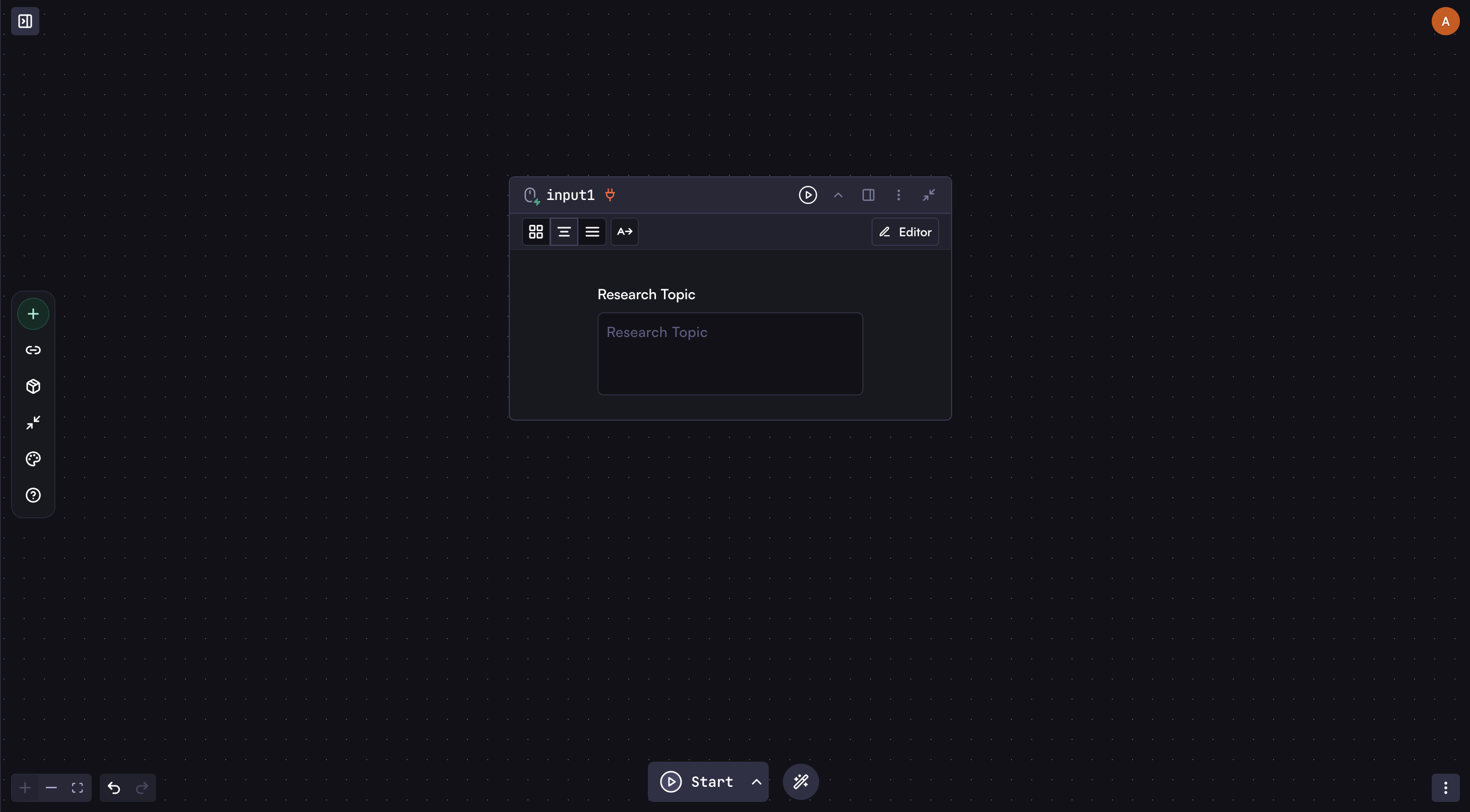
### Create the Input
First, add an **Input** step with a text field for the research topic.
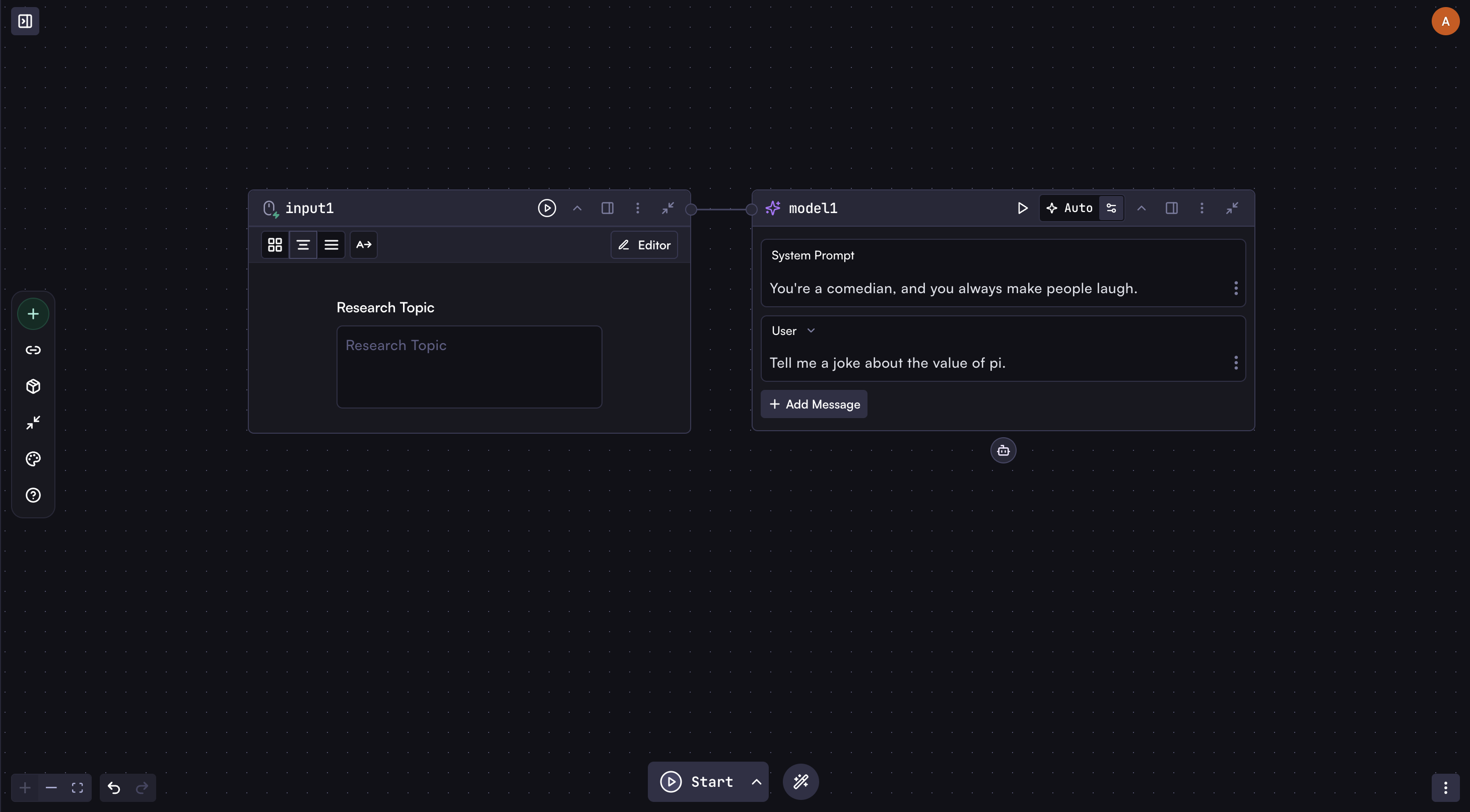
 ### Add Your Model Step
Add a **Model** step connected to the Input step. This will become your agent.
### Add Your Model Step
Add a **Model** step connected to the Input step. This will become your agent.
 ### Connect Agent Tools
Here's where the magic begins. Unlike regular workflow steps that connect left-to-right, agent tools connect **vertically below** the model step through the robot icon. This indicates these tools belong to and are controlled by this specific agent.
Connect these three steps as tools to your model:
* **Web Search**
* **Browser**
* **Markdown to PDF**
### Enable AI Auto-Fill for Tool Fields
For each connected tool, set key fields to **Auto**:
1. **Web Search tool**:
* Set "Search Engine" to Auto (lets the agent choose between Google, Bing, etc.)
* Set "Query" to Auto (agent will formulate specific search queries)
2. **Browser step**:
* Set "URL" to Auto (agent will decide which pages to visit based on search results)
3. **Markdown to PDF tool**:
* Set "Markdown Source" to Auto (agent will create the report content)
* Set "Filename" to Auto (agent will name the file appropriately)
When you select "Auto" for a field, the agent will determine the optimal value at runtime based on its reasoning.
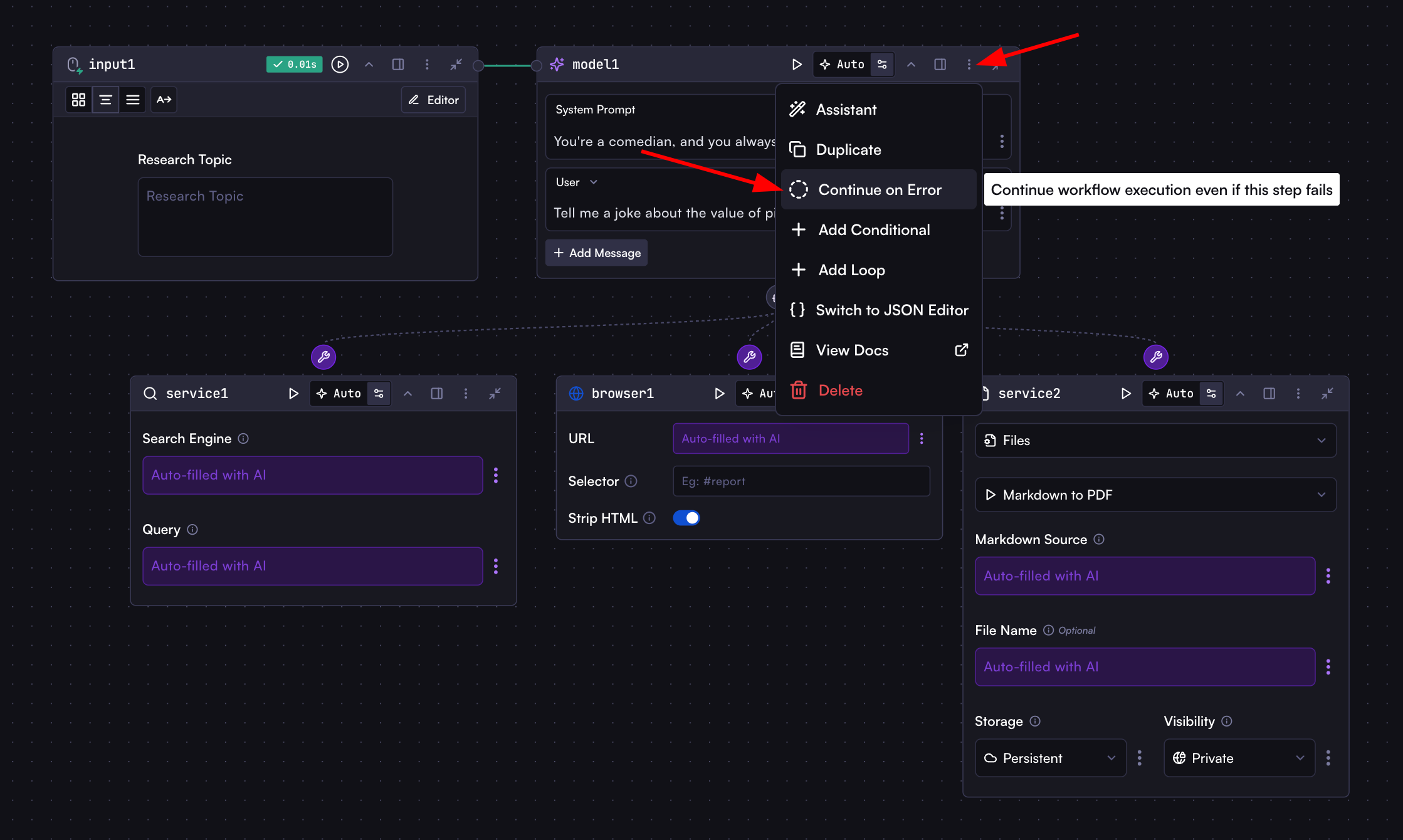
### Enable Error Recovery
Open the model step options menu and select "Continue on Error" from the context menu. This allows the agent to recover when tools fail.
### Connect Agent Tools
Here's where the magic begins. Unlike regular workflow steps that connect left-to-right, agent tools connect **vertically below** the model step through the robot icon. This indicates these tools belong to and are controlled by this specific agent.
Connect these three steps as tools to your model:
* **Web Search**
* **Browser**
* **Markdown to PDF**
### Enable AI Auto-Fill for Tool Fields
For each connected tool, set key fields to **Auto**:
1. **Web Search tool**:
* Set "Search Engine" to Auto (lets the agent choose between Google, Bing, etc.)
* Set "Query" to Auto (agent will formulate specific search queries)
2. **Browser step**:
* Set "URL" to Auto (agent will decide which pages to visit based on search results)
3. **Markdown to PDF tool**:
* Set "Markdown Source" to Auto (agent will create the report content)
* Set "Filename" to Auto (agent will name the file appropriately)
When you select "Auto" for a field, the agent will determine the optimal value at runtime based on its reasoning.
### Enable Error Recovery
Open the model step options menu and select "Continue on Error" from the context menu. This allows the agent to recover when tools fail.
 For example, if the browser tool fails to access a page due to restrictions, the agent can:
1. Recognize the failure
2. Try alternative sources
3. Continue its research using other available information
4. Still complete its task successfully
### Add Your Prompt
In the model step, add this simple prompt:
For example, if the browser tool fails to access a page due to restrictions, the agent can:
1. Recognize the failure
2. Try alternative sources
3. Continue its research using other available information
4. Still complete its task successfully
### Add Your Prompt
In the model step, add this simple prompt:
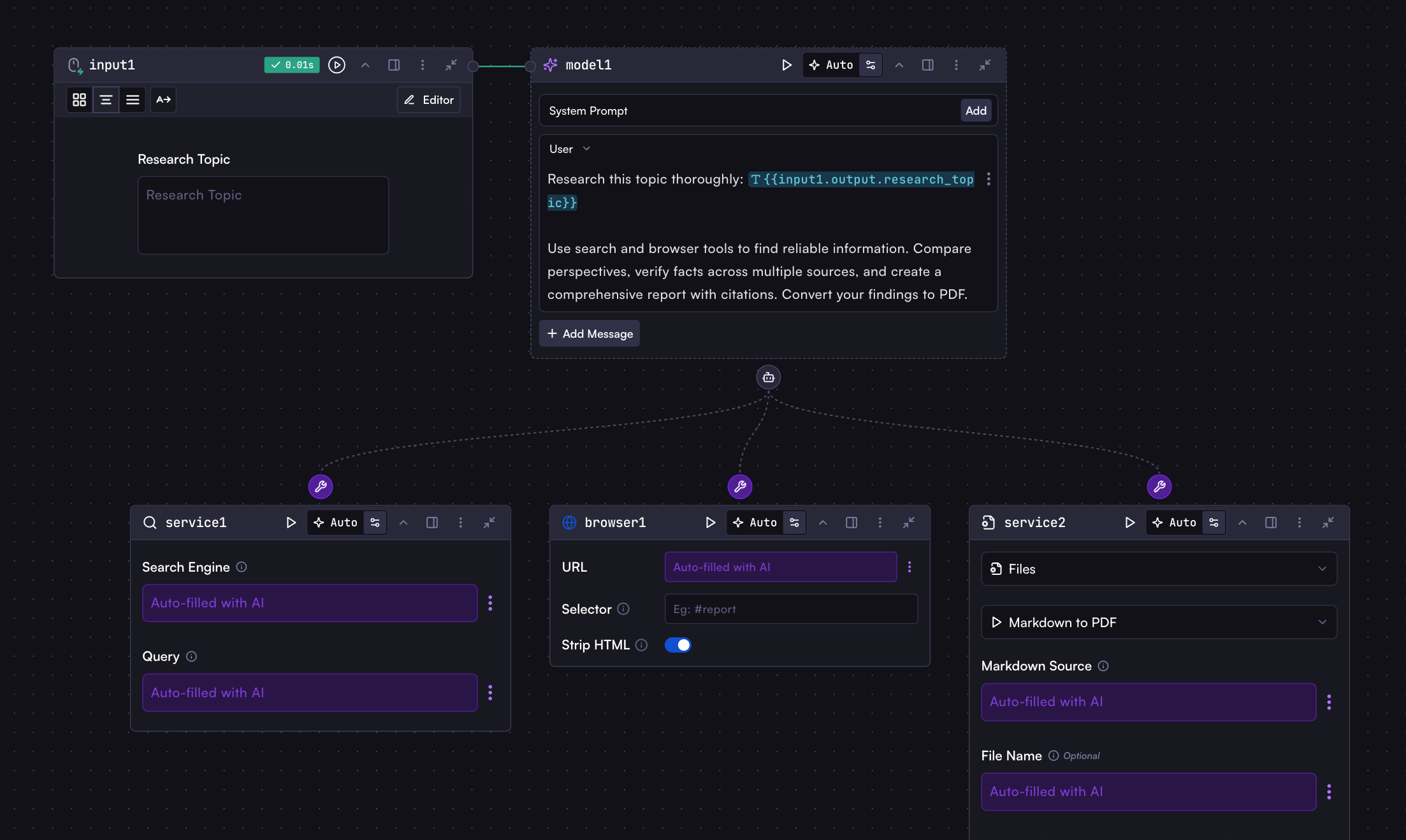 ```
Research this topic thoroughly: {{input1.output.research_topic}}
Use search and browser tools to find reliable information. Compare perspectives, verify facts across multiple sources, and create a comprehensive report with citations. Convert your findings to PDF and provide the link to download it.
```
That's it! With just these few lines, the agent knows exactly what to do.
### Run Your First Agent!
Run the workflow with any research topic and watch the magic unfold! Your agent autonomously breaks down the topic, formulates search queries, browses websites, compares perspectives, verifies facts, and delivers a comprehensive, well-organized PDF report—all without any further input from you.
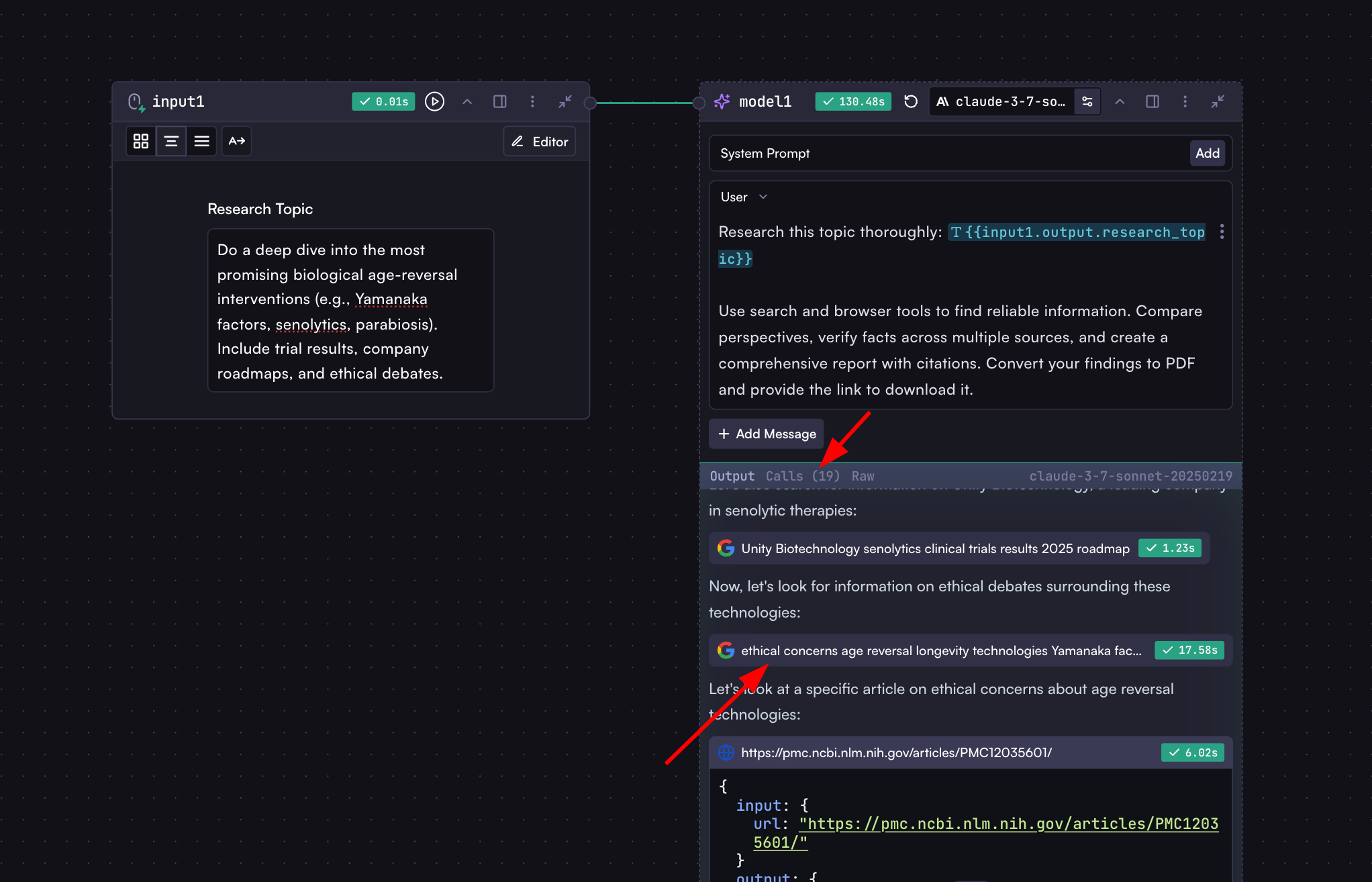
## Monitoring Agent Actions
When your agent runs, you can observe its reasoning and tool usage:
1. The **Output** section shows the agent's thinking process
2. The **Calls** tab displays each tool invocation with input parameters and results
```
Research this topic thoroughly: {{input1.output.research_topic}}
Use search and browser tools to find reliable information. Compare perspectives, verify facts across multiple sources, and create a comprehensive report with citations. Convert your findings to PDF and provide the link to download it.
```
That's it! With just these few lines, the agent knows exactly what to do.
### Run Your First Agent!
Run the workflow with any research topic and watch the magic unfold! Your agent autonomously breaks down the topic, formulates search queries, browses websites, compares perspectives, verifies facts, and delivers a comprehensive, well-organized PDF report—all without any further input from you.
## Monitoring Agent Actions
When your agent runs, you can observe its reasoning and tool usage:
1. The **Output** section shows the agent's thinking process
2. The **Calls** tab displays each tool invocation with input parameters and results
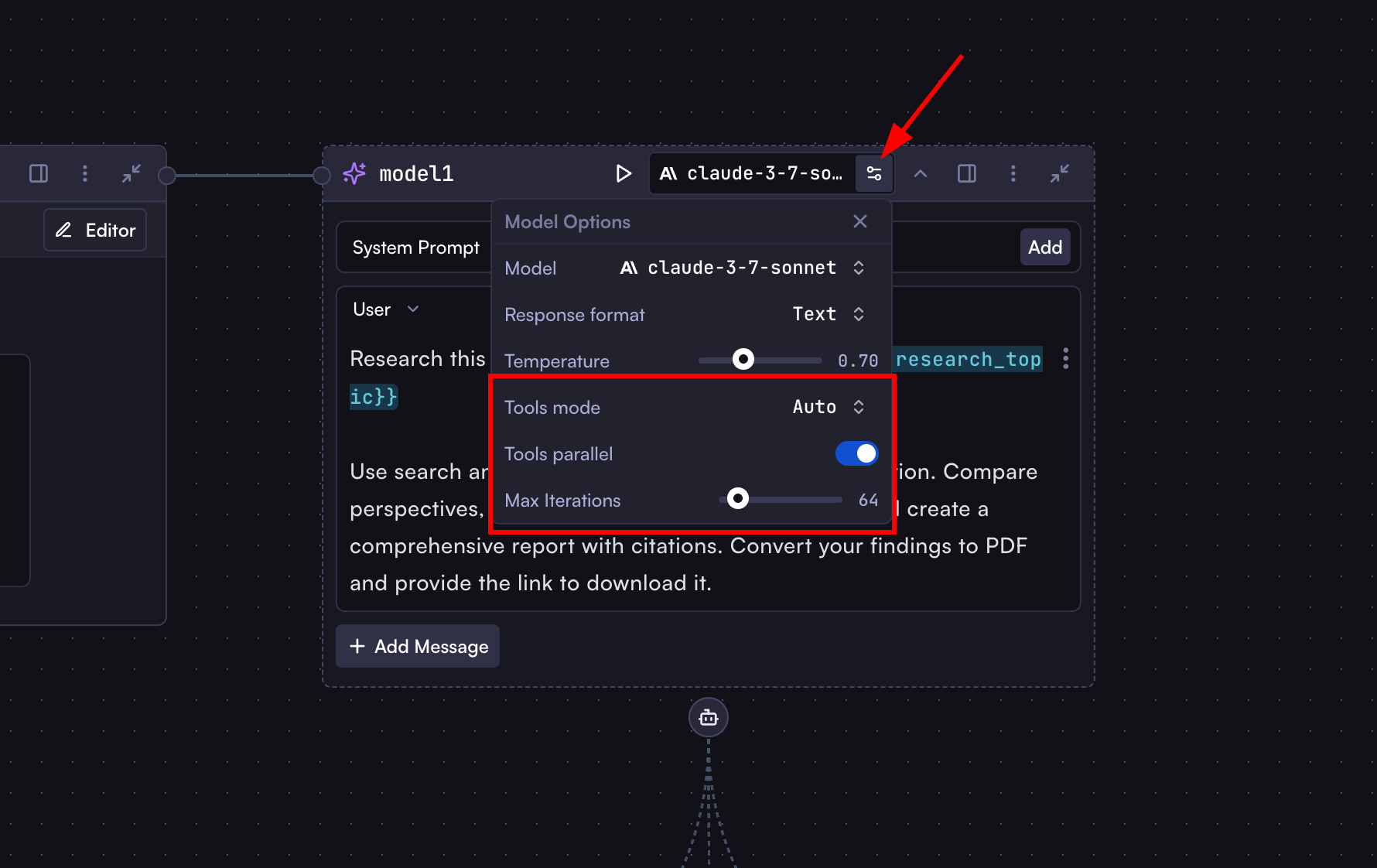
 ## Agent Configuration
In the Model step settings, you'll find special options for agents:
* **Tools Mode**:
* **Auto**: Agent decides when to use tools (recommended)
* **Required**: Agent must always use tools
* **None**: Agent does not use tools
* **Tools Parallel**: Enable parallel execution of multiple tools
* **Max Iterations**: Set the maximum number of tool-calling cycles
## Agent Configuration
In the Model step settings, you'll find special options for agents:
* **Tools Mode**:
* **Auto**: Agent decides when to use tools (recommended)
* **Required**: Agent must always use tools
* **None**: Agent does not use tools
* **Tools Parallel**: Enable parallel execution of multiple tools
* **Max Iterations**: Set the maximum number of tool-calling cycles
 ## Automated Email Response System
Let's see another example. We'll build a complete email processing system. Every time an email arrives, the agent analyzes it, crafts a personalized response, sends it, and notifies your team—all autonomously and within minutes of setup.
* **On Receive Email** trigger
* **Model** agent with tools:
* Send Email Reply
* Inform Team (Slack notification)
## Automated Email Response System
Let's see another example. We'll build a complete email processing system. Every time an email arrives, the agent analyzes it, crafts a personalized response, sends it, and notifies your team—all autonomously and within minutes of setup.
* **On Receive Email** trigger
* **Model** agent with tools:
* Send Email Reply
* Inform Team (Slack notification)
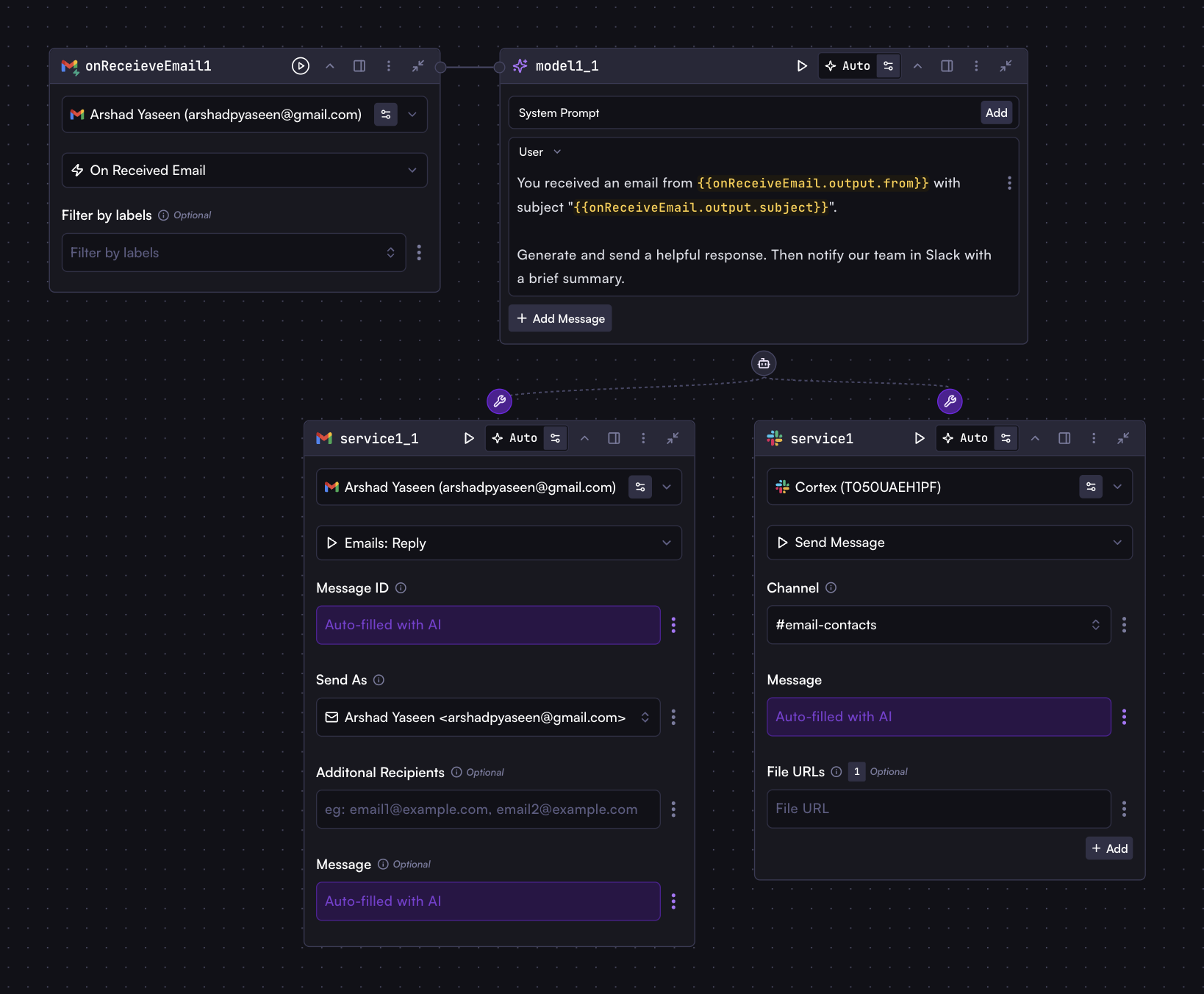 ```
You received an email from {{onReceiveEmail.output.from}} with subject "{{onReceiveEmail.output.subject}}".
Generate and send a helpful response. Then notify our team in Slack with a brief summary.
```
## Multiple Agents in One Workflow
While a single agent can handle complex tasks on its own, you can also use multiple agents in one workflow for specialized tasks:
* Research agent with specialized search tools
* Analysis agent with data processing capabilities
* Communication agent with email and notification tools
This modular approach allows you to create specialized agents for different workflow stages, though in many cases, a well-configured single agent can accomplish what might otherwise require multiple steps.
## Start Building Magical Agents Today
This guide has introduced you to the fundamentals of Cortex agents. Now it's time to build your own intelligent agents for your unique use cases and experience their transformative capabilities firsthand. Our platform continuously expands with new integrations and capabilities, empowering you to create increasingly sophisticated automated workflows that adapt to your business needs.
# API Usage
Source: https://docs.withcortex.ai/workflows/api-usage
Learn how to run and interact with workflows using the Cortex API and SDKs.
While you can run workflows directly in the Cortex UI, one of the most powerful aspects of workflows is the ability to integrate them into your applications using the Cortex API or SDKs.
## Using the Result Property
The `result` property plays a central role in API interactions. In your workflow's final code step, any data you return in the `result` property becomes the main output received when calling the workflow via API:
```javascript
return {
result: {
success: true,
data: modelStep.output.message,
metadata: {
processed_at: new Date().toISOString(),
confidence_score: modelStep.output.message.confidence_score,
},
},
};
```
When you run this workflow via API, the `result` object will be directly accessible in the API response.
### Rules for the Result Property
There are some key rules to remember about how the `result` property works:
1. If the last code step returns a object with a `result` property, it becomes the API response
2. If no `result` property exists, the entire output of the last step becomes the API response
3. Earlier steps results are overridden by the last code step
This means you should ensure your final code step's output contains exactly what you want to return to API consumers.
## Getting Your API Key and Workflow ID
Before you can run workflows via API, you'll need two things:
### 1. Create an API Key
To create an API key:
* Go to the [API Keys page](https://withcortex.ai/c/settings/api-keys)
* Click "New API Key"
* Enter a name for the key
* Copy the key (it will only be shown once)
### 2. Find Your Workflow ID
To copy your workflow ID:
## Running a Workflow via API
Let's take the fields extraction workflow that you built in the [Your First Workflow](/workflows/your-first-workflow) tutorial as an example. Now we'll see how to run it via API to pass dynamic files and extract fields programmatically, making the extracted data available in your application.
### Preparing Your Workflow for API Access
To make your workflow API-ready, you'll need to add a code step that returns the extracted data:
```
You received an email from {{onReceiveEmail.output.from}} with subject "{{onReceiveEmail.output.subject}}".
Generate and send a helpful response. Then notify our team in Slack with a brief summary.
```
## Multiple Agents in One Workflow
While a single agent can handle complex tasks on its own, you can also use multiple agents in one workflow for specialized tasks:
* Research agent with specialized search tools
* Analysis agent with data processing capabilities
* Communication agent with email and notification tools
This modular approach allows you to create specialized agents for different workflow stages, though in many cases, a well-configured single agent can accomplish what might otherwise require multiple steps.
## Start Building Magical Agents Today
This guide has introduced you to the fundamentals of Cortex agents. Now it's time to build your own intelligent agents for your unique use cases and experience their transformative capabilities firsthand. Our platform continuously expands with new integrations and capabilities, empowering you to create increasingly sophisticated automated workflows that adapt to your business needs.
# API Usage
Source: https://docs.withcortex.ai/workflows/api-usage
Learn how to run and interact with workflows using the Cortex API and SDKs.
While you can run workflows directly in the Cortex UI, one of the most powerful aspects of workflows is the ability to integrate them into your applications using the Cortex API or SDKs.
## Using the Result Property
The `result` property plays a central role in API interactions. In your workflow's final code step, any data you return in the `result` property becomes the main output received when calling the workflow via API:
```javascript
return {
result: {
success: true,
data: modelStep.output.message,
metadata: {
processed_at: new Date().toISOString(),
confidence_score: modelStep.output.message.confidence_score,
},
},
};
```
When you run this workflow via API, the `result` object will be directly accessible in the API response.
### Rules for the Result Property
There are some key rules to remember about how the `result` property works:
1. If the last code step returns a object with a `result` property, it becomes the API response
2. If no `result` property exists, the entire output of the last step becomes the API response
3. Earlier steps results are overridden by the last code step
This means you should ensure your final code step's output contains exactly what you want to return to API consumers.
## Getting Your API Key and Workflow ID
Before you can run workflows via API, you'll need two things:
### 1. Create an API Key
To create an API key:
* Go to the [API Keys page](https://withcortex.ai/c/settings/api-keys)
* Click "New API Key"
* Enter a name for the key
* Copy the key (it will only be shown once)
### 2. Find Your Workflow ID
To copy your workflow ID:
## Running a Workflow via API
Let's take the fields extraction workflow that you built in the [Your First Workflow](/workflows/your-first-workflow) tutorial as an example. Now we'll see how to run it via API to pass dynamic files and extract fields programmatically, making the extracted data available in your application.
### Preparing Your Workflow for API Access
To make your workflow API-ready, you'll need to add a code step that returns the extracted data:
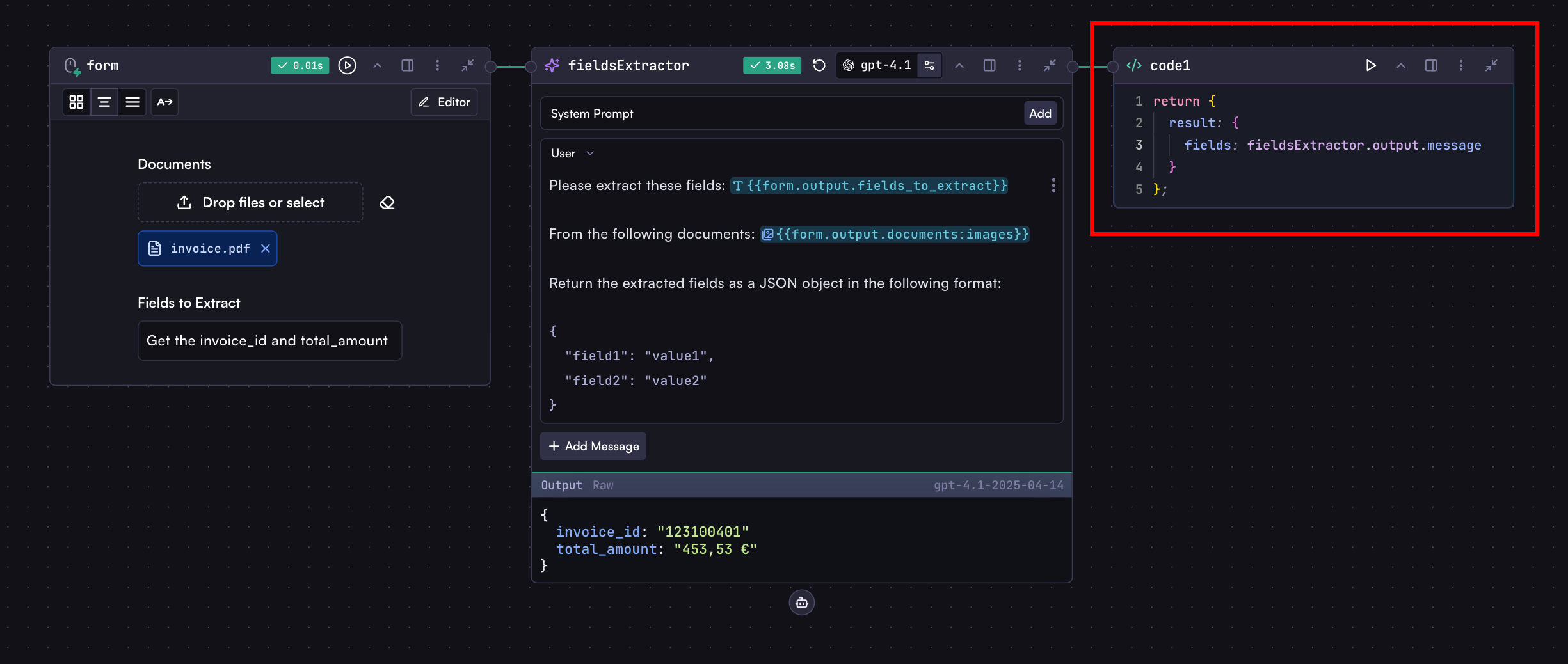 As you can see, the Code step returns an object with a `result` property that has a `fields` property containing the extracted data.
Now, let's deploy the workflow and run it via API. Before you can access your workflow through the API, you need to deploy it first:
1. Follow the instructions in the [Deploy](/workflows/deploy#deploying-a-workflow) section to publish your workflow
2. Once deployed, you can run it via API
### Run It
You can run a workflow using either the REST API with a direct HTTP call or using one of our SDKs.
```javascript Node.js
import { Cortex } from '@cortex-ai/sdk';
const cortex = new Cortex({
apiKey: process.env.CORTEX_API_KEY,
});
const run = await cortex.apps.workflows.runs.create('YOUR_WORKFLOW_ID', {
input: {
fields_to_extract: 'Get the invoice_number and total_amount',
documents: ['https://example.com/invoice.pdf'],
},
});
console.log(run.result.fields); // {invoice_number: '123456', total_amount: '1000'}
```
```bash cURL
curl -X POST "https://api.withcortex.ai/apps/c/workflows/YOUR_WORKFLOW_ID/runs" \
-H "Authorization: Bearer YOUR_CORTEX_API_KEY" \
-H "Content-Type: application/json" \
-d '{
"input": {
"documents": ["https://example.com/invoice.pdf"],
"fields_to_extract": "Get the invoice_number and total_amount"
}
}'
```
### Response Structure
The API response contains various information about the run, including:
```json
{
"id": "run_xxx",
"status": "COMPLETED",
"result": {
"fields": {
"invoice_number": "123456",
"total_amount": "1000"
}
}
// Additional metadata
}
```
The most important field is `result`, which contains the direct output from your workflow's final code step.
## Understanding the Input Object
The `input` object you provide when running a workflow corresponds to the fields you've defined in your workflow's input steps. The structure is based on the field you defined in the input step:
For example, if your input step has fields like:
Your API input would look like:
```json
{
"input": {
"names": ["Alice", "Mark"],
"preferredContact": "Phone",
"addressInfo": {
"streetAddress": "123 Maple Street, Springfield, IL 62704, USA"
}
}
}
```
## More Options
Beyond the basic `input` object, several additional parameters enable more granular control:
### Workflow Version Control
When running workflows via API, you can specify which version of the workflow to use.
```javascript
const run = await cortex.apps.workflows.runs.create('YOUR_WORKFLOW_ID', {
input: {
/* input data */
},
workflow_version_id: 'latest', // Options: 'latest', 'draft', or specific version number
});
```
### Starting from a Specific Step
If your workflow has multiple entry points (multiple input steps), you can specify which one to start from:
```javascript
const run = await cortex.apps.workflows.runs.create('YOUR_WORKFLOW_ID', {
input: {
/* input data of the selected input step */
},
from_step_key: 'myInputStep', // The key of the starting input step
});
```
### Background Processing
For long-running workflows, you can execute them in the background:
```javascript
const runInfo = await cortex.apps.workflows.runs.create('YOUR_WORKFLOW_ID', {
input: {
/* your input data */
},
background: true, // Returns immediately with run ID that you can poll later
});
// Later, check the status
const completedRun = await cortex.apps.workflows.runs.retrieve(
'YOUR_WORKFLOW_ID',
runInfo.id
);
```
## Error Handling
When running workflows, various errors can occur:
```javascript
try {
const run = await cortex.apps.workflows.runs.create('YOUR_WORKFLOW_ID', {
input: {
/* your input data */
},
});
if (run.status === 'FAILED') {
console.error('Workflow failed:', run.error);
} else {
console.log('Result:', run.result);
}
} catch (error) {
console.error('API Error:', error.message);
}
```
***
Detailed API documentation including all available parameters and response
fields
# Deploy
Source: https://docs.withcortex.ai/workflows/deploy
Learn how to deploy workflows, manage versions, rollback changes, and compare different versions of your workflows.
Deploy creates a versioned release of your workflow that can be used in Cortex Rules and accessed via API.
As you can see, the Code step returns an object with a `result` property that has a `fields` property containing the extracted data.
Now, let's deploy the workflow and run it via API. Before you can access your workflow through the API, you need to deploy it first:
1. Follow the instructions in the [Deploy](/workflows/deploy#deploying-a-workflow) section to publish your workflow
2. Once deployed, you can run it via API
### Run It
You can run a workflow using either the REST API with a direct HTTP call or using one of our SDKs.
```javascript Node.js
import { Cortex } from '@cortex-ai/sdk';
const cortex = new Cortex({
apiKey: process.env.CORTEX_API_KEY,
});
const run = await cortex.apps.workflows.runs.create('YOUR_WORKFLOW_ID', {
input: {
fields_to_extract: 'Get the invoice_number and total_amount',
documents: ['https://example.com/invoice.pdf'],
},
});
console.log(run.result.fields); // {invoice_number: '123456', total_amount: '1000'}
```
```bash cURL
curl -X POST "https://api.withcortex.ai/apps/c/workflows/YOUR_WORKFLOW_ID/runs" \
-H "Authorization: Bearer YOUR_CORTEX_API_KEY" \
-H "Content-Type: application/json" \
-d '{
"input": {
"documents": ["https://example.com/invoice.pdf"],
"fields_to_extract": "Get the invoice_number and total_amount"
}
}'
```
### Response Structure
The API response contains various information about the run, including:
```json
{
"id": "run_xxx",
"status": "COMPLETED",
"result": {
"fields": {
"invoice_number": "123456",
"total_amount": "1000"
}
}
// Additional metadata
}
```
The most important field is `result`, which contains the direct output from your workflow's final code step.
## Understanding the Input Object
The `input` object you provide when running a workflow corresponds to the fields you've defined in your workflow's input steps. The structure is based on the field you defined in the input step:
For example, if your input step has fields like:
Your API input would look like:
```json
{
"input": {
"names": ["Alice", "Mark"],
"preferredContact": "Phone",
"addressInfo": {
"streetAddress": "123 Maple Street, Springfield, IL 62704, USA"
}
}
}
```
## More Options
Beyond the basic `input` object, several additional parameters enable more granular control:
### Workflow Version Control
When running workflows via API, you can specify which version of the workflow to use.
```javascript
const run = await cortex.apps.workflows.runs.create('YOUR_WORKFLOW_ID', {
input: {
/* input data */
},
workflow_version_id: 'latest', // Options: 'latest', 'draft', or specific version number
});
```
### Starting from a Specific Step
If your workflow has multiple entry points (multiple input steps), you can specify which one to start from:
```javascript
const run = await cortex.apps.workflows.runs.create('YOUR_WORKFLOW_ID', {
input: {
/* input data of the selected input step */
},
from_step_key: 'myInputStep', // The key of the starting input step
});
```
### Background Processing
For long-running workflows, you can execute them in the background:
```javascript
const runInfo = await cortex.apps.workflows.runs.create('YOUR_WORKFLOW_ID', {
input: {
/* your input data */
},
background: true, // Returns immediately with run ID that you can poll later
});
// Later, check the status
const completedRun = await cortex.apps.workflows.runs.retrieve(
'YOUR_WORKFLOW_ID',
runInfo.id
);
```
## Error Handling
When running workflows, various errors can occur:
```javascript
try {
const run = await cortex.apps.workflows.runs.create('YOUR_WORKFLOW_ID', {
input: {
/* your input data */
},
});
if (run.status === 'FAILED') {
console.error('Workflow failed:', run.error);
} else {
console.log('Result:', run.result);
}
} catch (error) {
console.error('API Error:', error.message);
}
```
***
Detailed API documentation including all available parameters and response
fields
# Deploy
Source: https://docs.withcortex.ai/workflows/deploy
Learn how to deploy workflows, manage versions, rollback changes, and compare different versions of your workflows.
Deploy creates a versioned release of your workflow that can be used in Cortex Rules and accessed via API.
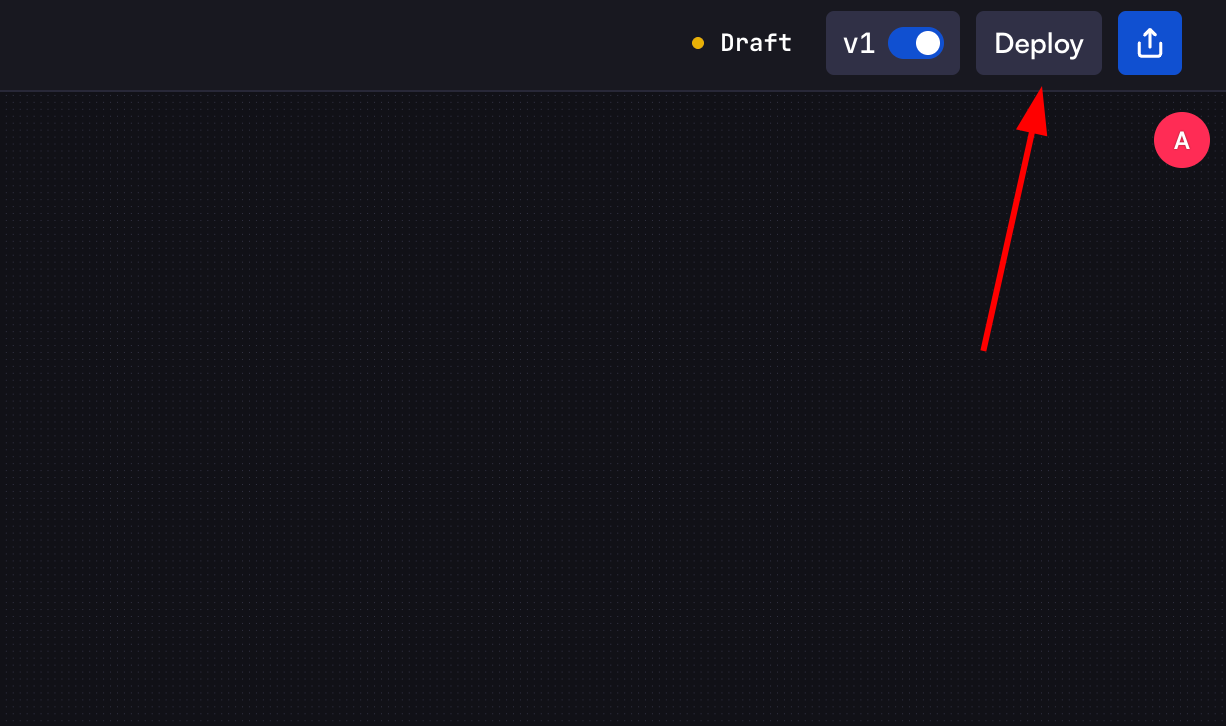 1. Click the `Deploy` button in the top-right corner of the workflow builder
2. In the deploy modal:
* Enter optional release notes to document changes
* Click `Deploy Now` to create the new version
3. The workflow will be deployed as a new version, overwriting the latest version
4. Previous versions remain accessible for rollback or reference
You can still access previous versions by specifying the version number or
rolling back to an earlier version if needed.
## Versions
The Versions page shows the complete version history of your workflow.
1. Click the `Deploy` button in the top-right corner of the workflow builder
2. In the deploy modal:
* Enter optional release notes to document changes
* Click `Deploy Now` to create the new version
3. The workflow will be deployed as a new version, overwriting the latest version
4. Previous versions remain accessible for rollback or reference
You can still access previous versions by specifying the version number or
rolling back to an earlier version if needed.
## Versions
The Versions page shows the complete version history of your workflow.
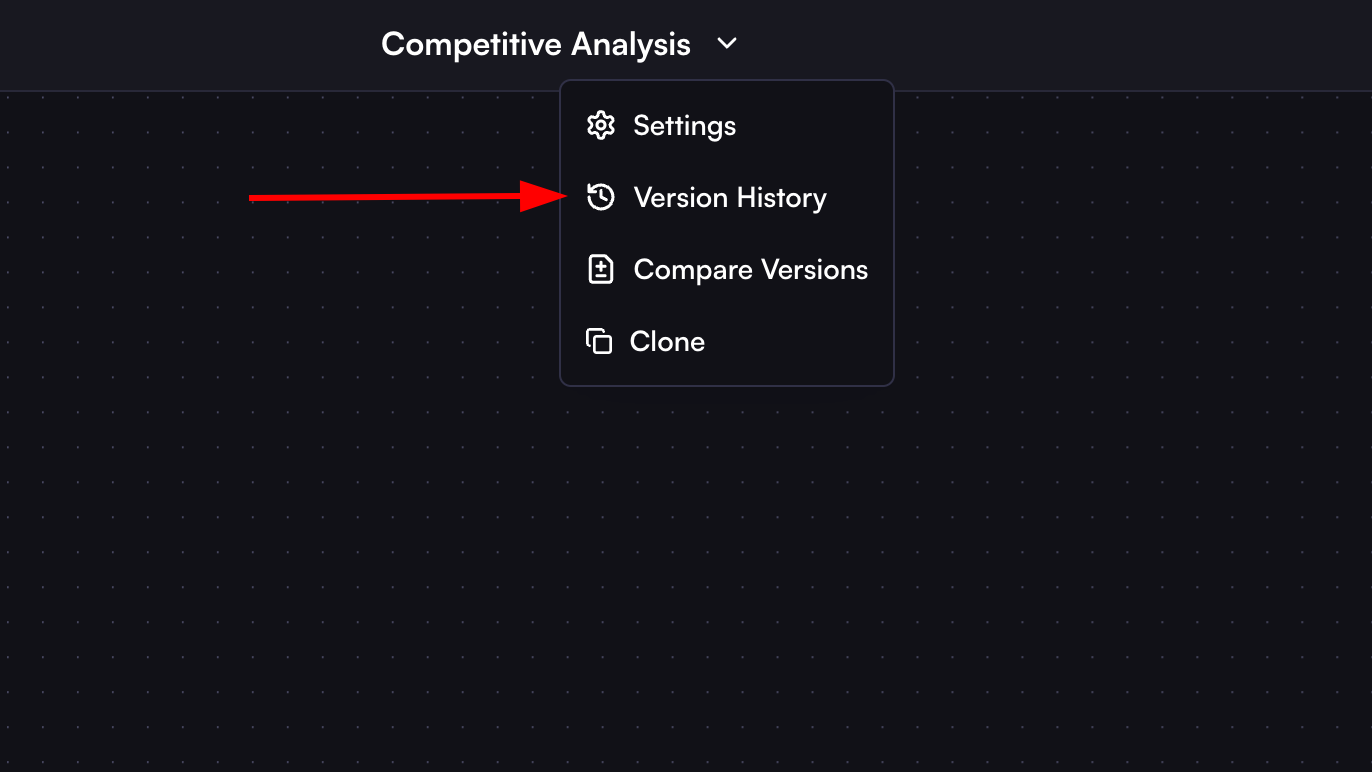 * Version ID: Unique identifier for each version
* Version number (v1, v2, etc.)
* Release notes
* Deployment timestamp
* User who deployed the version
### Version Actions
Each version has three action buttons:
* Version ID: Unique identifier for each version
* Version number (v1, v2, etc.)
* Release notes
* Deployment timestamp
* User who deployed the version
### Version Actions
Each version has three action buttons:
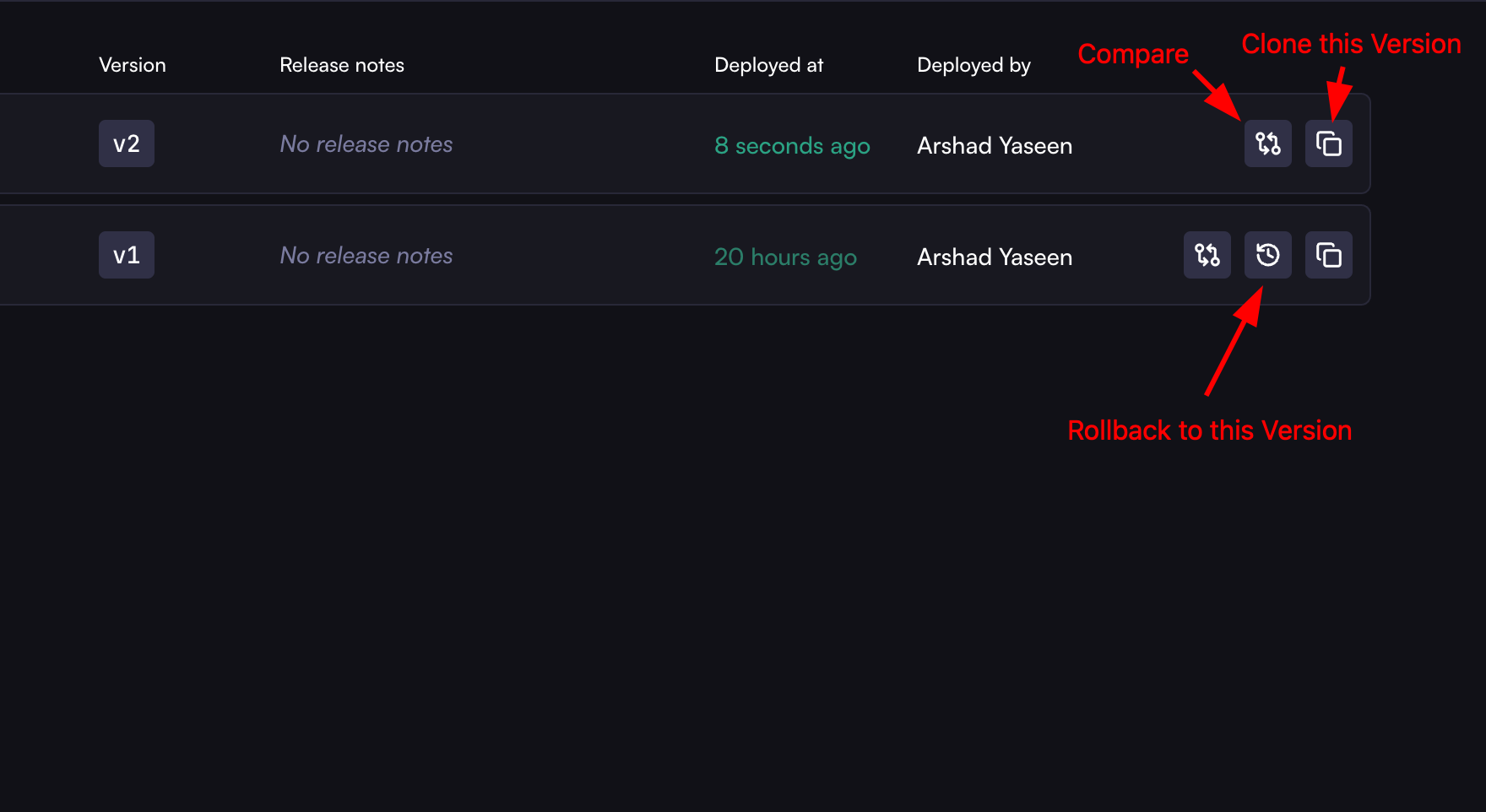 1. **Clone Version**: Creates a copy of that specific version
2. **Rollback**: Reverts to that version (overwrites latest)
3. **Compare**: Compare this version with current workflow
### Viewing Version Details
Click on a version in the Versions list to view its details:
* Complete workflow configuration
* UI view of the workflow at time of deployment
* JSON schema of the workflow
## Rollback Version
Rollback allows you to revert to a previous version of your workflow.
### How to Rollback
1. In the Versions list, find the version you want to rollback to
2. Click the rollback icon (circular arrow)
3. In the rollback modal:
* Review the warning message
* Add optional release notes
* Click "Rollback Now"
4. The selected version becomes the new latest version
## Compare Versions
Compare Versions helps you understand differences between workflow versions.
1. **Clone Version**: Creates a copy of that specific version
2. **Rollback**: Reverts to that version (overwrites latest)
3. **Compare**: Compare this version with current workflow
### Viewing Version Details
Click on a version in the Versions list to view its details:
* Complete workflow configuration
* UI view of the workflow at time of deployment
* JSON schema of the workflow
## Rollback Version
Rollback allows you to revert to a previous version of your workflow.
### How to Rollback
1. In the Versions list, find the version you want to rollback to
2. Click the rollback icon (circular arrow)
3. In the rollback modal:
* Review the warning message
* Add optional release notes
* Click "Rollback Now"
4. The selected version becomes the new latest version
## Compare Versions
Compare Versions helps you understand differences between workflow versions.
 ### Comparison Options
1. **UI Compare**: Visual comparison of workflow layouts
2. **Schema Compare**: Side-by-side JSON schema comparison
3. **View Options**:
* Side by Side: Shows versions in parallel
* Smart Diff: Highlights specific changes between versions
### How to Compare
1. Access comparison in two ways:
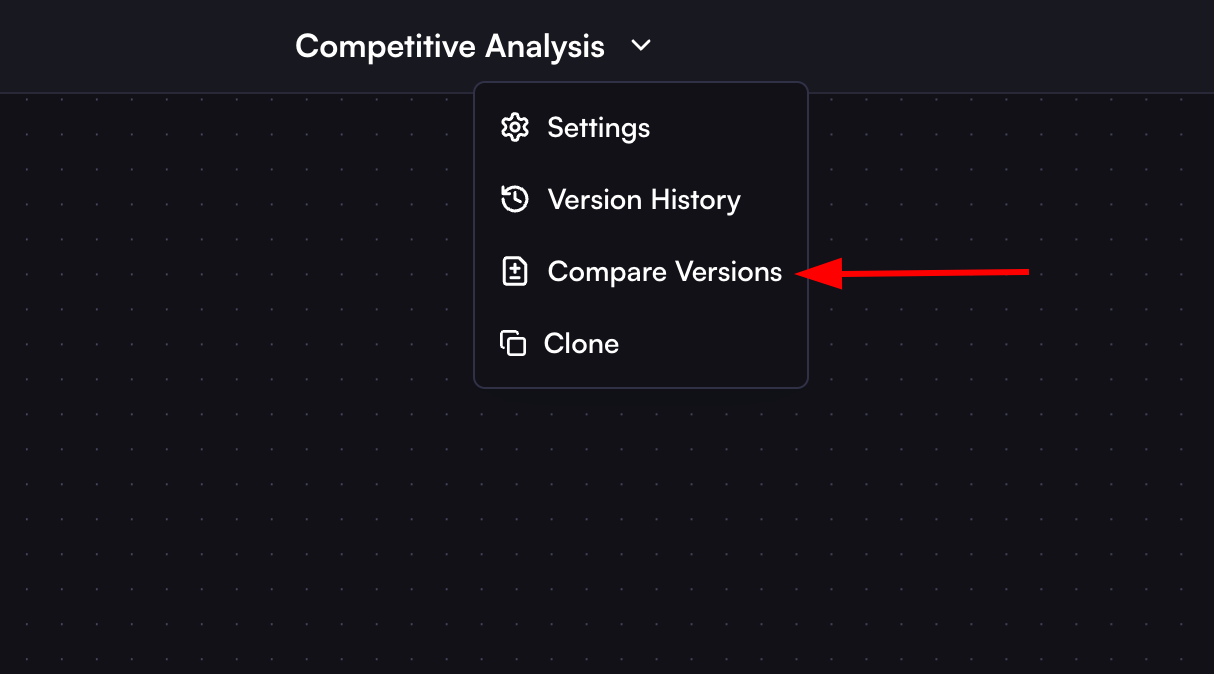
* Click the compare icon on any version in the Versions list
* Select "Compare Versions" from the workflow menu
2. Select versions to compare:
* Left side: Earlier version
* Right side: Later version or current draft
This versioning system provides complete workflow history tracking and the flexibility to manage changes effectively through deployment, rollback, and comparison features.
# Display
Source: https://docs.withcortex.ai/workflows/display
Learn how to display workflow results in a structured way.
### Comparison Options
1. **UI Compare**: Visual comparison of workflow layouts
2. **Schema Compare**: Side-by-side JSON schema comparison
3. **View Options**:
* Side by Side: Shows versions in parallel
* Smart Diff: Highlights specific changes between versions
### How to Compare
1. Access comparison in two ways:
* Click the compare icon on any version in the Versions list
* Select "Compare Versions" from the workflow menu
2. Select versions to compare:
* Left side: Earlier version
* Right side: Later version or current draft
This versioning system provides complete workflow history tracking and the flexibility to manage changes effectively through deployment, rollback, and comparison features.
# Display
Source: https://docs.withcortex.ai/workflows/display
Learn how to display workflow results in a structured way.
 ## Display
When building workflows, you have two main properties for displaying results:
```typescript
return {
display: string | array,
workflow_display: string | array,
};
```
* `display`: The primary property for showing the results UI everywhere including workflow, rules, and record contexts
* `workflow_display`: The property for showing the results UI only in the workflow context
## How to Return Display Properties
Display properties are typically returned in a code step, usually the last step of your workflow. And the UI will be rendered in this code step's output section.
```javascript
return {
display: `# Analysis Results\n\nThe analysis is complete with a ${util.formatNumber(modelStep.output.message.confidence_score, { style: 'percent' })} confidence score.`,
};
```
## Display Formats
All display properties support two main formats:
### Markdown
Use markdown for rich text formatting:
```javascript
return {
display: `
# Analysis Results 📊
## Key Findings
- Revenue: ${util.formatCurrency(modelStep.output.message.revenue)}
- Growth: ${modelStep.output.message.growth_percentage}%
## Details
${modelStep.output.message.analysis}
`,
};
```
### Structured Display
For more complex layouts, use arrays and objects that Cortex will render as beautiful, readable UI content:
```javascript
return {
display: [
// Content follows
'# Financial Report',
'Generated on: ' + new Date().toISOString(),
// More sections can follow, each with optional config
[{ $variant: 'info' }, '## Revenue Breakdown'],
],
};
```
### Tables in Structured Display
Tables can be created in two ways:
1. **Single Row Table**: Add an object directly to the display array:
```javascript
return {
display: [
'# Performance Metrics',
'',
'Monthly Overview:',
// Single row table
{
Metric: 'Value',
Revenue: util.formatCurrency(modelStep.output.message.revenue),
Growth: modelStep.output.message.growth + '%',
Status: modelStep.output.message.status,
},
],
};
```
2. **Multi-Row Table**: Wrap multiple row objects in an array:
```javascript
return {
display: [
'# Performance Metrics',
'',
'Monthly Overview:',
// Multi-row table
[
// Row 1
{
Month: 'January',
Revenue: util.formatCurrency(1000000),
Growth: '15%',
Status: 'On Track',
},
// Row 2
{
Month: 'February',
Revenue: util.formatCurrency(1200000),
Growth: '20%',
Status: 'Exceeding',
},
],
],
};
```
### Display Configuration
In structured displays, any nested array can include a configuration object as its first element:
```javascript
return {
display: [
// Section with success variant
[{ $variant: 'success' }, '# Successful Analysis', 'All tests passed'],
// Section with warning variant
[
{ $variant: 'warning' },
'# Attention Required',
'Some metrics need review',
],
// Section without config (optional)
['# Regular Section', 'No special styling'],
],
};
```
### Mermaid Diagrams
Cortex supports Mermaid diagrams to output visualizations in the result UI:
```javascript
return {
display: `
# Analysis Visualization 📊
\`\`\`mermaid
graph TD
A[Input Document] -->|Process| B(Text Extraction)
B --> C{Analysis}
C -->|High Risk| D[Alert]
C -->|Medium Risk| E[Review]
C -->|Low Risk| F[Approve]
\`\`\`
`,
};
```
You can create diagrams dynamically with workflow data:
```javascript
const analysisResults = modelStep.output.message;
// Create pie chart segments from analysis results
const pieSegments = analysisResults.categories
.map((cat) => ` "${cat.name}" : ${cat.percentage}`)
.join('\n');
return {
display: `
## Analysis Distribution
\`\`\`mermaid
pie title Document Category Distribution
${pieSegments}
\`\`\`
## Process Flow
\`\`\`mermaid
graph LR
A[Start] -->|${analysisResults.steps[0]}| B(Processing)
B -->|${analysisResults.steps[1]}| C{Analysis}
C -->|${analysisResults.outcomes.success}| D[Success]
C -->|${analysisResults.outcomes.failure}| E[Failure]
\`\`\`
`,
};
```
## Available Colors
The following colors can be used to style display variants:
* `info` - Informational blue
* `success` - Positive green
* `danger` - Critical red
* `warning` - Cautionary yellow
* `orange` - Orange highlight
* `yellow` - Yellow highlight
* `green` - Green highlight
* `red` - Red highlight
* `blue` - Blue highlight
## Displaying in Rules and Records Contexts
This section is only relevant if you're working with rules and records. If
you're just building standalone workflows, you can skip this section.
When workflows run as part of rules and records, you can use additional display properties:
```typescript
return {
// For displaying in rule and record contexts
rule_display: string | array,
record_display: string,
// For displaying metric blocks in rule and record contexts
rule_blocks: array,
record_blocks: array,
};
```
### Rule & Record Display Properties
These context-specific properties determine where results appear on the record page:
* `rule_display`: Shows within the specific rule section on a record page
* `record_display`: Shows at the top level of the record page
Record and rule properties serve different purposes:
* Record properties appear at the top level of the record page, showing overall results
* Rule properties appear within their specific rule section, showing results specific to that rule
Use record properties to elevate important results for better visibility at the top of the record page.
### Metric Blocks for Rules and Records
Blocks display key metrics with optional formatting and styling. All properties except `label` and `value` are optional.
#### Record Blocks
```javascript
return {
record_blocks: [
{
label: 'Revenue', // Required
value: 1234567, // Required
description: 'YTD Revenue', // Optional
value_color: 'success', // Optional
format: 'currency', // Optional
order: 1, // Optional
},
],
};
```
#### Rule Blocks
```javascript
return {
rule_blocks: [
{
label: 'Risk Score',
value: 85.7,
description: 'Credit risk assessment score based on historical data',
value_color: 'warning',
format: 'number',
order: 1,
},
],
};
```
#### Block Properties
1. **Required Properties**:
* `label`: Identifies the metric
* `value`: The actual value to display
2. **Optional Properties**:
* `description`: Tooltip text explaining the metric
* `value_color`: Color styling for the value
* `format`: How to format the value
* `order`: Display order (numeric)
#### Available Formats
* `date`: Formats timestamps as dates
* `datetime`: Formats timestamps with date and time
* `number`: Formats numerical values
* `currency`: Formats monetary values
* `percent`: Formats percentage values
#### Special Status Color
In rules and records contexts, the `status` color is dynamic and changes based on the workflow or rule status:
```javascript
return {
rule_blocks: [
{
label: 'Workflow Status',
value: 'Processing Complete',
value_color: 'status', // Will reflect current workflow status
order: 1,
},
],
};
```
# Input Webhooks
Source: https://docs.withcortex.ai/workflows/input-webhooks
Learn how to add webhooks to workflow inputs for quick API access.
Webhooks provide a streamlined way to run workflows via direct HTTP requests. Unlike the standard [API and SDK](/workflows/api-usage) approach, webhooks allow you to call a specific input step directly, making them ideal for quick implementations and simple integrations.
## Display
When building workflows, you have two main properties for displaying results:
```typescript
return {
display: string | array,
workflow_display: string | array,
};
```
* `display`: The primary property for showing the results UI everywhere including workflow, rules, and record contexts
* `workflow_display`: The property for showing the results UI only in the workflow context
## How to Return Display Properties
Display properties are typically returned in a code step, usually the last step of your workflow. And the UI will be rendered in this code step's output section.
```javascript
return {
display: `# Analysis Results\n\nThe analysis is complete with a ${util.formatNumber(modelStep.output.message.confidence_score, { style: 'percent' })} confidence score.`,
};
```
## Display Formats
All display properties support two main formats:
### Markdown
Use markdown for rich text formatting:
```javascript
return {
display: `
# Analysis Results 📊
## Key Findings
- Revenue: ${util.formatCurrency(modelStep.output.message.revenue)}
- Growth: ${modelStep.output.message.growth_percentage}%
## Details
${modelStep.output.message.analysis}
`,
};
```
### Structured Display
For more complex layouts, use arrays and objects that Cortex will render as beautiful, readable UI content:
```javascript
return {
display: [
// Content follows
'# Financial Report',
'Generated on: ' + new Date().toISOString(),
// More sections can follow, each with optional config
[{ $variant: 'info' }, '## Revenue Breakdown'],
],
};
```
### Tables in Structured Display
Tables can be created in two ways:
1. **Single Row Table**: Add an object directly to the display array:
```javascript
return {
display: [
'# Performance Metrics',
'',
'Monthly Overview:',
// Single row table
{
Metric: 'Value',
Revenue: util.formatCurrency(modelStep.output.message.revenue),
Growth: modelStep.output.message.growth + '%',
Status: modelStep.output.message.status,
},
],
};
```
2. **Multi-Row Table**: Wrap multiple row objects in an array:
```javascript
return {
display: [
'# Performance Metrics',
'',
'Monthly Overview:',
// Multi-row table
[
// Row 1
{
Month: 'January',
Revenue: util.formatCurrency(1000000),
Growth: '15%',
Status: 'On Track',
},
// Row 2
{
Month: 'February',
Revenue: util.formatCurrency(1200000),
Growth: '20%',
Status: 'Exceeding',
},
],
],
};
```
### Display Configuration
In structured displays, any nested array can include a configuration object as its first element:
```javascript
return {
display: [
// Section with success variant
[{ $variant: 'success' }, '# Successful Analysis', 'All tests passed'],
// Section with warning variant
[
{ $variant: 'warning' },
'# Attention Required',
'Some metrics need review',
],
// Section without config (optional)
['# Regular Section', 'No special styling'],
],
};
```
### Mermaid Diagrams
Cortex supports Mermaid diagrams to output visualizations in the result UI:
```javascript
return {
display: `
# Analysis Visualization 📊
\`\`\`mermaid
graph TD
A[Input Document] -->|Process| B(Text Extraction)
B --> C{Analysis}
C -->|High Risk| D[Alert]
C -->|Medium Risk| E[Review]
C -->|Low Risk| F[Approve]
\`\`\`
`,
};
```
You can create diagrams dynamically with workflow data:
```javascript
const analysisResults = modelStep.output.message;
// Create pie chart segments from analysis results
const pieSegments = analysisResults.categories
.map((cat) => ` "${cat.name}" : ${cat.percentage}`)
.join('\n');
return {
display: `
## Analysis Distribution
\`\`\`mermaid
pie title Document Category Distribution
${pieSegments}
\`\`\`
## Process Flow
\`\`\`mermaid
graph LR
A[Start] -->|${analysisResults.steps[0]}| B(Processing)
B -->|${analysisResults.steps[1]}| C{Analysis}
C -->|${analysisResults.outcomes.success}| D[Success]
C -->|${analysisResults.outcomes.failure}| E[Failure]
\`\`\`
`,
};
```
## Available Colors
The following colors can be used to style display variants:
* `info` - Informational blue
* `success` - Positive green
* `danger` - Critical red
* `warning` - Cautionary yellow
* `orange` - Orange highlight
* `yellow` - Yellow highlight
* `green` - Green highlight
* `red` - Red highlight
* `blue` - Blue highlight
## Displaying in Rules and Records Contexts
This section is only relevant if you're working with rules and records. If
you're just building standalone workflows, you can skip this section.
When workflows run as part of rules and records, you can use additional display properties:
```typescript
return {
// For displaying in rule and record contexts
rule_display: string | array,
record_display: string,
// For displaying metric blocks in rule and record contexts
rule_blocks: array,
record_blocks: array,
};
```
### Rule & Record Display Properties
These context-specific properties determine where results appear on the record page:
* `rule_display`: Shows within the specific rule section on a record page
* `record_display`: Shows at the top level of the record page
Record and rule properties serve different purposes:
* Record properties appear at the top level of the record page, showing overall results
* Rule properties appear within their specific rule section, showing results specific to that rule
Use record properties to elevate important results for better visibility at the top of the record page.
### Metric Blocks for Rules and Records
Blocks display key metrics with optional formatting and styling. All properties except `label` and `value` are optional.
#### Record Blocks
```javascript
return {
record_blocks: [
{
label: 'Revenue', // Required
value: 1234567, // Required
description: 'YTD Revenue', // Optional
value_color: 'success', // Optional
format: 'currency', // Optional
order: 1, // Optional
},
],
};
```
#### Rule Blocks
```javascript
return {
rule_blocks: [
{
label: 'Risk Score',
value: 85.7,
description: 'Credit risk assessment score based on historical data',
value_color: 'warning',
format: 'number',
order: 1,
},
],
};
```
#### Block Properties
1. **Required Properties**:
* `label`: Identifies the metric
* `value`: The actual value to display
2. **Optional Properties**:
* `description`: Tooltip text explaining the metric
* `value_color`: Color styling for the value
* `format`: How to format the value
* `order`: Display order (numeric)
#### Available Formats
* `date`: Formats timestamps as dates
* `datetime`: Formats timestamps with date and time
* `number`: Formats numerical values
* `currency`: Formats monetary values
* `percent`: Formats percentage values
#### Special Status Color
In rules and records contexts, the `status` color is dynamic and changes based on the workflow or rule status:
```javascript
return {
rule_blocks: [
{
label: 'Workflow Status',
value: 'Processing Complete',
value_color: 'status', // Will reflect current workflow status
order: 1,
},
],
};
```
# Input Webhooks
Source: https://docs.withcortex.ai/workflows/input-webhooks
Learn how to add webhooks to workflow inputs for quick API access.
Webhooks provide a streamlined way to run workflows via direct HTTP requests. Unlike the standard [API and SDK](/workflows/api-usage) approach, webhooks allow you to call a specific input step directly, making them ideal for quick implementations and simple integrations.
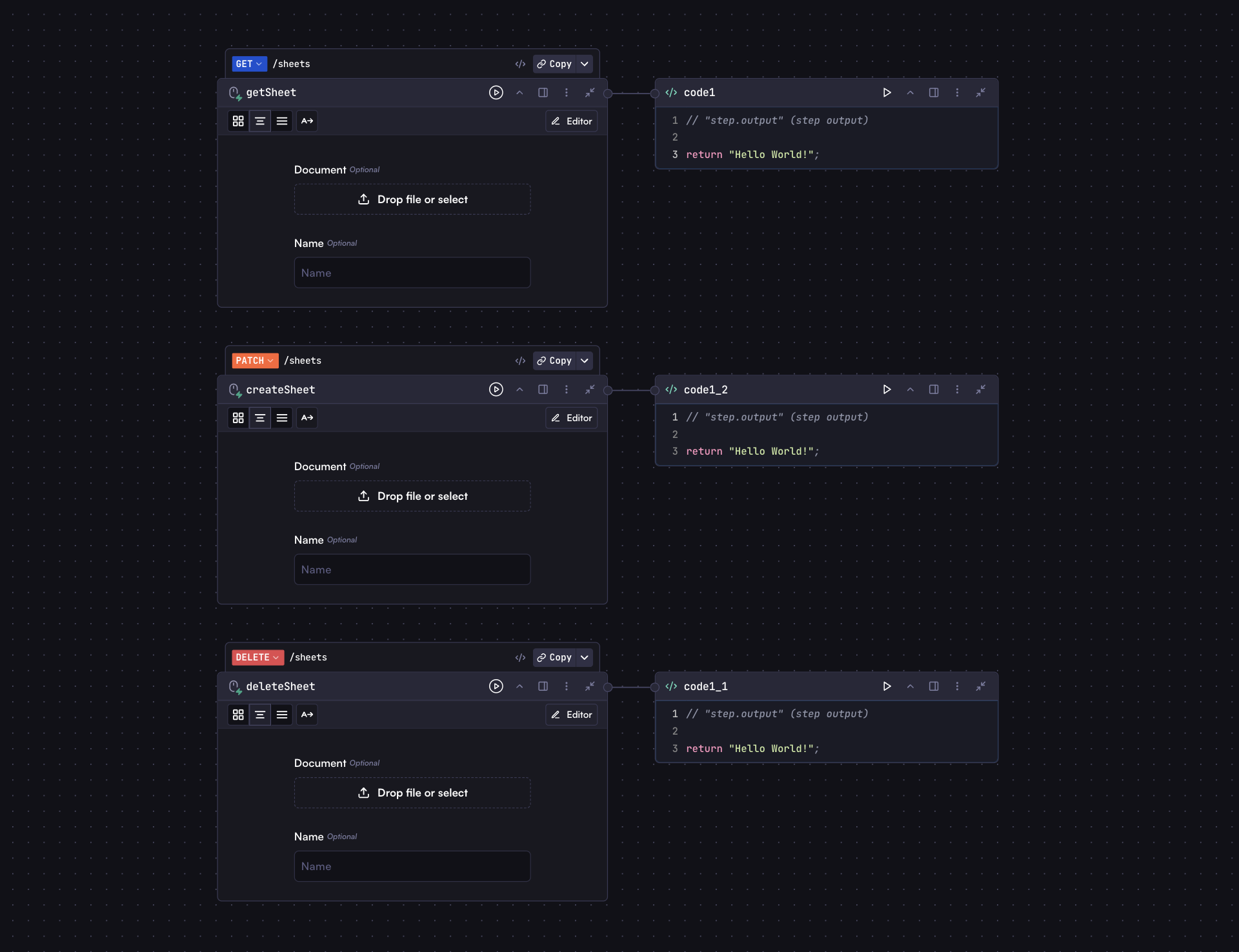 ## Adding a Webhook to an Input Step
To add a webhook to an input step:
1. Select your input step
2. Click the options menu (⋮)
3. Select "Add Webhook"
4. A new header will appear above the step with the HTTP method and path
Once added, you can modify the HTTP method and path by clicking on them in the webhook header.
## Webhook Configuration
By default, the webhook path is set to the input step's key (e.g., `/input1`). You can customize this path to better represent your workflow's purpose.
If there are multiple webhooks with the same method and path, only one will be
executed based on their order in the outliner.
## Webhook URLs
After adding a webhook to an input step, you can access the webhook URL in two ways:
1. **Copy Latest Version URL**: References the latest deployed version of your workflow
2. **Copy Draft Version URL**: References the current draft version (for testing before deployment)
Access these URLs by clicking the "Copy" dropdown button in the top-right corner of the workflow interface.
## Running a Workflow via Webhook
Webhooks provide a simple way to trigger your workflows through HTTP requests. You can call webhooks with different HTTP methods and pass parameters to your workflow inputs either through query parameters or in the request body.
### Using Query Parameters
For GET requests, parameters must be passed as query parameters:
```
https://api.withcortex.ai/webhooks/work_xxx/input1?text=Hello&file=https://example.com/sample.pdf
```
### Using Request Body
For POST, PUT, PATCH, and DELETE methods, you can pass data through the request body as JSON:
```bash
curl -X POST "https://api.withcortex.ai/webhooks/work_xxx/input1" \
-H "Content-Type: application/json" \
-d '{
"text": "Hello",
"file": "https://example.com/sample.pdf"
}'
```
## Webhook Limitations
Webhooks have some limitations compared to the standard [API and SDK](/workflows/api-usage) approach:
1. **No streaming support**: Cannot stream responses
2. **File handling**: For GET requests, files must be passed as URLs or base64-encoded strings. For POST, PUT, PATCH, and DELETE requests, you can use FormData to upload files directly.
3. **Size limits**: If files are passed as base64-encoded strings, consider URL length limits for GET requests (typically 5MB or less)
4. **No SDK support**: Must use direct HTTP requests
## Webhook Response Structure
The webhook response structure is identical to the [API response](/workflows/api-usage#response-structure):
```json
{
"id": "run_xxx",
"status": "COMPLETED",
"result": {
// Output of the workflow's last step
}
// Additional metadata
}
```
## Understanding the Input Object
The input object for webhooks follows the same structure as the [API input object](/workflows/api-usage#understanding-the-input-object). The parameters you provide (either via query parameters or request body) correspond to the fields you've defined in your workflow's input step.
For example, if your input step has fields like `names`, `preferredContact`, and `addressInfo`, your webhook POST request body would look like:
```json
{
"names": ["Alice", "Mark"],
"preferredContact": "phone",
"addressInfo": {
"streetAddress": "123 Maple Street, Springfield, IL 62704, USA"
}
}
```
## Background Processing
Webhook requests have a 100-second timeout limit. If your workflow takes
longer than 100 seconds to complete, the client connection will time out,
though the run will continue executing in the background.
For long-running workflows, you can explicitly execute them in the background:
```bash
curl -X POST "https://api.withcortex.ai/webhooks/work_xxx/input1?background=true" \
-H "Content-Type: application/json" \
-d '{
"text": "Hello",
"file": "https://example.com/sample.pdf"
}'
```
This will return immediately with a run ID that you can use to check the status later using the standard API.
## Uploading Files with FormData
For non-GET requests (POST, PUT, PATCH, DELETE), you can upload files directly using multipart/form-data:
```bash
curl --request POST \
--url https://api.withcortex.ai/webhooks/work_xxx/input1 \
--form 'file=@./path/to/file.pdf' \
--form 'text=Hello World'
```
This allows you to easily upload local files without having to convert them to base64 or host them at a URL. You can mix file uploads with regular form fields as shown in the example above.
## Securing Webhook Endpoints
Webhook endpoints have no built-in authentication by default and can be called
by anyone who knows the URL. It's important to implement some form of access
control.
Until built-in authentication is available, you can secure your webhook endpoints using these approaches:
### Implementing Authentication in Code
For more robust security, add a code step immediately after your input step that validates request headers or tokens:
## Adding a Webhook to an Input Step
To add a webhook to an input step:
1. Select your input step
2. Click the options menu (⋮)
3. Select "Add Webhook"
4. A new header will appear above the step with the HTTP method and path
Once added, you can modify the HTTP method and path by clicking on them in the webhook header.
## Webhook Configuration
By default, the webhook path is set to the input step's key (e.g., `/input1`). You can customize this path to better represent your workflow's purpose.
If there are multiple webhooks with the same method and path, only one will be
executed based on their order in the outliner.
## Webhook URLs
After adding a webhook to an input step, you can access the webhook URL in two ways:
1. **Copy Latest Version URL**: References the latest deployed version of your workflow
2. **Copy Draft Version URL**: References the current draft version (for testing before deployment)
Access these URLs by clicking the "Copy" dropdown button in the top-right corner of the workflow interface.
## Running a Workflow via Webhook
Webhooks provide a simple way to trigger your workflows through HTTP requests. You can call webhooks with different HTTP methods and pass parameters to your workflow inputs either through query parameters or in the request body.
### Using Query Parameters
For GET requests, parameters must be passed as query parameters:
```
https://api.withcortex.ai/webhooks/work_xxx/input1?text=Hello&file=https://example.com/sample.pdf
```
### Using Request Body
For POST, PUT, PATCH, and DELETE methods, you can pass data through the request body as JSON:
```bash
curl -X POST "https://api.withcortex.ai/webhooks/work_xxx/input1" \
-H "Content-Type: application/json" \
-d '{
"text": "Hello",
"file": "https://example.com/sample.pdf"
}'
```
## Webhook Limitations
Webhooks have some limitations compared to the standard [API and SDK](/workflows/api-usage) approach:
1. **No streaming support**: Cannot stream responses
2. **File handling**: For GET requests, files must be passed as URLs or base64-encoded strings. For POST, PUT, PATCH, and DELETE requests, you can use FormData to upload files directly.
3. **Size limits**: If files are passed as base64-encoded strings, consider URL length limits for GET requests (typically 5MB or less)
4. **No SDK support**: Must use direct HTTP requests
## Webhook Response Structure
The webhook response structure is identical to the [API response](/workflows/api-usage#response-structure):
```json
{
"id": "run_xxx",
"status": "COMPLETED",
"result": {
// Output of the workflow's last step
}
// Additional metadata
}
```
## Understanding the Input Object
The input object for webhooks follows the same structure as the [API input object](/workflows/api-usage#understanding-the-input-object). The parameters you provide (either via query parameters or request body) correspond to the fields you've defined in your workflow's input step.
For example, if your input step has fields like `names`, `preferredContact`, and `addressInfo`, your webhook POST request body would look like:
```json
{
"names": ["Alice", "Mark"],
"preferredContact": "phone",
"addressInfo": {
"streetAddress": "123 Maple Street, Springfield, IL 62704, USA"
}
}
```
## Background Processing
Webhook requests have a 100-second timeout limit. If your workflow takes
longer than 100 seconds to complete, the client connection will time out,
though the run will continue executing in the background.
For long-running workflows, you can explicitly execute them in the background:
```bash
curl -X POST "https://api.withcortex.ai/webhooks/work_xxx/input1?background=true" \
-H "Content-Type: application/json" \
-d '{
"text": "Hello",
"file": "https://example.com/sample.pdf"
}'
```
This will return immediately with a run ID that you can use to check the status later using the standard API.
## Uploading Files with FormData
For non-GET requests (POST, PUT, PATCH, DELETE), you can upload files directly using multipart/form-data:
```bash
curl --request POST \
--url https://api.withcortex.ai/webhooks/work_xxx/input1 \
--form 'file=@./path/to/file.pdf' \
--form 'text=Hello World'
```
This allows you to easily upload local files without having to convert them to base64 or host them at a URL. You can mix file uploads with regular form fields as shown in the example above.
## Securing Webhook Endpoints
Webhook endpoints have no built-in authentication by default and can be called
by anyone who knows the URL. It's important to implement some form of access
control.
Until built-in authentication is available, you can secure your webhook endpoints using these approaches:
### Implementing Authentication in Code
For more robust security, add a code step immediately after your input step that validates request headers or tokens:
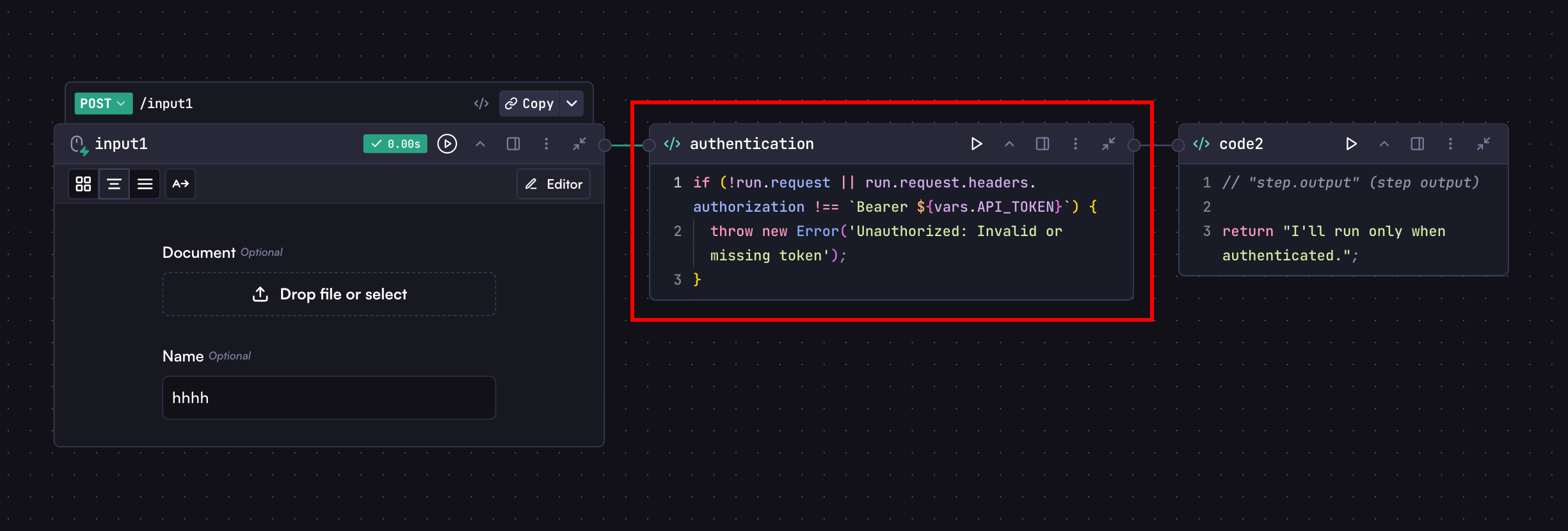 ```javascript
if (
!run.request ||
run.request.headers.authorization !== `Bearer ${vars.API_TOKEN}`
) {
throw new Error('Unauthorized: Invalid or missing token');
}
```
This example checks for a Bearer token in the Authorization header and compares it with a token stored in [Cortex Variables](/workflows/steps-advanced/variables).
If it's not valid, the code step will throw an error, causing the workflow to fail without running subsequent steps, and the API call will return an error response.
To call this protected webhook:
```bash
curl -X POST "https://api.withcortex.ai/webhooks/work_xxx/input1" \
-H "Authorization: Bearer your-secret-token" \
-H "Content-Type: application/json" \
-d '{
"text": "Hello"
}'
```
The `run.request` object provides access to:
* Headers (`run.request.headers`)
* IP address (`run.request.ip`)
* HTTP method (`run.request.method`)
* Query parameters (`run.request.query`)
* Request URL (`run.request.url`)
***
Learn about the standard API and SDK approach for more advanced workflow
integrations
{' '}
# Introduction
Source: https://docs.withcortex.ai/workflows/introduction
Introduction to the Cortex Workflows.
Workflows are the foundation of Cortex. A workflow is a series of connected steps that process data, perform actions, and even do **agentic** tasks. Each workflow:
* Processes data through a sequence of steps
* Can connect to external systems
* Produces outputs that can be displayed or used by other systems
Steps are the building blocks of workflows. Cortex offers diverse step types:
* **Processing steps**: Input, Model (AI), Code, HTTP Request, Browser
* **Action steps**: Send messages, emails, notifications
* **Integration steps**: Slack, Notion, Google Sheets, and a lot more
* **Trigger steps**: Schedule, webhook, or external event triggers
## Let's Get Started
In the following sections, you'll learn how to build workflows by doing. We'll start with simple examples and progressively add more complexity.
First, let's create a blank workflow so that we can learn from scratch.
1. Go to the [Workflows page](https://withcortex.ai/c/workflows)
2. Click the "New Workflow" button in the top right corner
3. Click the "Start from scratch" button in the modal footer that appears
You should now see a clean blank canvas.
```javascript
if (
!run.request ||
run.request.headers.authorization !== `Bearer ${vars.API_TOKEN}`
) {
throw new Error('Unauthorized: Invalid or missing token');
}
```
This example checks for a Bearer token in the Authorization header and compares it with a token stored in [Cortex Variables](/workflows/steps-advanced/variables).
If it's not valid, the code step will throw an error, causing the workflow to fail without running subsequent steps, and the API call will return an error response.
To call this protected webhook:
```bash
curl -X POST "https://api.withcortex.ai/webhooks/work_xxx/input1" \
-H "Authorization: Bearer your-secret-token" \
-H "Content-Type: application/json" \
-d '{
"text": "Hello"
}'
```
The `run.request` object provides access to:
* Headers (`run.request.headers`)
* IP address (`run.request.ip`)
* HTTP method (`run.request.method`)
* Query parameters (`run.request.query`)
* Request URL (`run.request.url`)
***
Learn about the standard API and SDK approach for more advanced workflow
integrations
{' '}
# Introduction
Source: https://docs.withcortex.ai/workflows/introduction
Introduction to the Cortex Workflows.
Workflows are the foundation of Cortex. A workflow is a series of connected steps that process data, perform actions, and even do **agentic** tasks. Each workflow:
* Processes data through a sequence of steps
* Can connect to external systems
* Produces outputs that can be displayed or used by other systems
Steps are the building blocks of workflows. Cortex offers diverse step types:
* **Processing steps**: Input, Model (AI), Code, HTTP Request, Browser
* **Action steps**: Send messages, emails, notifications
* **Integration steps**: Slack, Notion, Google Sheets, and a lot more
* **Trigger steps**: Schedule, webhook, or external event triggers
## Let's Get Started
In the following sections, you'll learn how to build workflows by doing. We'll start with simple examples and progressively add more complexity.
First, let's create a blank workflow so that we can learn from scratch.
1. Go to the [Workflows page](https://withcortex.ai/c/workflows)
2. Click the "New Workflow" button in the top right corner
3. Click the "Start from scratch" button in the modal footer that appears
You should now see a clean blank canvas.
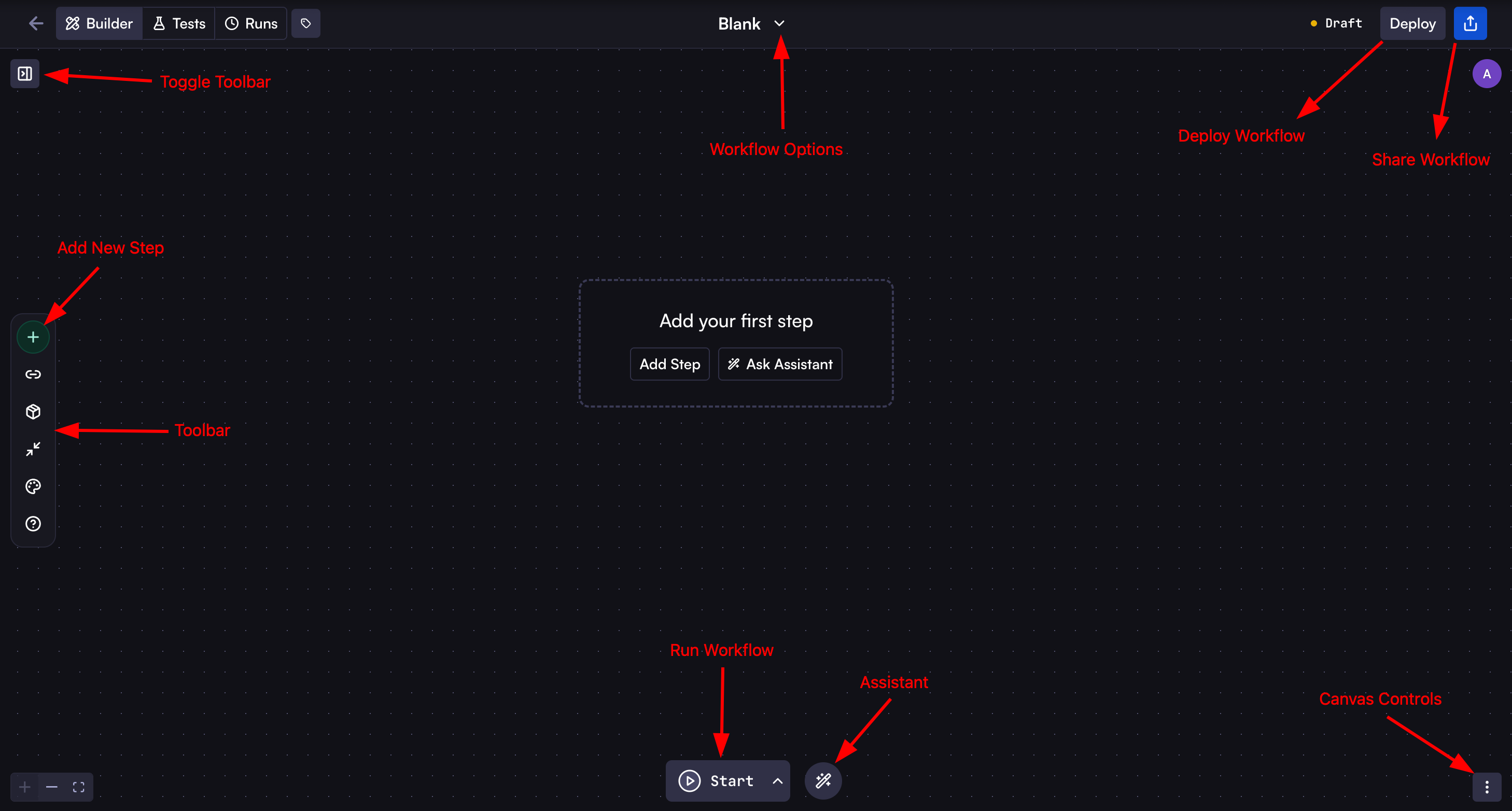 Now, let's get familiar with the canvas interface:
* **Toggle Outliner**: Show or hide the outliner on the left to see the outline of the workflow.
* **Add New Step**: Click the plus (+) button on the left toolbar to add a new step to your workflow.
* **Toolbar**: Use the buttons like Workflow Customization, Collapse steps, and more.
* **Workflow Options**: Click the workflow name at the top to rename it or click the chevron down icon to open the workflow options menu, where you can open the workflow settings, compare versions, clone, and more.
* **[Deploy Workflow](/workflows/deploy)**: Use the "Deploy" button in the top right to publish a new version of the workflow.
* **[Share Workflow](/workflows/share)**: Click the share button to share the workflow in different ways.
* **Run Workflow**: Click the run button at the bottom to execute the workflow.
* **Assistant**: Use the assistant for creating, editing, or debugging the workflow.
* **Canvas Controls**: Access additional canvas options from the menu in the bottom right to enable Focus Mode, toggle workflow minimap, access Schema Editor, and more.
## Next Steps
We highly recommend creating your first workflow now. This hands-on experience will give you a strong understanding of workflow basics and how they function. The rest of our documentation assumes you've completed this step, and having this foundation will make it much easier to understand all the advanced concepts we'll cover later.
Get familiar with the Cortex workflow by creating a simple workflow.
Learn about the different types of steps and how to use them in your
workflows.
Ready to take your workflows to the next level? Discover the power of intelligent agents in Cortex!
Autonomous AI agents that can reason, plan, and interact with various tools to
complete complex tasks.
# Share
Source: https://docs.withcortex.ai/workflows/share
Learn how to share workflows in different ways.
Cortex offers multiple ways to share your workflows with others, enabling collaboration and integration with various platforms. This guide covers all available sharing methods.
Now, let's get familiar with the canvas interface:
* **Toggle Outliner**: Show or hide the outliner on the left to see the outline of the workflow.
* **Add New Step**: Click the plus (+) button on the left toolbar to add a new step to your workflow.
* **Toolbar**: Use the buttons like Workflow Customization, Collapse steps, and more.
* **Workflow Options**: Click the workflow name at the top to rename it or click the chevron down icon to open the workflow options menu, where you can open the workflow settings, compare versions, clone, and more.
* **[Deploy Workflow](/workflows/deploy)**: Use the "Deploy" button in the top right to publish a new version of the workflow.
* **[Share Workflow](/workflows/share)**: Click the share button to share the workflow in different ways.
* **Run Workflow**: Click the run button at the bottom to execute the workflow.
* **Assistant**: Use the assistant for creating, editing, or debugging the workflow.
* **Canvas Controls**: Access additional canvas options from the menu in the bottom right to enable Focus Mode, toggle workflow minimap, access Schema Editor, and more.
## Next Steps
We highly recommend creating your first workflow now. This hands-on experience will give you a strong understanding of workflow basics and how they function. The rest of our documentation assumes you've completed this step, and having this foundation will make it much easier to understand all the advanced concepts we'll cover later.
Get familiar with the Cortex workflow by creating a simple workflow.
Learn about the different types of steps and how to use them in your
workflows.
Ready to take your workflows to the next level? Discover the power of intelligent agents in Cortex!
Autonomous AI agents that can reason, plan, and interact with various tools to
complete complex tasks.
# Share
Source: https://docs.withcortex.ai/workflows/share
Learn how to share workflows in different ways.
Cortex offers multiple ways to share your workflows with others, enabling collaboration and integration with various platforms. This guide covers all available sharing methods.
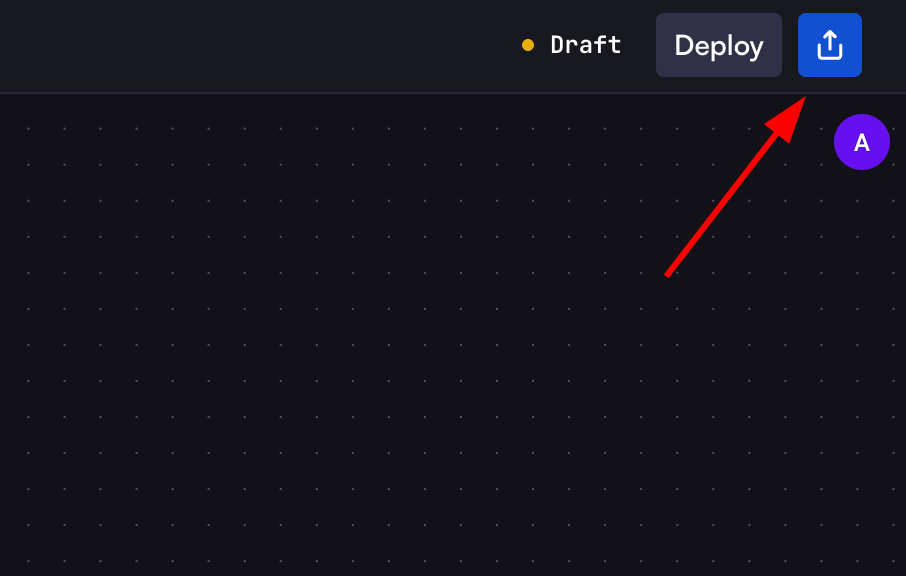 ## Share Methods Overview
When clicking on the share button on the top right of workflow header, you'll see several sharing options:
* [Share with Users](#share-with-users) - Share directly with other users
* [Share with Orgs](#share-with-organizations) - Share with entire organizations
* [MCP](#model-context-protocol-mcp) - Connect with Claude Desktop and other MCP clients
* [API & SDKs](#api-%26-sdks) - Integrate workflows via REST API or SDKs
* [Collections](#collections) - Add workflows to collections for no-code workflow management
## Share with Users
This option allows you to share your workflow publicly with anyone via a link, even if they don't have a Cortex account.
1. Select the "Share with Users" tab
2. Click the "Generate Share Link" button
3. Copy the generated URL to share with others
Anyone with this link can access a public-facing version of your workflow where they can:
* View the workflow's input form
* Fill out the required inputs
* Submit the workflow to run
The shared link will always reflect the latest version of your workflow after
each deployment, so users automatically get access to your updates without
needing a new link.
This is particularly useful for:
* Creating surveys or data collection forms
* Building public-facing tools or utilities
* Gathering information from external users
For example, you could create a survey workflow that collects responses and processes them automatically. Users accessing the shared link will only see the input form, submit their responses, and the workflow will process the data behind the scenes.
Currently, users with the shared link cannot see the workflow's output. This
feature will be added in a future update.
## Share with Organizations
Share your workflow with other organizations in Cortex to enable broader collaboration.
1. Select the "Share with Orgs" tab
2. From the dropdown, select the organization you want to share with
3. Click "Share"
Organizations with access will be able to run the workflow in their own
workflows and collections, but won't be able to edit or view step sources like
prompts and code. Usage costs will be charged to the organization that
executes the workflow.
## Model Context Protocol (MCP)
The Model Context Protocol (MCP) allows you to connect your Cortex workflows with various MCP-compatible clients like Claude Desktop, Cursor, and many others. For a complete list of supported applications, see the [all supported apps](https://modelcontextprotocol.io/clients#feature-support-matrix).
### Generating an MCP Server
1. Select the "MCP" tab
2. Click the "Generate MCP Server" button
3. Copy the generated server URL (format: `https://api.withcortex.ai/endpoints/{ID}/mcp`)
The MCP server URL will automatically reflect the latest changes to your
workflow after each deployment, ensuring all MCP clients always use the most
recent version.
### Configuring MCP Clients
Below is an example of setting up Claude Desktop with your Cortex workflow. Other MCP clients may have different configuration methods - refer to their respective documentation for setup instructions.
To use your Cortex workflow in Claude Desktop:
1. Install the latest version of Claude Desktop from [claude.ai/download](https://claude.ai/download)
2. Open or create the Claude Desktop configuration file:
* MacOS/Linux: `~/Library/Application Support/Claude/claude_desktop_config.json`
* Windows: `%AppData%\Claude\claude_desktop_config.json`
3. Add your Cortex MCP server configuration:
```json
{
"mcpServers": {
"name-for-your-mcp-server": {
"command": "npx",
"args": ["mcp-remote", "GENERATED_MCP_SERVER_URL"]
}
}
}
```
> Replace `GENERATED_MCP_SERVER_URL` with the actual MCP server URL you copied in step 3 (the URL that looks like `https://api.withcortex.ai/endpoints/{ID}/mcp`).
4. Save the file and restart Claude Desktop
5. Verify the connection by looking for the hammer icon in Claude Desktop
6. Your Cortex workflow is now available in Claude Desktop
## API & SDKs
The API option allows you to integrate your Cortex workflows into external applications or services.
Learn how to integrate your workflow with applications via API and SDKs
## Collections
Collections provide a structured way to store, classify, and manage workflow-related data securely. They serve as the visual interface for non-technical users to interact with workflows, records, and automation without writing code.
1. Select the "Collections" tab
2. To add this workflow to a collection, click "Go to Collections"
3. In the Collections Rules page, add a rule selecting this workflow
Learn how to create and manage collections in Cortex
# Branching
Source: https://docs.withcortex.ai/workflows/steps-advanced/branching
Create conditional logic to route data down different paths
## Share Methods Overview
When clicking on the share button on the top right of workflow header, you'll see several sharing options:
* [Share with Users](#share-with-users) - Share directly with other users
* [Share with Orgs](#share-with-organizations) - Share with entire organizations
* [MCP](#model-context-protocol-mcp) - Connect with Claude Desktop and other MCP clients
* [API & SDKs](#api-%26-sdks) - Integrate workflows via REST API or SDKs
* [Collections](#collections) - Add workflows to collections for no-code workflow management
## Share with Users
This option allows you to share your workflow publicly with anyone via a link, even if they don't have a Cortex account.
1. Select the "Share with Users" tab
2. Click the "Generate Share Link" button
3. Copy the generated URL to share with others
Anyone with this link can access a public-facing version of your workflow where they can:
* View the workflow's input form
* Fill out the required inputs
* Submit the workflow to run
The shared link will always reflect the latest version of your workflow after
each deployment, so users automatically get access to your updates without
needing a new link.
This is particularly useful for:
* Creating surveys or data collection forms
* Building public-facing tools or utilities
* Gathering information from external users
For example, you could create a survey workflow that collects responses and processes them automatically. Users accessing the shared link will only see the input form, submit their responses, and the workflow will process the data behind the scenes.
Currently, users with the shared link cannot see the workflow's output. This
feature will be added in a future update.
## Share with Organizations
Share your workflow with other organizations in Cortex to enable broader collaboration.
1. Select the "Share with Orgs" tab
2. From the dropdown, select the organization you want to share with
3. Click "Share"
Organizations with access will be able to run the workflow in their own
workflows and collections, but won't be able to edit or view step sources like
prompts and code. Usage costs will be charged to the organization that
executes the workflow.
## Model Context Protocol (MCP)
The Model Context Protocol (MCP) allows you to connect your Cortex workflows with various MCP-compatible clients like Claude Desktop, Cursor, and many others. For a complete list of supported applications, see the [all supported apps](https://modelcontextprotocol.io/clients#feature-support-matrix).
### Generating an MCP Server
1. Select the "MCP" tab
2. Click the "Generate MCP Server" button
3. Copy the generated server URL (format: `https://api.withcortex.ai/endpoints/{ID}/mcp`)
The MCP server URL will automatically reflect the latest changes to your
workflow after each deployment, ensuring all MCP clients always use the most
recent version.
### Configuring MCP Clients
Below is an example of setting up Claude Desktop with your Cortex workflow. Other MCP clients may have different configuration methods - refer to their respective documentation for setup instructions.
To use your Cortex workflow in Claude Desktop:
1. Install the latest version of Claude Desktop from [claude.ai/download](https://claude.ai/download)
2. Open or create the Claude Desktop configuration file:
* MacOS/Linux: `~/Library/Application Support/Claude/claude_desktop_config.json`
* Windows: `%AppData%\Claude\claude_desktop_config.json`
3. Add your Cortex MCP server configuration:
```json
{
"mcpServers": {
"name-for-your-mcp-server": {
"command": "npx",
"args": ["mcp-remote", "GENERATED_MCP_SERVER_URL"]
}
}
}
```
> Replace `GENERATED_MCP_SERVER_URL` with the actual MCP server URL you copied in step 3 (the URL that looks like `https://api.withcortex.ai/endpoints/{ID}/mcp`).
4. Save the file and restart Claude Desktop
5. Verify the connection by looking for the hammer icon in Claude Desktop
6. Your Cortex workflow is now available in Claude Desktop
## API & SDKs
The API option allows you to integrate your Cortex workflows into external applications or services.
Learn how to integrate your workflow with applications via API and SDKs
## Collections
Collections provide a structured way to store, classify, and manage workflow-related data securely. They serve as the visual interface for non-technical users to interact with workflows, records, and automation without writing code.
1. Select the "Collections" tab
2. To add this workflow to a collection, click "Go to Collections"
3. In the Collections Rules page, add a rule selecting this workflow
Learn how to create and manage collections in Cortex
# Branching
Source: https://docs.withcortex.ai/workflows/steps-advanced/branching
Create conditional logic to route data down different paths
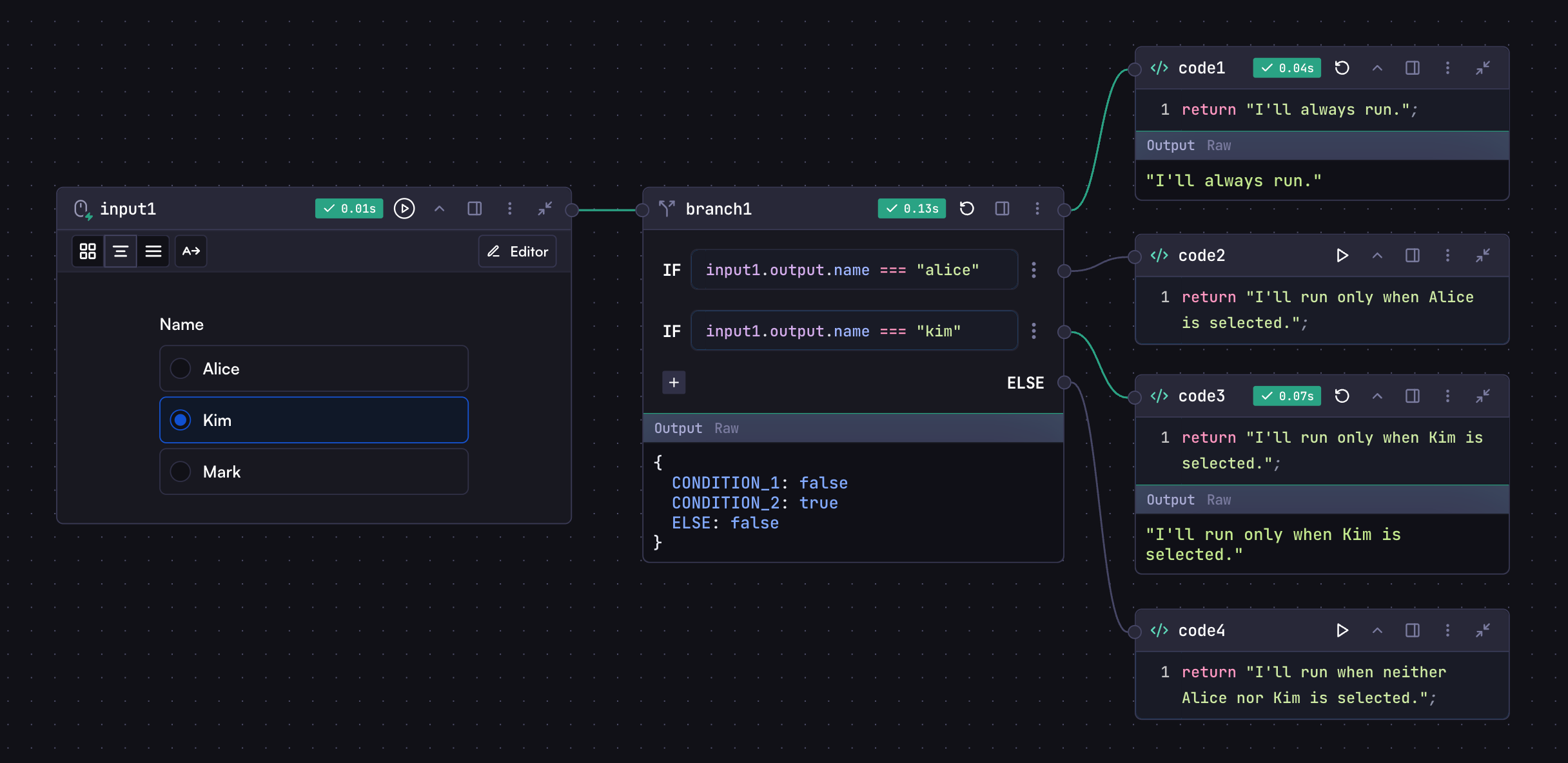 ## Structure
A Branch step consists of three main components:
1. **Default Destination**: Steps connected to the top connection circle execute regardless of conditions
2. **Conditional Paths**: Multiple `IF` conditions with their own destination steps
3. **Else Path**: Optional default path when no conditions are met
## Adding Conditions
1. Click the "+" button located at the bottom of the existing conditions
2. Write your condition logic in the new condition box
3. Connect desired steps to the new condition's destination
# Conditional
Source: https://docs.withcortex.ai/workflows/steps-advanced/conditional
Control workflow execution by defining conditions that determine whether steps should run or be skipped.
## Structure
A Branch step consists of three main components:
1. **Default Destination**: Steps connected to the top connection circle execute regardless of conditions
2. **Conditional Paths**: Multiple `IF` conditions with their own destination steps
3. **Else Path**: Optional default path when no conditions are met
## Adding Conditions
1. Click the "+" button located at the bottom of the existing conditions
2. Write your condition logic in the new condition box
3. Connect desired steps to the new condition's destination
# Conditional
Source: https://docs.withcortex.ai/workflows/steps-advanced/conditional
Control workflow execution by defining conditions that determine whether steps should run or be skipped.
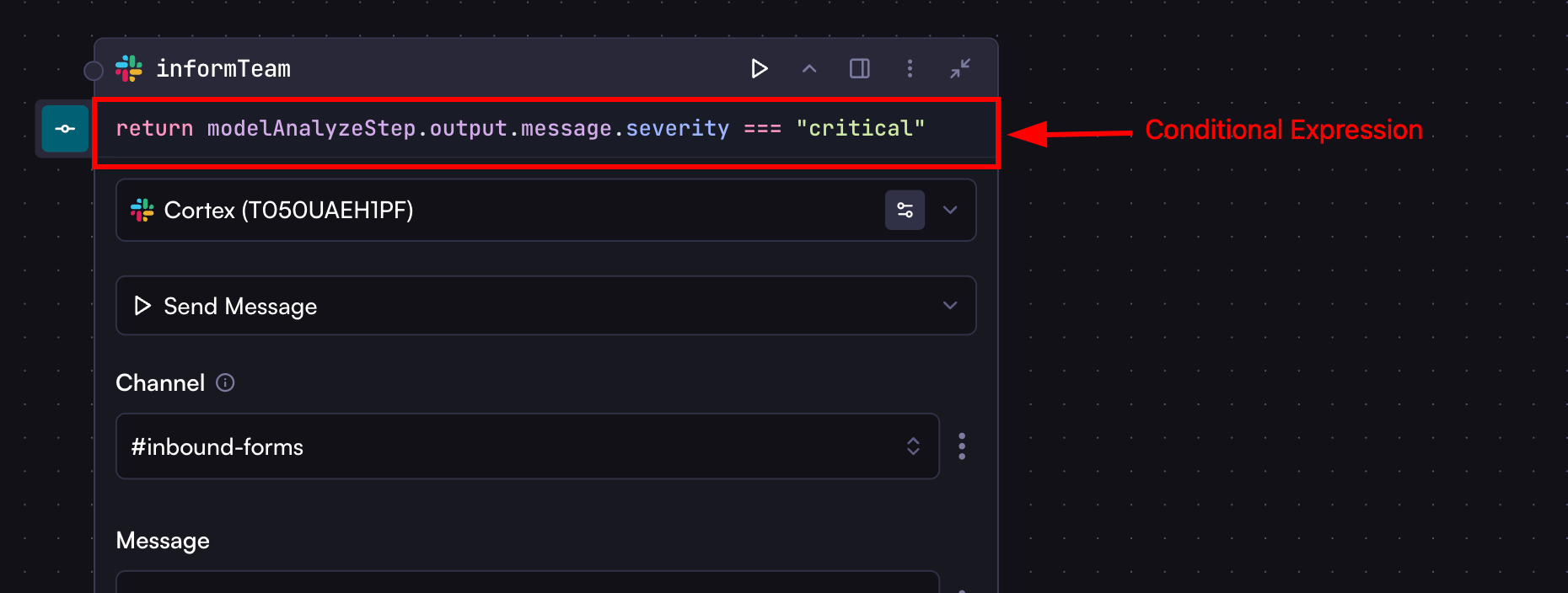 ## Enabling Conditional
To enable conditional for a step:
1. Click the step's options menu (⋮)
2. Click `Add Conditional`
3. Enter a condition that determines whether the step should run
## Conditional Expression
* A JavaScript expression that evaluates to a boolean value
* Must return `true` or `false`
* Cannot contain async operations
## Common Expressions
```javascript
return input1.output.document_type === 'pdf';
return codeStep1.output.score > 0.8 && codeStep2.output.verified;
return codeStep1.output.results?.length > 0;
```
## Invalid Expressions
* Async operations
* Function declarations
* Complex logic blocks with if/else
## Step Skip Handling
When a step is skipped due to a conditional evaluating to `false`, subsequent steps need to handle this gracefully when accessing the output of the skipped step.
# Loop
Source: https://docs.withcortex.ai/workflows/steps-advanced/loop
Process a list of items by executing the same step repeatedly, handling each element one at a time in sequence.
## Enabling Conditional
To enable conditional for a step:
1. Click the step's options menu (⋮)
2. Click `Add Conditional`
3. Enter a condition that determines whether the step should run
## Conditional Expression
* A JavaScript expression that evaluates to a boolean value
* Must return `true` or `false`
* Cannot contain async operations
## Common Expressions
```javascript
return input1.output.document_type === 'pdf';
return codeStep1.output.score > 0.8 && codeStep2.output.verified;
return codeStep1.output.results?.length > 0;
```
## Invalid Expressions
* Async operations
* Function declarations
* Complex logic blocks with if/else
## Step Skip Handling
When a step is skipped due to a conditional evaluating to `false`, subsequent steps need to handle this gracefully when accessing the output of the skipped step.
# Loop
Source: https://docs.withcortex.ai/workflows/steps-advanced/loop
Process a list of items by executing the same step repeatedly, handling each element one at a time in sequence.
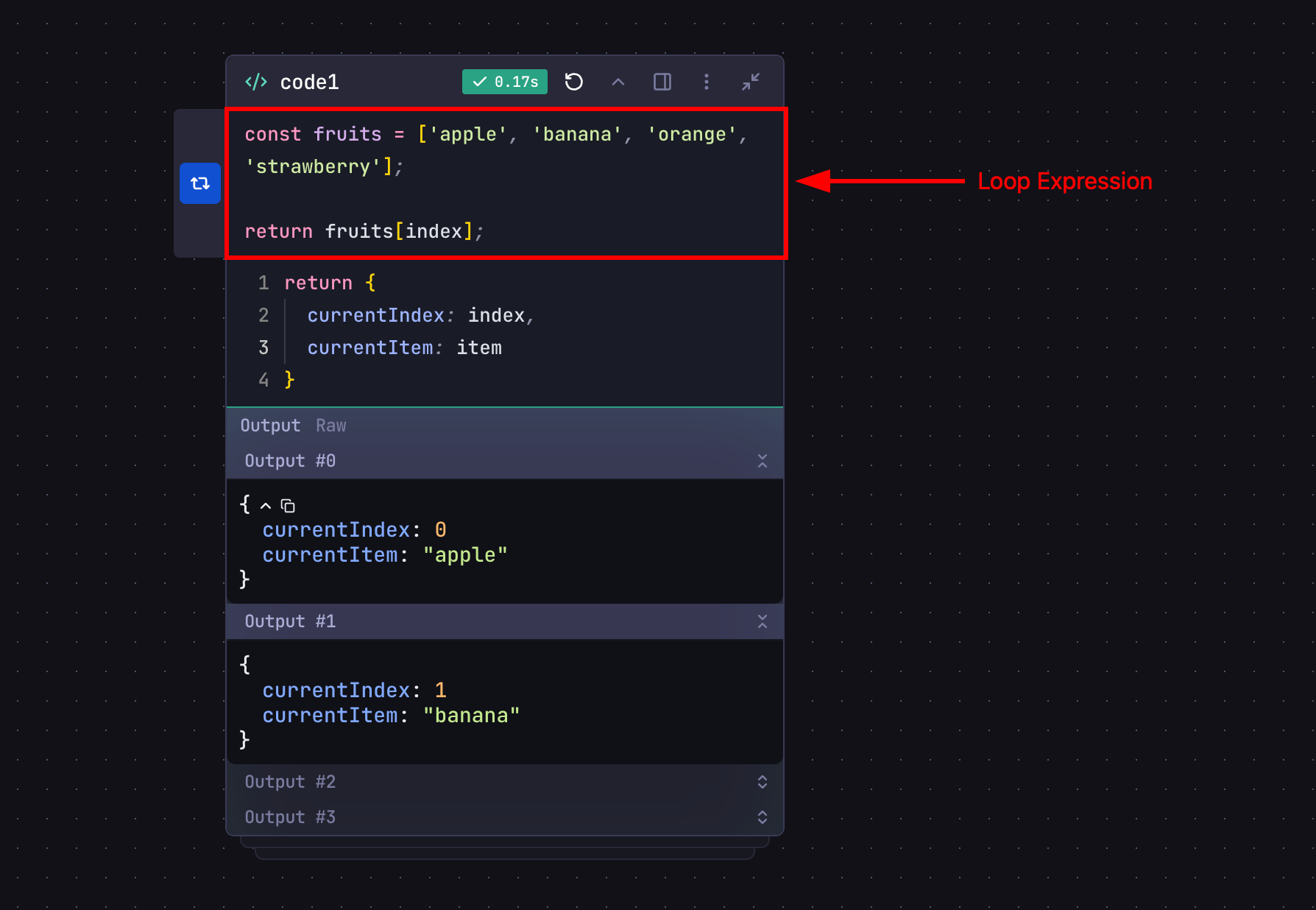 ## Enabling Loop
To enable looping for a step:
1. Click the step's options menu (⋮)
2. Click `Add Loop`
3. Enter a loop expression that determines how the step iterates
## Loop Expression
* A JavaScript expression that returns the next item to process
* Returns `null`, `undefined`, or `false` to terminate the loop
* Has access to special variables:
* `index`: Current iteration number (starts at 0)
* `item`: Current value being processed
## Loop Output
* When loop is enabled, the step's output becomes an array
* Each array element contains the output from one iteration
* Output array maintains the order of processing
## Loop Expression Rules
* Return one item at a time from the array: `return items[index];`
* Never return the full array (causes infinite loop)
## Accessing Output
When a step has looping enabled, its output becomes an array containing results from each iteration:
```javascript
const results = modelStep.output.map((item) => item.message);
```
When accessing the output of a looped step in code steps, you must use array methods like `map()` to access individual iteration results.
## Loop Termination
Loop stops when the expression returns `null`, `undefined`, or `false`.
Array bounds automatically handle termination:
```javascript
return items[index]; // Returns undefined when index >= length
```
## Examples
Here are some practical examples demonstrating how to use loops in your workflows:
### Parallel API Requests
Process multiple API endpoints simultaneously:
## Enabling Loop
To enable looping for a step:
1. Click the step's options menu (⋮)
2. Click `Add Loop`
3. Enter a loop expression that determines how the step iterates
## Loop Expression
* A JavaScript expression that returns the next item to process
* Returns `null`, `undefined`, or `false` to terminate the loop
* Has access to special variables:
* `index`: Current iteration number (starts at 0)
* `item`: Current value being processed
## Loop Output
* When loop is enabled, the step's output becomes an array
* Each array element contains the output from one iteration
* Output array maintains the order of processing
## Loop Expression Rules
* Return one item at a time from the array: `return items[index];`
* Never return the full array (causes infinite loop)
## Accessing Output
When a step has looping enabled, its output becomes an array containing results from each iteration:
```javascript
const results = modelStep.output.map((item) => item.message);
```
When accessing the output of a looped step in code steps, you must use array methods like `map()` to access individual iteration results.
## Loop Termination
Loop stops when the expression returns `null`, `undefined`, or `false`.
Array bounds automatically handle termination:
```javascript
return items[index]; // Returns undefined when index >= length
```
## Examples
Here are some practical examples demonstrating how to use loops in your workflows:
### Parallel API Requests
Process multiple API endpoints simultaneously:
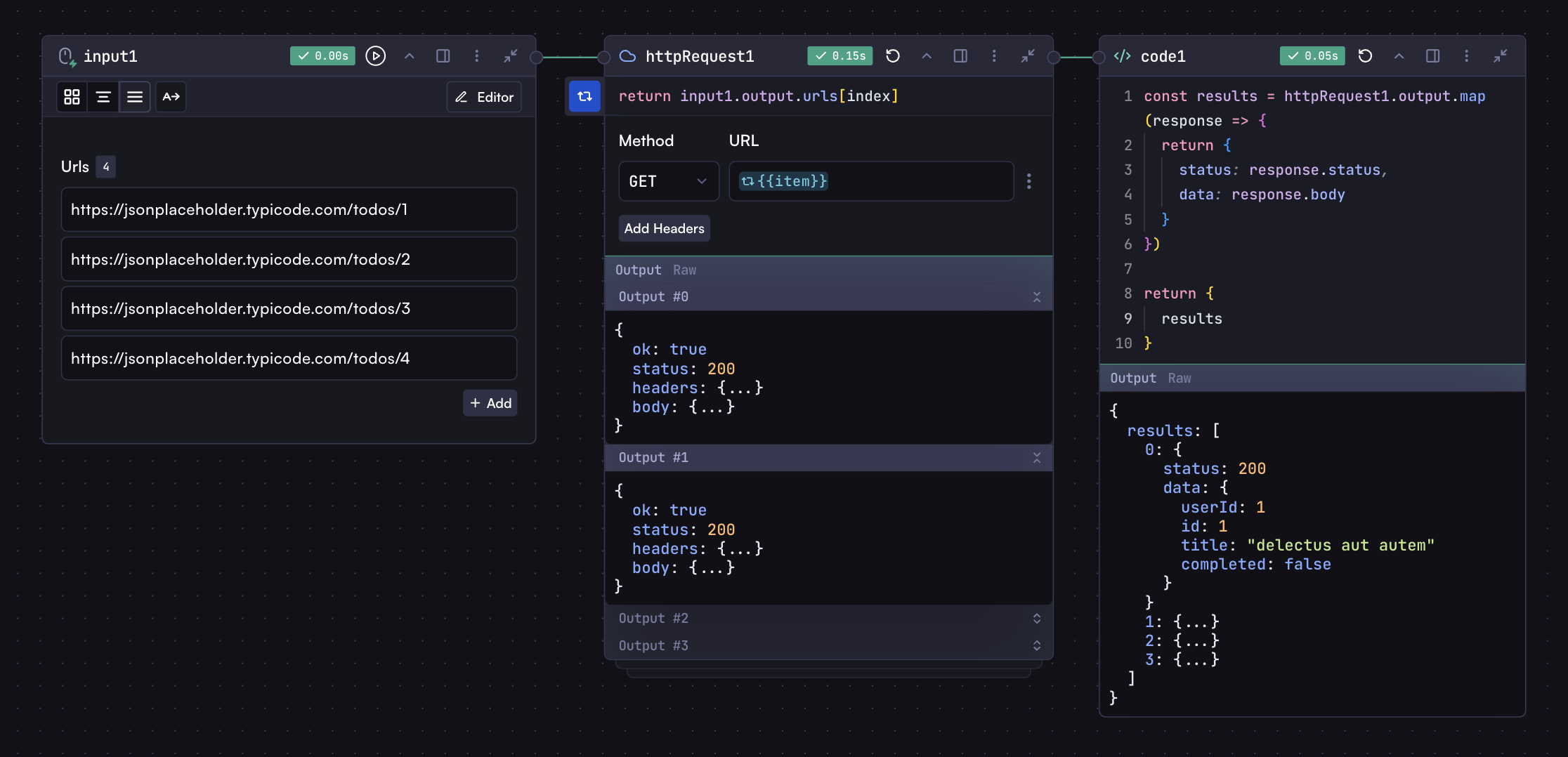 ### File Batch Processing
Process multiple files with consistent logic:
### File Batch Processing
Process multiple files with consistent logic:
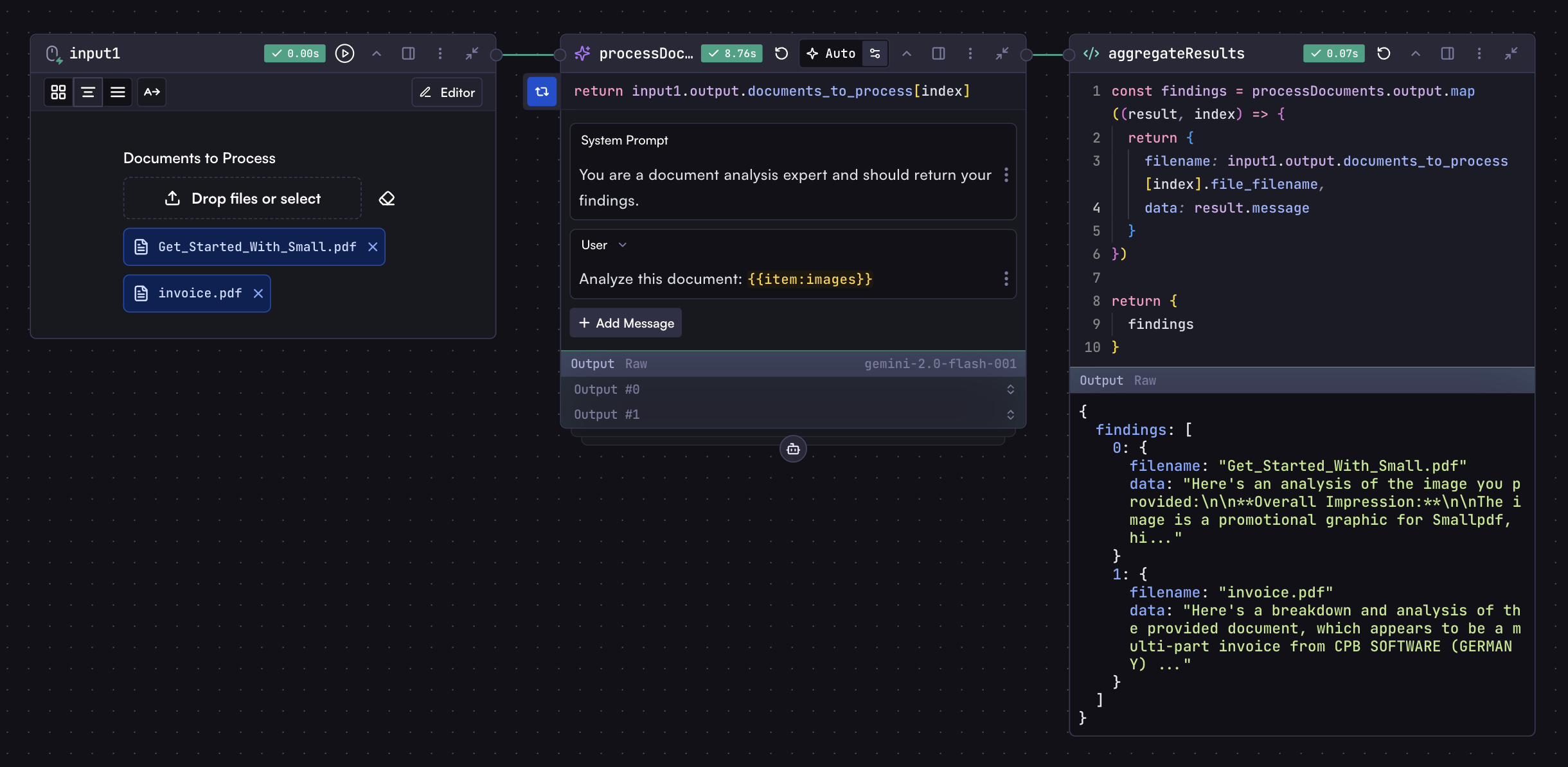 This eliminates the need for separate model steps for each file.
### Object Properties Processing
For objects, you can loop through keys or values, so your loop expression should return an object with the key and value:
```javascript
const entries = Object.entries({
apple: 'red',
banana: 'yellow',
orange: 'orange',
});
return entries[index]
? { key: entries[index][0], value: entries[index][1] }
: null;
```
This approach lets you process each property with the same logic while maintaining property names.
## Remove Loop
To remove a loop from a step:
1. Click the step's options menu (⋮)
2. Click `Remove Loop`
# Variables
Source: https://docs.withcortex.ai/workflows/steps-advanced/variables
Learn how to create and use variables to securely manage reusable values across your workflows
## What are Variables?
Variables provide a secure and centralized way to manage reusable values across your workflows. They are ideal for storing sensitive information like API keys, credentials, configuration settings, and other frequently used data.
By using variables instead of hardcoding values directly in your workflow steps, you can:
* **Enhance Security**: Keep sensitive data like API keys and credentials secure
* **Improve Maintainability**: Update values in one place rather than throughout multiple workflows
* **Simplify Development**: Reference common values easily across different steps and workflows
## Creating Variables
You can create variables from two places:
* By clicking the **Variables** button from the workflow builder toolbar
* Or since it's a global resource (Organization level), you can also create them from the [Variables](https://withcortex.ai/c/settings/variables) section in the settings
In this example, we'll create a variable from the workflow builder toolbar:
1. Click the **Variables** button from the workflow builder toolbar, which will open the variables modal where you can create, edit, or delete variables
2. Click the **New Variable** button to create a new variable
3. Enter a key for the variable (e.g., `API_KEY`)
4. Enter the value for the variable (e.g., `1234567890`)
5. Enable the **Secret** option if the variable contains sensitive information
6. Click the **Create** button
You should now see the variable in the variables modal.
This eliminates the need for separate model steps for each file.
### Object Properties Processing
For objects, you can loop through keys or values, so your loop expression should return an object with the key and value:
```javascript
const entries = Object.entries({
apple: 'red',
banana: 'yellow',
orange: 'orange',
});
return entries[index]
? { key: entries[index][0], value: entries[index][1] }
: null;
```
This approach lets you process each property with the same logic while maintaining property names.
## Remove Loop
To remove a loop from a step:
1. Click the step's options menu (⋮)
2. Click `Remove Loop`
# Variables
Source: https://docs.withcortex.ai/workflows/steps-advanced/variables
Learn how to create and use variables to securely manage reusable values across your workflows
## What are Variables?
Variables provide a secure and centralized way to manage reusable values across your workflows. They are ideal for storing sensitive information like API keys, credentials, configuration settings, and other frequently used data.
By using variables instead of hardcoding values directly in your workflow steps, you can:
* **Enhance Security**: Keep sensitive data like API keys and credentials secure
* **Improve Maintainability**: Update values in one place rather than throughout multiple workflows
* **Simplify Development**: Reference common values easily across different steps and workflows
## Creating Variables
You can create variables from two places:
* By clicking the **Variables** button from the workflow builder toolbar
* Or since it's a global resource (Organization level), you can also create them from the [Variables](https://withcortex.ai/c/settings/variables) section in the settings
In this example, we'll create a variable from the workflow builder toolbar:
1. Click the **Variables** button from the workflow builder toolbar, which will open the variables modal where you can create, edit, or delete variables
2. Click the **New Variable** button to create a new variable
3. Enter a key for the variable (e.g., `API_KEY`)
4. Enter the value for the variable (e.g., `1234567890`)
5. Enable the **Secret** option if the variable contains sensitive information
6. Click the **Create** button
You should now see the variable in the variables modal.

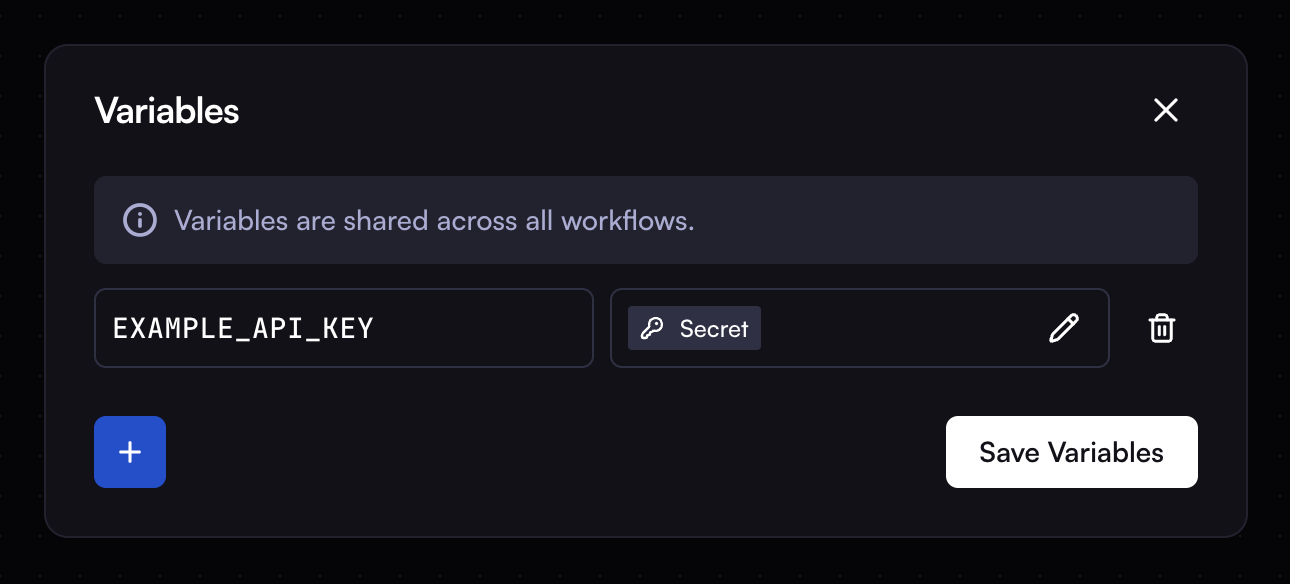 ## Using Variables
Variables can be referenced in any step of your workflow using syntax as same you [accessing step outputs](/workflows/steps/overview#variables), But we use `vars` object to access them.
```
vars.API_KEY
```
## Using Variables
Variables can be referenced in any step of your workflow using syntax as same you [accessing step outputs](/workflows/steps/overview#variables), But we use `vars` object to access them.
```
vars.API_KEY
```
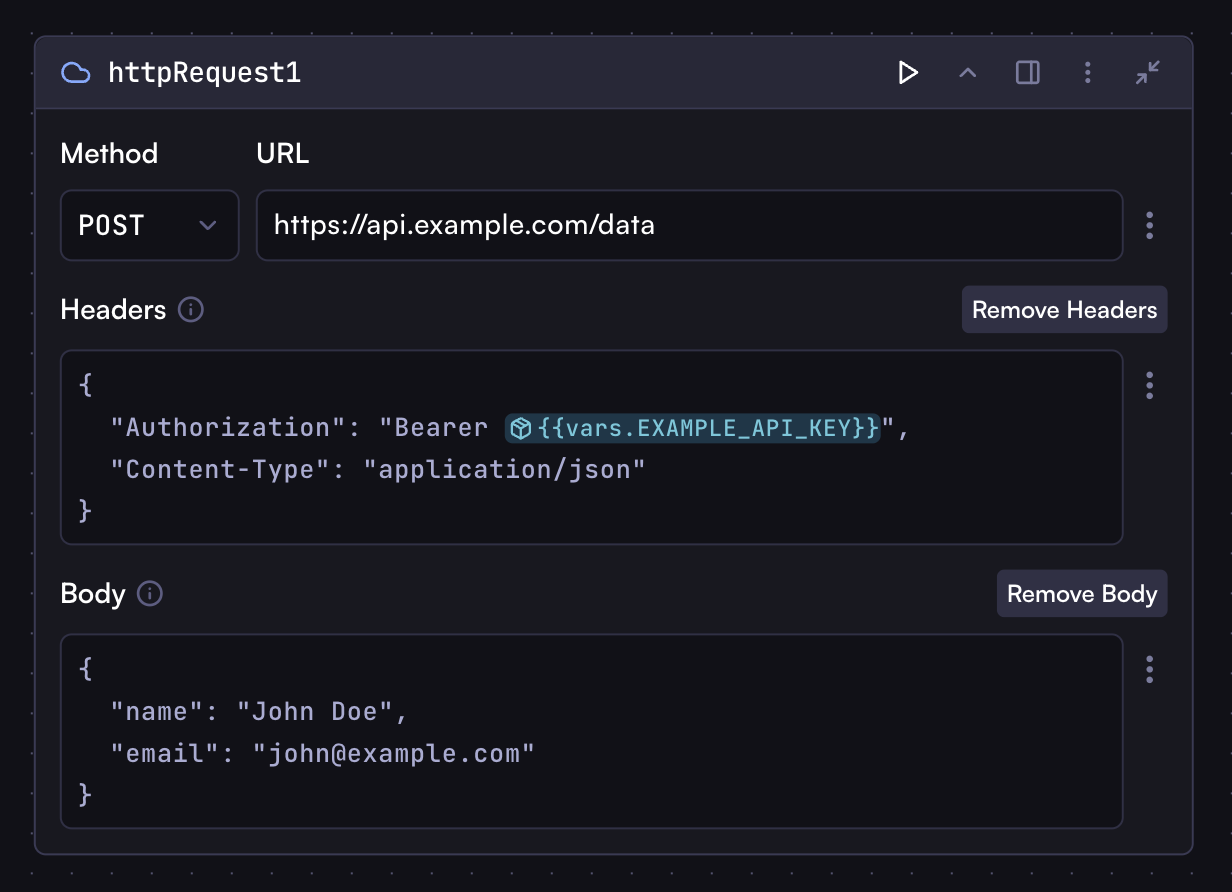 ## Secret Variables
Secret variables provide an extra layer of security for sensitive information like API keys, passwords, and access tokens. They have the following security features:
* **End-to-End Encryption**: Variables are encrypted at rest and in transit
* **One-Way Storage**: Once created, the value cannot be viewed or retrieved by anyone, including workflow owners and administrators
* **Runtime-Only Access**: Values are only decrypted and accessible during workflow execution
* **Automatic Masking**: Any attempts to log or output the variable value will show as `********` instead of the actual value
This ensures your sensitive data remains secure while still being usable in your workflows.
# Input Step
Source: https://docs.withcortex.ai/workflows/steps/input
Learn how to configure and use Input steps in your workflows.
Input steps serve as starting points in a workflow, collecting initial data from users. When you run a workflow or an individual input step, all steps connected to the right of that input step will execute in sequence, forming a chain. A workflow can contain multiple input steps, with each creating its own execution chain. The data collected by an input step becomes available to all subsequent connected steps in its chain.
## Field Types
Input steps support the following field types:
* **Text** - Single-line or multi-line text input
* **Number** - Numeric input that only accepts numbers
* **Checkbox** - Boolean input (checked or unchecked)
* **Date** - Calendar date picker
* **Time** - Time selection picker
* **Options** - Dropdown or radio button selection from predefined options
* **File** - File upload field
* **Date Time** - Combined date and time picker
* **Group** - Container for organizing related fields, can be nested
## Adding a Field
To add a field to an input step:
* Click the "Editor" button in the input step toolbar if you've already added a field
* For your first field, click the plus button in the center of the input step
* Use the WYSIWYG editor to select a field type from the bottom toolbar
* Provide a label and key for referencing the field in subsequent steps
* Click "Done" to save your changes
* Add as many fields as needed to complete your form
## Using Input Values
You can reference input values in connected steps using the following syntax:
```
inputStep.output.fieldKey
```
Where `inputStep` is the input step's key and `fieldKey` is the field's key. For fields with multiple values enabled, the value will be an array.
For group fields, access nested fields using dot notation:
```
inputStep.output.groupFieldKey.fieldKeyInsideGroup
```
## Secret Variables
Secret variables provide an extra layer of security for sensitive information like API keys, passwords, and access tokens. They have the following security features:
* **End-to-End Encryption**: Variables are encrypted at rest and in transit
* **One-Way Storage**: Once created, the value cannot be viewed or retrieved by anyone, including workflow owners and administrators
* **Runtime-Only Access**: Values are only decrypted and accessible during workflow execution
* **Automatic Masking**: Any attempts to log or output the variable value will show as `********` instead of the actual value
This ensures your sensitive data remains secure while still being usable in your workflows.
# Input Step
Source: https://docs.withcortex.ai/workflows/steps/input
Learn how to configure and use Input steps in your workflows.
Input steps serve as starting points in a workflow, collecting initial data from users. When you run a workflow or an individual input step, all steps connected to the right of that input step will execute in sequence, forming a chain. A workflow can contain multiple input steps, with each creating its own execution chain. The data collected by an input step becomes available to all subsequent connected steps in its chain.
## Field Types
Input steps support the following field types:
* **Text** - Single-line or multi-line text input
* **Number** - Numeric input that only accepts numbers
* **Checkbox** - Boolean input (checked or unchecked)
* **Date** - Calendar date picker
* **Time** - Time selection picker
* **Options** - Dropdown or radio button selection from predefined options
* **File** - File upload field
* **Date Time** - Combined date and time picker
* **Group** - Container for organizing related fields, can be nested
## Adding a Field
To add a field to an input step:
* Click the "Editor" button in the input step toolbar if you've already added a field
* For your first field, click the plus button in the center of the input step
* Use the WYSIWYG editor to select a field type from the bottom toolbar
* Provide a label and key for referencing the field in subsequent steps
* Click "Done" to save your changes
* Add as many fields as needed to complete your form
## Using Input Values
You can reference input values in connected steps using the following syntax:
```
inputStep.output.fieldKey
```
Where `inputStep` is the input step's key and `fieldKey` is the field's key. For fields with multiple values enabled, the value will be an array.
For group fields, access nested fields using dot notation:
```
inputStep.output.groupFieldKey.fieldKeyInsideGroup
```
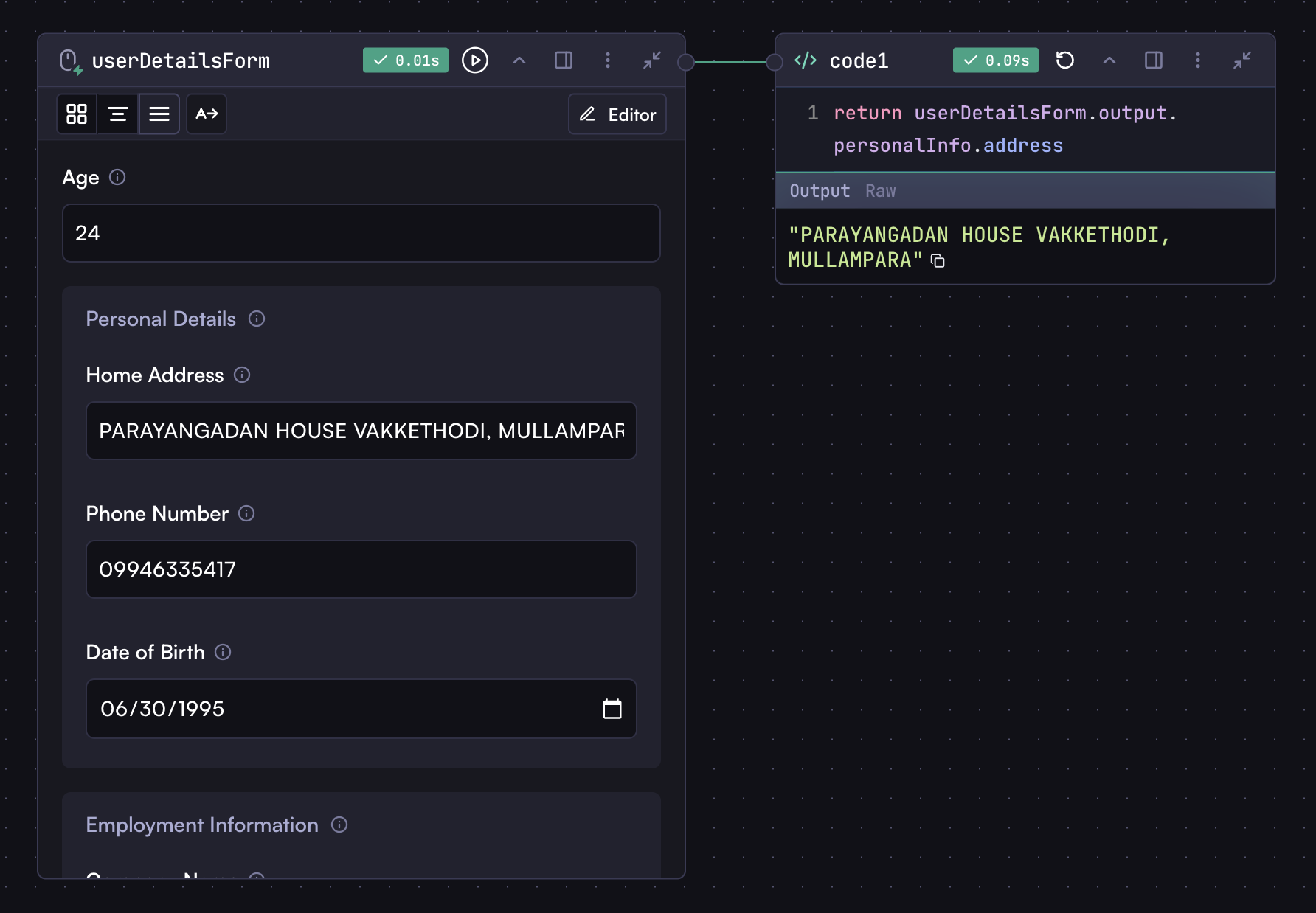 ## Field Settings
Common settings available for all fields include:
* **Optional** - Makes the field non-required
* **Description** - Helpful text that appears when hovering over the info icon
* **Multiple Values/Selection** - Enables collection of multiple values (where applicable)
## Field Settings
Common settings available for all fields include:
* **Optional** - Makes the field non-required
* **Description** - Helpful text that appears when hovering over the info icon
* **Multiple Values/Selection** - Enables collection of multiple values (where applicable)
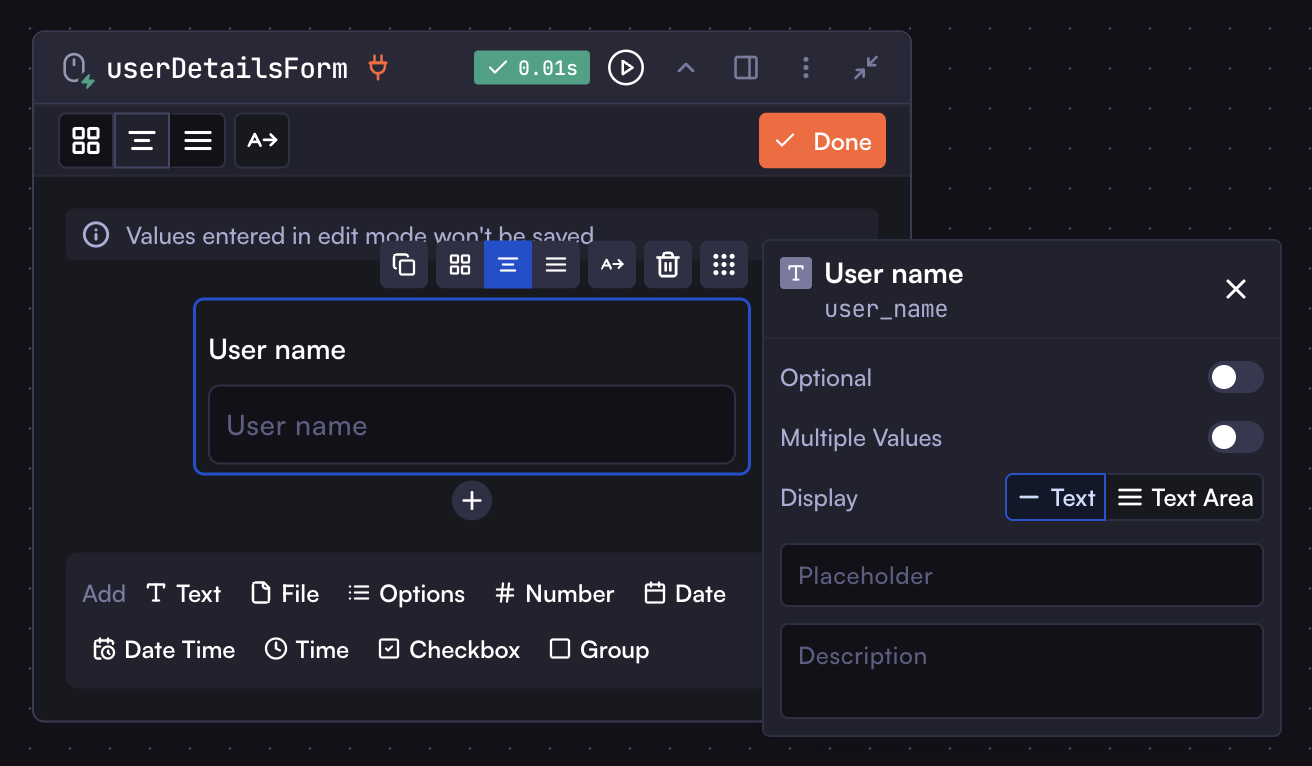 Each field type has its own specific settings that you can configure as needed.
## File Field
Each field type has its own specific settings that you can configure as needed.
## File Field
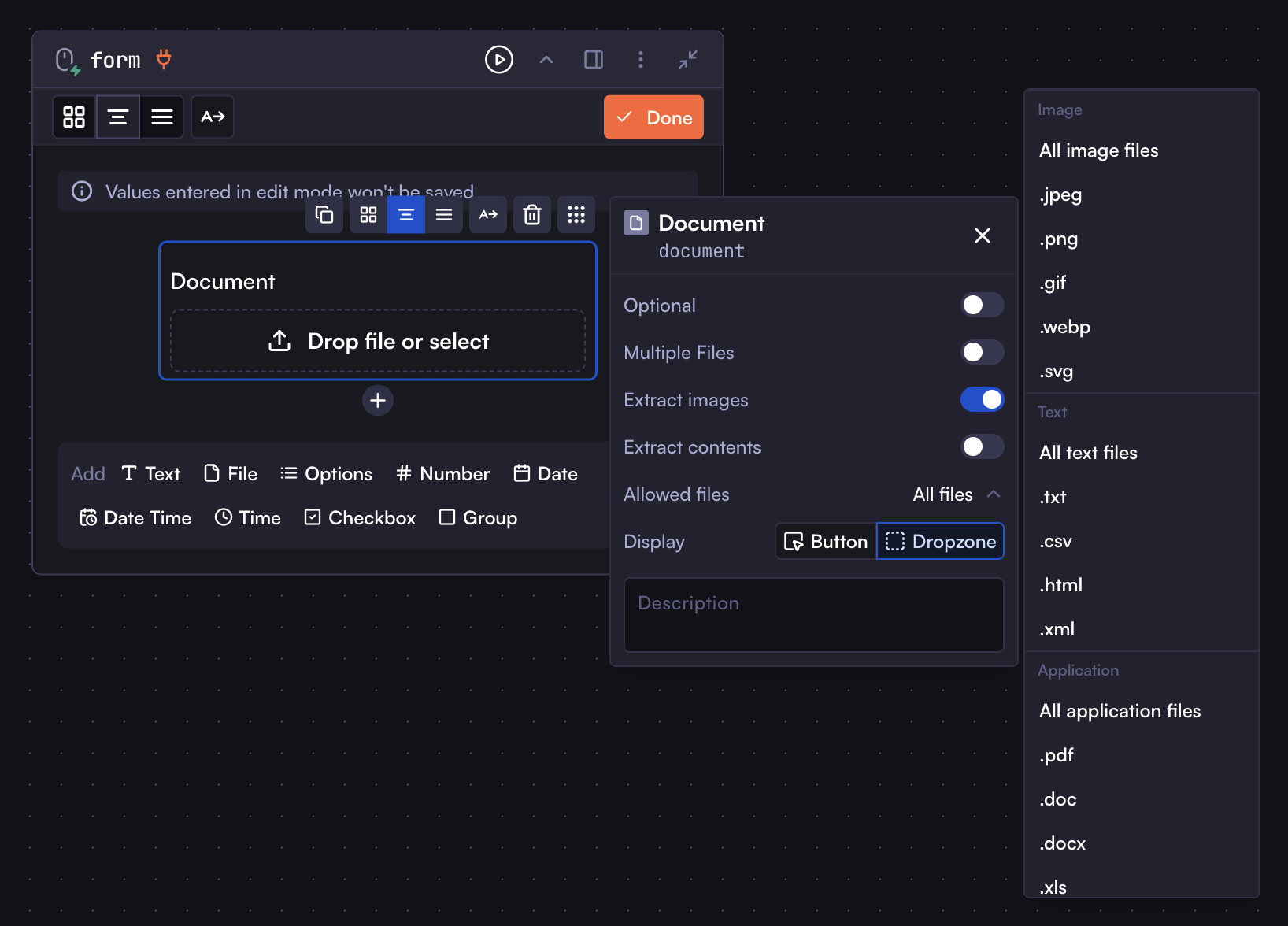 The File field allows users to upload files to your workflow for document processing, image analysis, and other file-based operations. Configuration options include:
* **Multiple Files** - Enables multiple file uploads, returning an array of files
* **Extract images** - Automatically extracts images from documents, accessible with the `:images` suffix
* **Extract contents** - Extracts text from documents, accessible with the `:content` suffix
* **Allowed files** - Controls permitted file types:
* All files
* Image files (.jpg, .png, .gif, .webp, .svg)
* Text files (.txt, .csv, .html, .xml)
* Application files (.pdf, .doc, .docx, .xls, etc.)
### Accessing Files
Access uploaded files in subsequent steps using:
```
inputStep.output.fileFieldKey
```
File outputs include metadata like filename, URL, content type, and size.
### Using Files in Model Steps
Use special suffixes in model prompts with the `{{}}` syntax:
* `:images` - Passes extracted images to the LLM (requires "Extract Images" enabled)
* `:content` - Passes extracted text to the LLM (requires "Extract Contents" enabled)
* `:file` - Passes raw files directly (primarily for Google models handling video/audio)
Example usage in model prompts:
```
Please analyze the following document:
{{inputStep.output.fileFieldKey:images}}
Please summarize this document:
{{inputStep.output.fileFieldKey:content}}
Please transcribe this video:
{{inputStep.output.fileFieldKey:file}}
```
These suffixes simplify document processing without manual extraction. The `:file` suffix works primarily with Google models that support video or audio input.
***
That's all about the input step. The rest is up to you to explore other fields and use them in your workflows. You now have a good understanding of inputs and how to use them, so you can easily add, configure, and use input fields in your workflows.
# Overview
Source: https://docs.withcortex.ai/workflows/steps/overview
Learn about the different types of steps in Workflows.
You learned how to create a workflow, understand steps, connect them together, and access step outputs when you built [your first workflow](/workflows/your-first-workflow).
In this section, we'll explore more detailed information about steps. While all steps share the same fundamental concept, each step type has its own unique properties and capabilities.
## Introduction to Steps
Steps are the building blocks of workflows. They are the individual units of work that make up a workflow. The concept is simple: steps are connected from left to right in a chain, with each step flowing into the next. When steps are connected, the output of one step automatically becomes available as input for the next step in the chain. This creates a seamless flow of data throughout your workflow, where information is passed along from one step to the next. We'll cover the specific syntax for accessing step outputs in the coming sections.
The File field allows users to upload files to your workflow for document processing, image analysis, and other file-based operations. Configuration options include:
* **Multiple Files** - Enables multiple file uploads, returning an array of files
* **Extract images** - Automatically extracts images from documents, accessible with the `:images` suffix
* **Extract contents** - Extracts text from documents, accessible with the `:content` suffix
* **Allowed files** - Controls permitted file types:
* All files
* Image files (.jpg, .png, .gif, .webp, .svg)
* Text files (.txt, .csv, .html, .xml)
* Application files (.pdf, .doc, .docx, .xls, etc.)
### Accessing Files
Access uploaded files in subsequent steps using:
```
inputStep.output.fileFieldKey
```
File outputs include metadata like filename, URL, content type, and size.
### Using Files in Model Steps
Use special suffixes in model prompts with the `{{}}` syntax:
* `:images` - Passes extracted images to the LLM (requires "Extract Images" enabled)
* `:content` - Passes extracted text to the LLM (requires "Extract Contents" enabled)
* `:file` - Passes raw files directly (primarily for Google models handling video/audio)
Example usage in model prompts:
```
Please analyze the following document:
{{inputStep.output.fileFieldKey:images}}
Please summarize this document:
{{inputStep.output.fileFieldKey:content}}
Please transcribe this video:
{{inputStep.output.fileFieldKey:file}}
```
These suffixes simplify document processing without manual extraction. The `:file` suffix works primarily with Google models that support video or audio input.
***
That's all about the input step. The rest is up to you to explore other fields and use them in your workflows. You now have a good understanding of inputs and how to use them, so you can easily add, configure, and use input fields in your workflows.
# Overview
Source: https://docs.withcortex.ai/workflows/steps/overview
Learn about the different types of steps in Workflows.
You learned how to create a workflow, understand steps, connect them together, and access step outputs when you built [your first workflow](/workflows/your-first-workflow).
In this section, we'll explore more detailed information about steps. While all steps share the same fundamental concept, each step type has its own unique properties and capabilities.
## Introduction to Steps
Steps are the building blocks of workflows. They are the individual units of work that make up a workflow. The concept is simple: steps are connected from left to right in a chain, with each step flowing into the next. When steps are connected, the output of one step automatically becomes available as input for the next step in the chain. This creates a seamless flow of data throughout your workflow, where information is passed along from one step to the next. We'll cover the specific syntax for accessing step outputs in the coming sections.
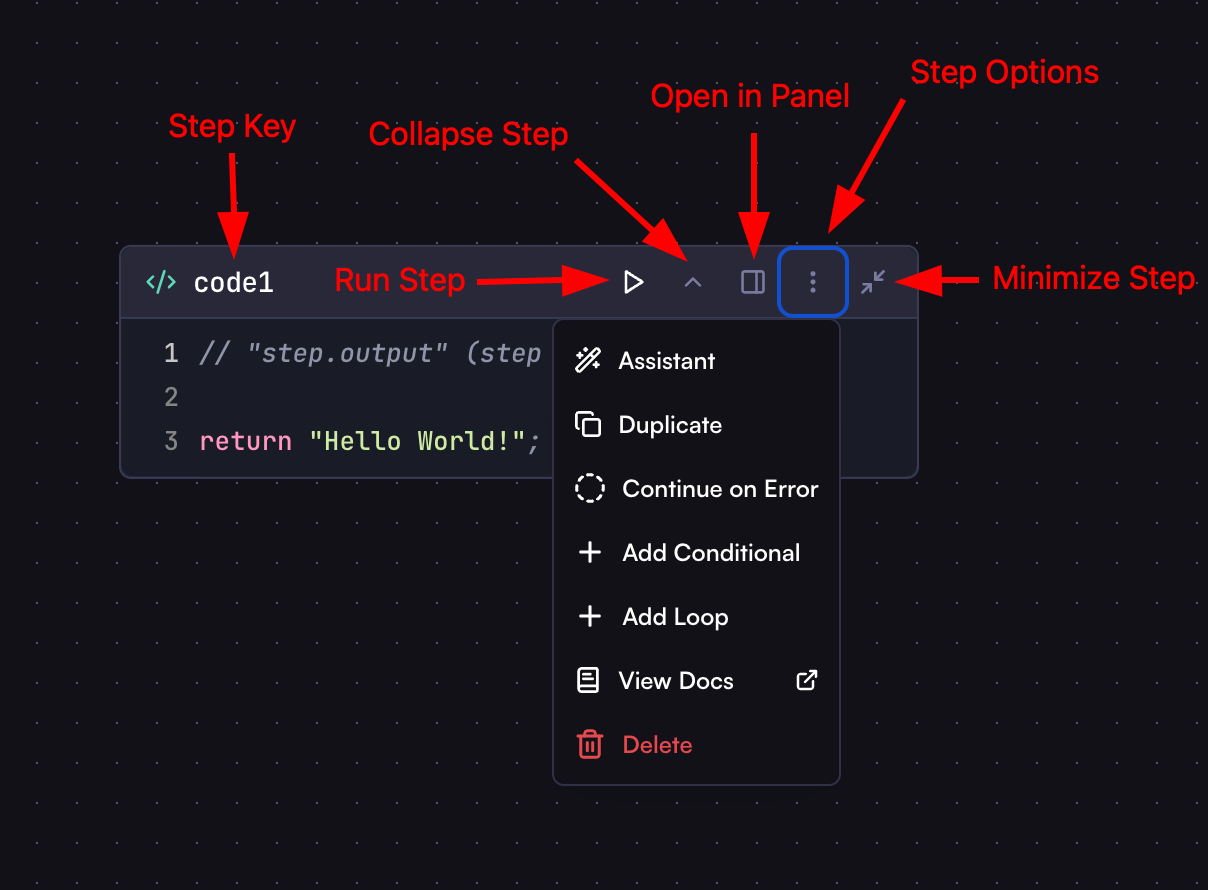 * **Step Key**: Identifier used to reference the step when accessing its output. Click to rename it.
* **Collapse Step**: Collapses the step body while keeping output visible if available.
* **Run Step**: Executes only this specific step to quickly view its output without running the entire workflow.
* **Open in Panel**: Opens the step in a separate panel for focused editing.
* **Step Options**: Provides additional configuration options:
* **Assistant**: Opens the step in assistant mode for direct editing with AI assistance
* **Duplicate**: Creates a copy of the step
* **Continue on Error**: Allows workflow to continue even if this step fails (output won't be available)
* **Add Conditional**: Creates conditional logic (detailed in later sections)
* **Add Loop**: Adds iteration capability (detailed in later sections)
* **Delete**: Removes the step
* **Minimize Step**: Collapses the step to show only its type with a large label, maintaining workflow readability while still allowing panel access for editing.
## Step Types
Cortex offers a variety of step types, each with its own unique properties and capabilities:
* **Processing steps**: Input, Model (AI), Code, HTTP Request, Browser
* **Action steps**: Send Slack message, send email, create a new row in a spreadsheet, add content to a Notion page, and more
* **Trigger steps**: On receiving an email, on new event in Google Calendar, on new Slack message, and more
* **File steps**: Upload a file, download a file, convert markdown to PDF, convert HTML to PDF, extract pages from PDF, extract contents from PDF, and more
* **Tool steps**: Perform a Google search, Maps search, YouTube search, and more
* **Step Key**: Identifier used to reference the step when accessing its output. Click to rename it.
* **Collapse Step**: Collapses the step body while keeping output visible if available.
* **Run Step**: Executes only this specific step to quickly view its output without running the entire workflow.
* **Open in Panel**: Opens the step in a separate panel for focused editing.
* **Step Options**: Provides additional configuration options:
* **Assistant**: Opens the step in assistant mode for direct editing with AI assistance
* **Duplicate**: Creates a copy of the step
* **Continue on Error**: Allows workflow to continue even if this step fails (output won't be available)
* **Add Conditional**: Creates conditional logic (detailed in later sections)
* **Add Loop**: Adds iteration capability (detailed in later sections)
* **Delete**: Removes the step
* **Minimize Step**: Collapses the step to show only its type with a large label, maintaining workflow readability while still allowing panel access for editing.
## Step Types
Cortex offers a variety of step types, each with its own unique properties and capabilities:
* **Processing steps**: Input, Model (AI), Code, HTTP Request, Browser
* **Action steps**: Send Slack message, send email, create a new row in a spreadsheet, add content to a Notion page, and more
* **Trigger steps**: On receiving an email, on new event in Google Calendar, on new Slack message, and more
* **File steps**: Upload a file, download a file, convert markdown to PDF, convert HTML to PDF, extract pages from PDF, extract contents from PDF, and more
* **Tool steps**: Perform a Google search, Maps search, YouTube search, and more
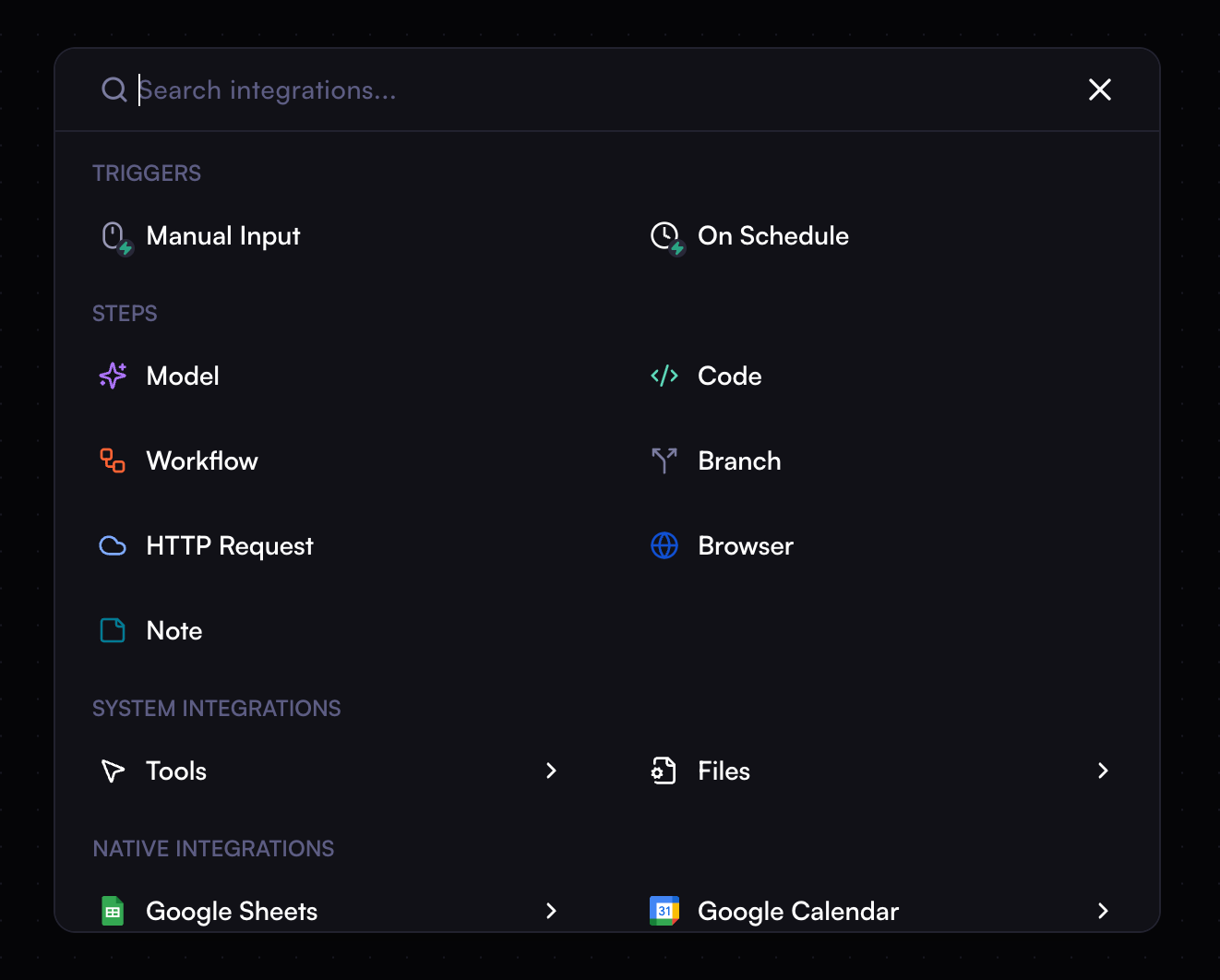 Steps connected to a trigger step are executed when the trigger event occurs.
These connected steps receive the corresponding data from the trigger step.
## Step Outputs
The output of a step is the data that the step produces. This output can be used in any steps connected to that step.
Steps connected to a trigger step are executed when the trigger event occurs.
These connected steps receive the corresponding data from the trigger step.
## Step Outputs
The output of a step is the data that the step produces. This output can be used in any steps connected to that step.
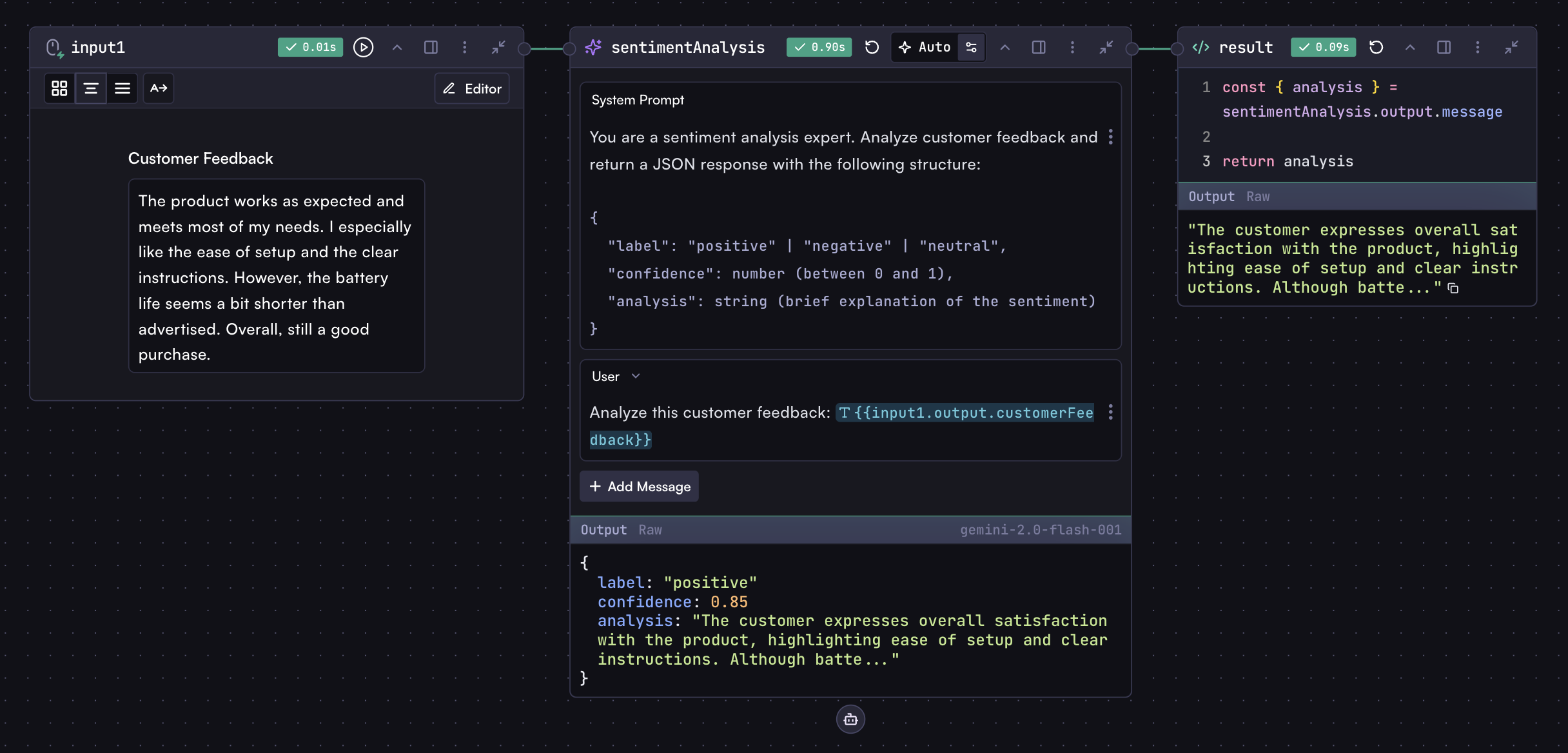 Looking at the image above of the workflow, you can see there are some special syntax patterns used to reference the output of previous steps. This is accomplished through variables in workflows.
### Variables
Variables allow you to access a step's output in other steps. Step outputs can be of different types: objects, arrays, strings, numbers, booleans, etc. Most steps produce object outputs, like the Model step, HTTP Request step, Browser step, trigger steps, and action steps. For Code steps, the output is whatever you return from the code.
To access step outputs in your workflow, use this syntax:
```
{{stepKey.output}}
```
Where `stepKey` is the key of the step, and `output` refers to the step's output.
Use this syntax in any step's input fields (except Code steps). For example, you can use it in Model step prompts, Browser step URLs, HTTP Request step URLs, bodies, headers, and more. Wherever you use this syntax, it will be replaced with the step's output.
Variables are replaced as is. Objects and arrays are automatically stringified when used in text contexts like model prompts (e.g., `{{userDataStep.output}}` becomes a JSON string).
In Code steps, since they use , you can access the variable directly without the special `{{}}` syntax:
```
stepKey.output
```
Looking at the image above of the workflow, you can see there are some special syntax patterns used to reference the output of previous steps. This is accomplished through variables in workflows.
### Variables
Variables allow you to access a step's output in other steps. Step outputs can be of different types: objects, arrays, strings, numbers, booleans, etc. Most steps produce object outputs, like the Model step, HTTP Request step, Browser step, trigger steps, and action steps. For Code steps, the output is whatever you return from the code.
To access step outputs in your workflow, use this syntax:
```
{{stepKey.output}}
```
Where `stepKey` is the key of the step, and `output` refers to the step's output.
Use this syntax in any step's input fields (except Code steps). For example, you can use it in Model step prompts, Browser step URLs, HTTP Request step URLs, bodies, headers, and more. Wherever you use this syntax, it will be replaced with the step's output.
Variables are replaced as is. Objects and arrays are automatically stringified when used in text contexts like model prompts (e.g., `{{userDataStep.output}}` becomes a JSON string).
In Code steps, since they use , you can access the variable directly without the special `{{}}` syntax:
```
stepKey.output
```
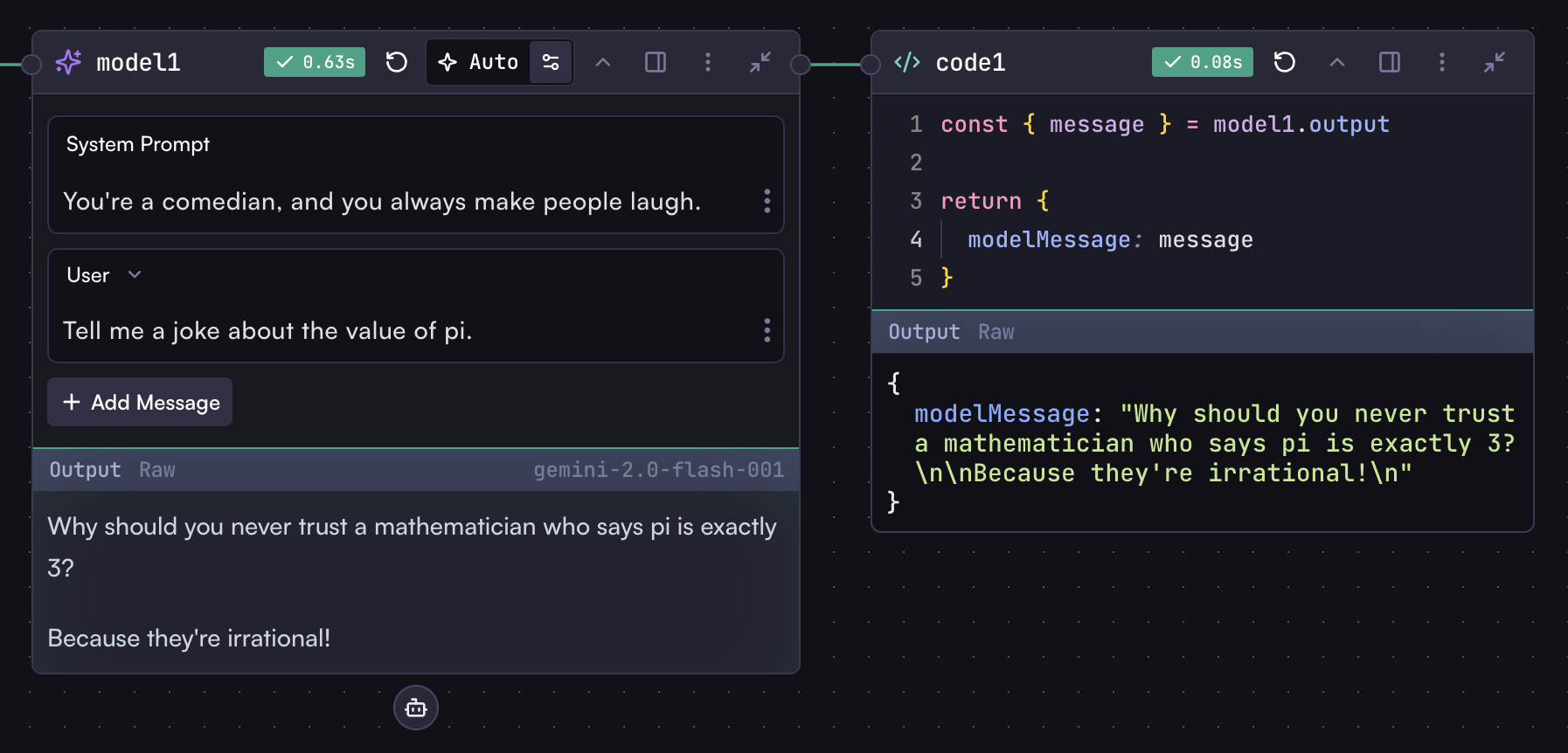 Wherever you use variables, you'll get auto-completion assistance. In Code
steps, you'll get type safety for variables, with errors and messages if
you're using variables incorrectly or accessing non-existent properties.
If a step's output is an object, you can access its properties using dot notation:
```
stepKey.output.property
```
For example, to access input field values from an input step:
```
inputStep.output.userName
```
Or to access the output of a Model step, which contains the LLM's response:
```
modelStep.output.message
```
As mentioned, most steps output objects, and you can access their properties using dot notation. You can easily inspect a step's output by selecting the `raw` tab in the step's output section. This helps you understand what the step outputs and how to use it.
Another example: the response body of an HTTP request step is available in the `body` property:
```
httpStep.output.body
```
Steps also provide other useful properties specific to their type. For instance, an HTTP request step includes the response status code in the `status` property:
```
httpStep.output.status
```
## Step Output Inspection
To understand what's available, inspect the step output in the raw tab, and you'll see what you can use.
Wherever you use variables, you'll get auto-completion assistance. In Code
steps, you'll get type safety for variables, with errors and messages if
you're using variables incorrectly or accessing non-existent properties.
If a step's output is an object, you can access its properties using dot notation:
```
stepKey.output.property
```
For example, to access input field values from an input step:
```
inputStep.output.userName
```
Or to access the output of a Model step, which contains the LLM's response:
```
modelStep.output.message
```
As mentioned, most steps output objects, and you can access their properties using dot notation. You can easily inspect a step's output by selecting the `raw` tab in the step's output section. This helps you understand what the step outputs and how to use it.
Another example: the response body of an HTTP request step is available in the `body` property:
```
httpStep.output.body
```
Steps also provide other useful properties specific to their type. For instance, an HTTP request step includes the response status code in the `status` property:
```
httpStep.output.status
```
## Step Output Inspection
To understand what's available, inspect the step output in the raw tab, and you'll see what you can use.
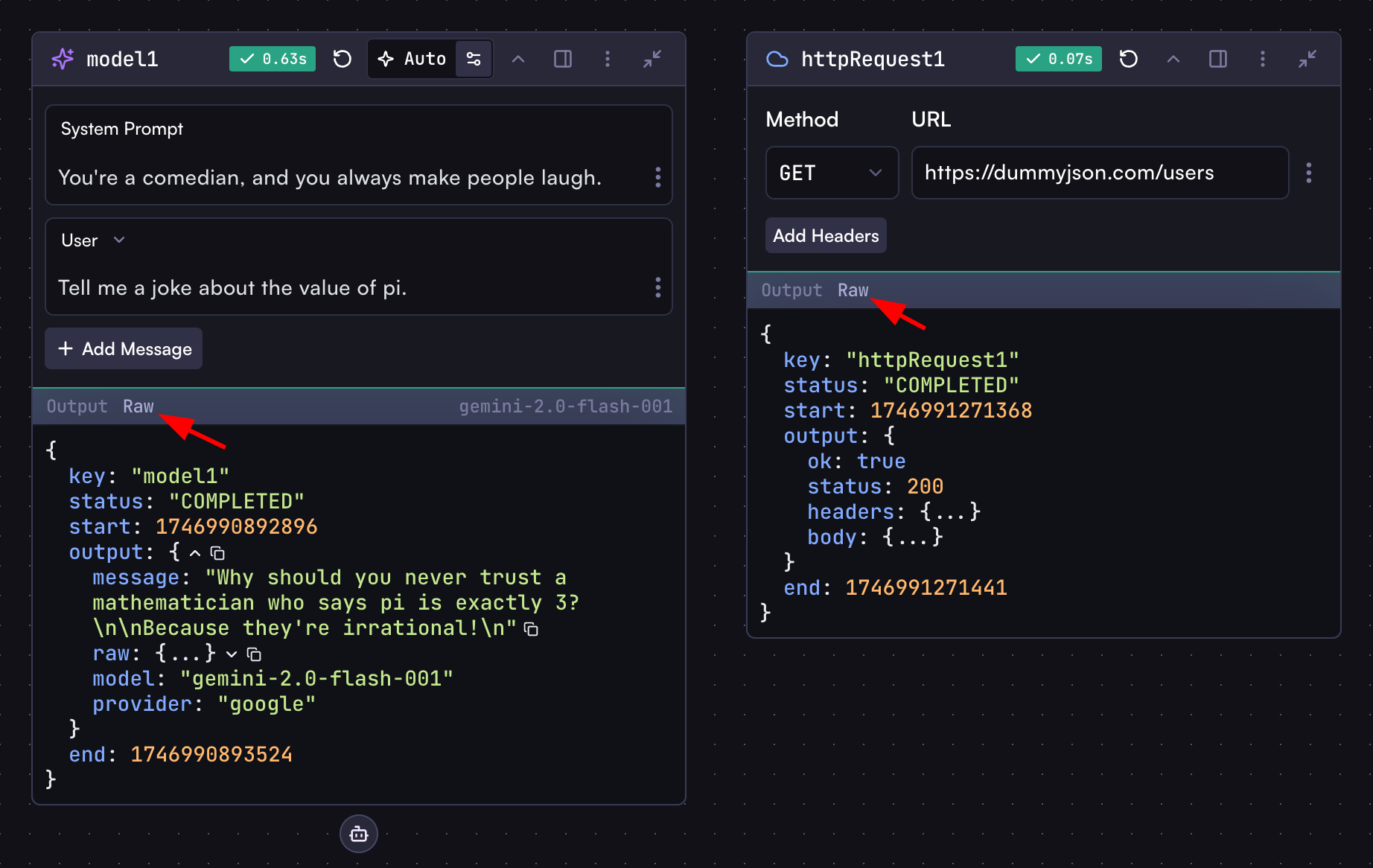 ***
Remember: use the `{{}}` syntax to access step outputs in non-code steps, and use variables directly in Code steps without this syntax.
## Next Steps
Now that you understand the basics of steps, let's dive into the different types of steps and how to use them.
Create interactive forms and collect user input in your workflows
Transform data with AI models, code execution, and HTTP requests
Automate workflows with event triggers and interact with external services
Ready to take your workflows to the next level? Discover the power of intelligent agents in Cortex!
Autonomous AI agents that can reason, plan, and interact with various tools to
complete complex tasks.
# Processing Steps
Source: https://docs.withcortex.ai/workflows/steps/processing
Learn about the different processing steps available in workflows.
Processing steps handle the core computational and transformation logic in your workflows.
## Model Step
Model steps leverage AI models to generate text, analyze content, and produce structured outputs based on your prompts and instructions.
***
Remember: use the `{{}}` syntax to access step outputs in non-code steps, and use variables directly in Code steps without this syntax.
## Next Steps
Now that you understand the basics of steps, let's dive into the different types of steps and how to use them.
Create interactive forms and collect user input in your workflows
Transform data with AI models, code execution, and HTTP requests
Automate workflows with event triggers and interact with external services
Ready to take your workflows to the next level? Discover the power of intelligent agents in Cortex!
Autonomous AI agents that can reason, plan, and interact with various tools to
complete complex tasks.
# Processing Steps
Source: https://docs.withcortex.ai/workflows/steps/processing
Learn about the different processing steps available in workflows.
Processing steps handle the core computational and transformation logic in your workflows.
## Model Step
Model steps leverage AI models to generate text, analyze content, and produce structured outputs based on your prompts and instructions.
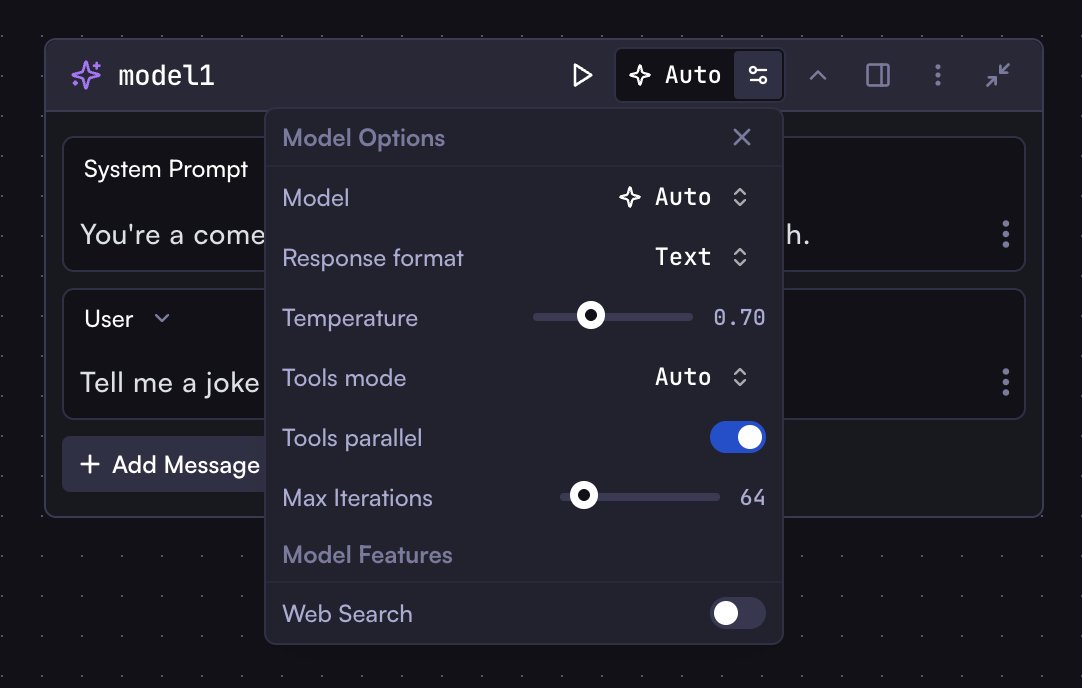 ### Configuration
* **Model**: Select a model or use Auto to automatically choose the best model
* **System Prompt**: Instructions that guide the model's behavior
* **Prompts**: The main input to the model, can include variables from previous steps, including system, user, and assistant prompts
* **Response Format**: Text or JSON (use JSON when expecting structured data)
* **Temperature**: Controls randomness (lower values = more deterministic responses)
* **JSON Editor**: Optional editor for configuring messages as JSON
* **Web Search**: Enable web search for the model before generating a response. This gives the model access to the latest information. Note that not all models support web search - this option will only appear if the selected model supports it.
You might see some Tools and Iteration options in the model step settings.
These are related to Workflow Agents, which we will cover in the
[Agents](/workflows/agents) section.
### Output
```javascript
// When response format is Text
modelStep.output.message; // Text string response
// When response format is JSON
modelStep.output.message.propertyName; // Direct access to JSON properties
```
### Bring Your Own Model (BYOM)
Cortex allows you to connect your own AI provider accounts to use their models in your workflows.
### Configuration
* **Model**: Select a model or use Auto to automatically choose the best model
* **System Prompt**: Instructions that guide the model's behavior
* **Prompts**: The main input to the model, can include variables from previous steps, including system, user, and assistant prompts
* **Response Format**: Text or JSON (use JSON when expecting structured data)
* **Temperature**: Controls randomness (lower values = more deterministic responses)
* **JSON Editor**: Optional editor for configuring messages as JSON
* **Web Search**: Enable web search for the model before generating a response. This gives the model access to the latest information. Note that not all models support web search - this option will only appear if the selected model supports it.
You might see some Tools and Iteration options in the model step settings.
These are related to Workflow Agents, which we will cover in the
[Agents](/workflows/agents) section.
### Output
```javascript
// When response format is Text
modelStep.output.message; // Text string response
// When response format is JSON
modelStep.output.message.propertyName; // Direct access to JSON properties
```
### Bring Your Own Model (BYOM)
Cortex allows you to connect your own AI provider accounts to use their models in your workflows.
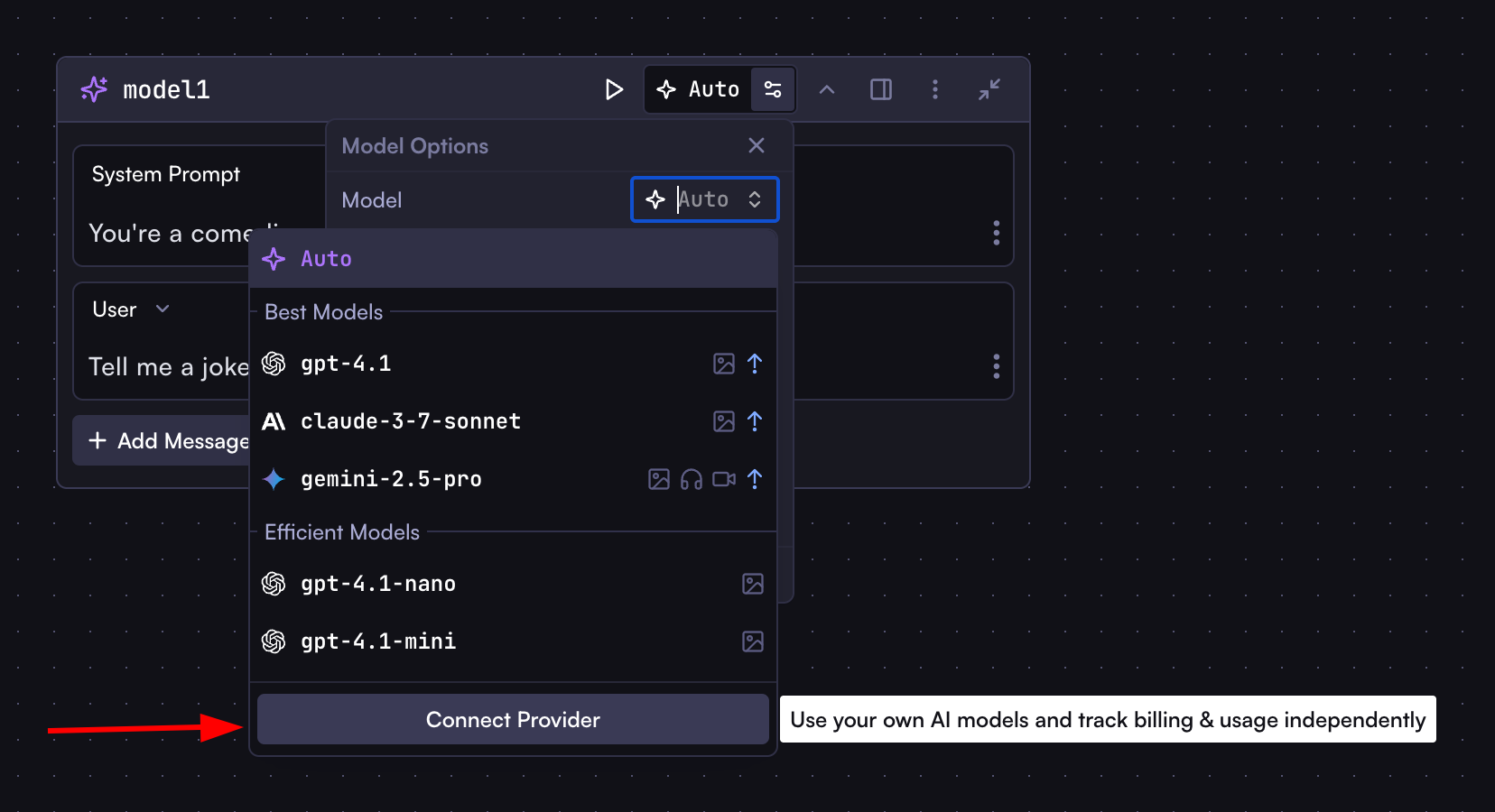 To connect your own AI provider:
1. Click "Connect Provider" in the model selection dropdown
2. Select a provider from the modal (OpenAI, Anthropic, Google AI, Azure AI, xAI, Open Router, Groq, etc.)
3. Enter the required configuration details (e.g., API Key)
4. Click "Test Connection" to verify your credentials
5. Click "Add Integration" to complete the setup
Once connected, all models from that provider will be available in the model selector.
You can manage all your integrations including AI providers in the [Cortex Settings](http://withcortex.ai/c/settings/integrations).
## Code Step
Code steps execute JavaScript to transform data, perform calculations, or custom logic.
To connect your own AI provider:
1. Click "Connect Provider" in the model selection dropdown
2. Select a provider from the modal (OpenAI, Anthropic, Google AI, Azure AI, xAI, Open Router, Groq, etc.)
3. Enter the required configuration details (e.g., API Key)
4. Click "Test Connection" to verify your credentials
5. Click "Add Integration" to complete the setup
Once connected, all models from that provider will be available in the model selector.
You can manage all your integrations including AI providers in the [Cortex Settings](http://withcortex.ai/c/settings/integrations).
## Code Step
Code steps execute JavaScript to transform data, perform calculations, or custom logic.
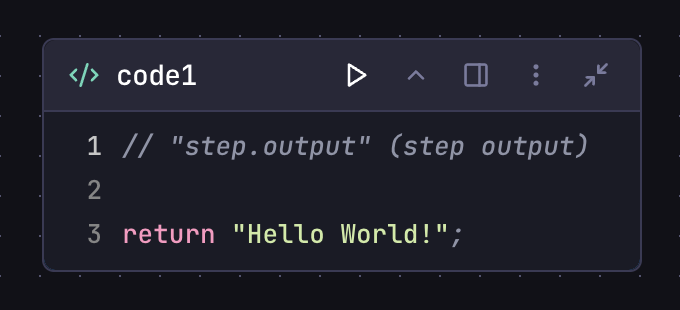 ### Configuration
* **JavaScript (ES6+)** code editor with syntax highlighting
* Direct access to other step outputs (no need for \{\{}} syntax)
* No external imports, async/await, or browser/Node.js APIs
### Example
```javascript
// Transform data from previous steps
const items = httpStep.output.body.items;
const filteredItems = items.filter((item) => item.price > 100);
// Return any data type - becomes the step output
return {
filtered: filteredItems,
count: filteredItems.length,
};
```
### Output
Accessed as `codeStep.output` (whatever was returned from the code)
## HTTP Request Step
HTTP Request steps connect to external APIs and services.
### Configuration
* **JavaScript (ES6+)** code editor with syntax highlighting
* Direct access to other step outputs (no need for \{\{}} syntax)
* No external imports, async/await, or browser/Node.js APIs
### Example
```javascript
// Transform data from previous steps
const items = httpStep.output.body.items;
const filteredItems = items.filter((item) => item.price > 100);
// Return any data type - becomes the step output
return {
filtered: filteredItems,
count: filteredItems.length,
};
```
### Output
Accessed as `codeStep.output` (whatever was returned from the code)
## HTTP Request Step
HTTP Request steps connect to external APIs and services.
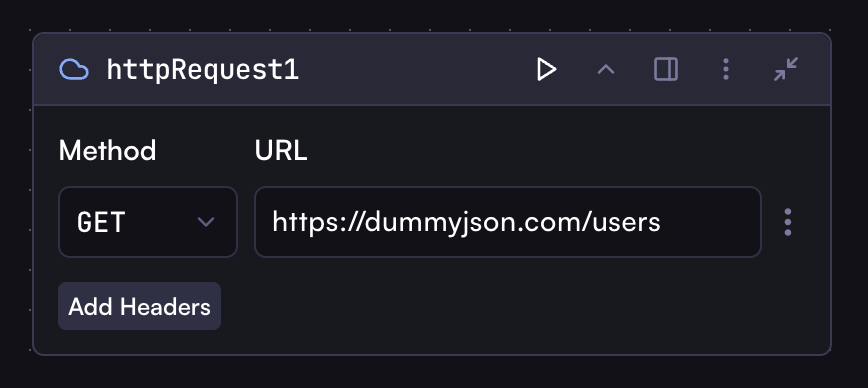 ### Configuration
* **Method**: GET, POST, PUT, DELETE, etc.
* **URL**: API endpoint, can include variables
* **Headers**: HTTP headers as JSON, can include variables
* **Body**: Request payload as JSON, can include variables
### Output
```javascript
httpStep.output.status; // HTTP status code
httpStep.output.headers; // Response headers
httpStep.output.body; // Response body (object if JSON, string otherwise)
```
## Browser Step
Browser steps interact with web pages to extract information.
### Configuration
* **Method**: GET, POST, PUT, DELETE, etc.
* **URL**: API endpoint, can include variables
* **Headers**: HTTP headers as JSON, can include variables
* **Body**: Request payload as JSON, can include variables
### Output
```javascript
httpStep.output.status; // HTTP status code
httpStep.output.headers; // Response headers
httpStep.output.body; // Response body (object if JSON, string otherwise)
```
## Browser Step
Browser steps interact with web pages to extract information.
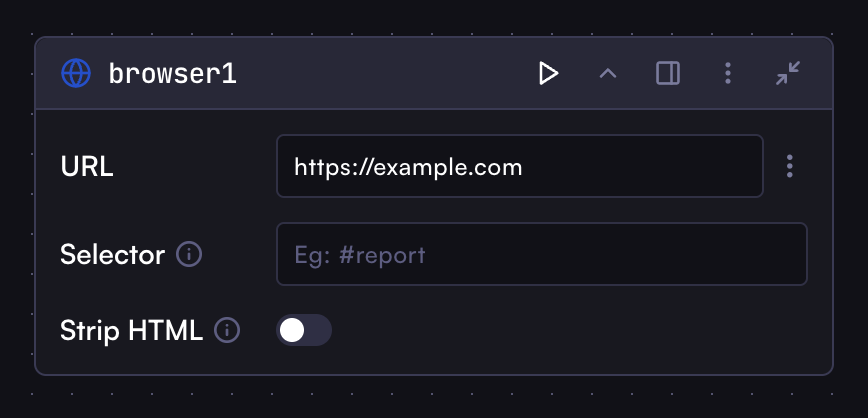 ### Configuration
* **URL**: The web page to navigate to
* **Selector**: CSS selector to wait for before extracting content
* **Strip HTML**: Remove HTML tags from selected content to return plain text
### Output
```javascript
browserStep.output.ok; // Success status
browserStep.output.body; // Page content
browserStep.output.headers; // Page headers
```
## Workflow Step
Workflow steps execute another workflow from within the current workflow.
### Configuration
* **URL**: The web page to navigate to
* **Selector**: CSS selector to wait for before extracting content
* **Strip HTML**: Remove HTML tags from selected content to return plain text
### Output
```javascript
browserStep.output.ok; // Success status
browserStep.output.body; // Page content
browserStep.output.headers; // Page headers
```
## Workflow Step
Workflow steps execute another workflow from within the current workflow.
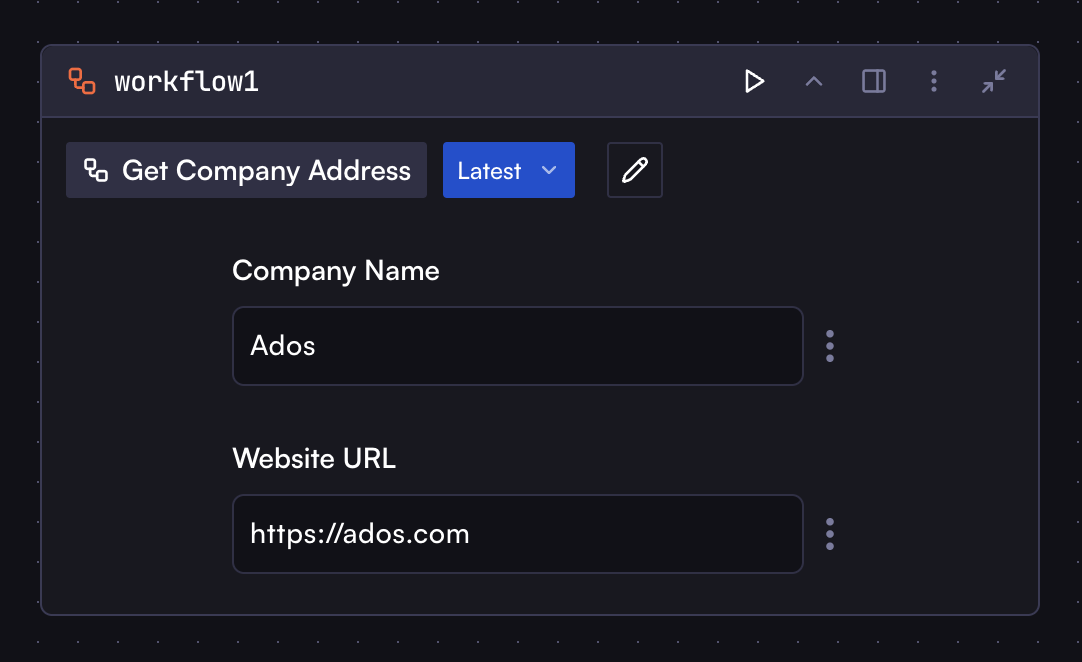 ### Configuration
* **Workflow**: Select another workflow to run
* **Input**: Map inputs from current workflow to the target workflow
### Output
```javascript
workflowStep.output.result; // The output of the last step in the called workflow
```
# Built-in Triggers
Source: https://docs.withcortex.ai/workflows/steps/triggers-and-actions/built-in-triggers
Explore the built-in trigger options available in Cortex workflows.
## Scheduler Trigger
The Scheduler is a built-in trigger step that allows you to run workflows at specified times or intervals. Unlike other triggers that depend on external integrations, the Scheduler is built into Cortex, so no additional connections are required.
With the Scheduler trigger, you can configure:
* Regular intervals (every minute, hour, day, etc.)
* Specific times using cron expressions
* Time zone settings for accurate scheduling
This trigger is ideal for recurring tasks such as generating daily reports, sending weekly newsletters, or performing periodic data updates.
### Configuration
* **Workflow**: Select another workflow to run
* **Input**: Map inputs from current workflow to the target workflow
### Output
```javascript
workflowStep.output.result; // The output of the last step in the called workflow
```
# Built-in Triggers
Source: https://docs.withcortex.ai/workflows/steps/triggers-and-actions/built-in-triggers
Explore the built-in trigger options available in Cortex workflows.
## Scheduler Trigger
The Scheduler is a built-in trigger step that allows you to run workflows at specified times or intervals. Unlike other triggers that depend on external integrations, the Scheduler is built into Cortex, so no additional connections are required.
With the Scheduler trigger, you can configure:
* Regular intervals (every minute, hour, day, etc.)
* Specific times using cron expressions
* Time zone settings for accurate scheduling
This trigger is ideal for recurring tasks such as generating daily reports, sending weekly newsletters, or performing periodic data updates.
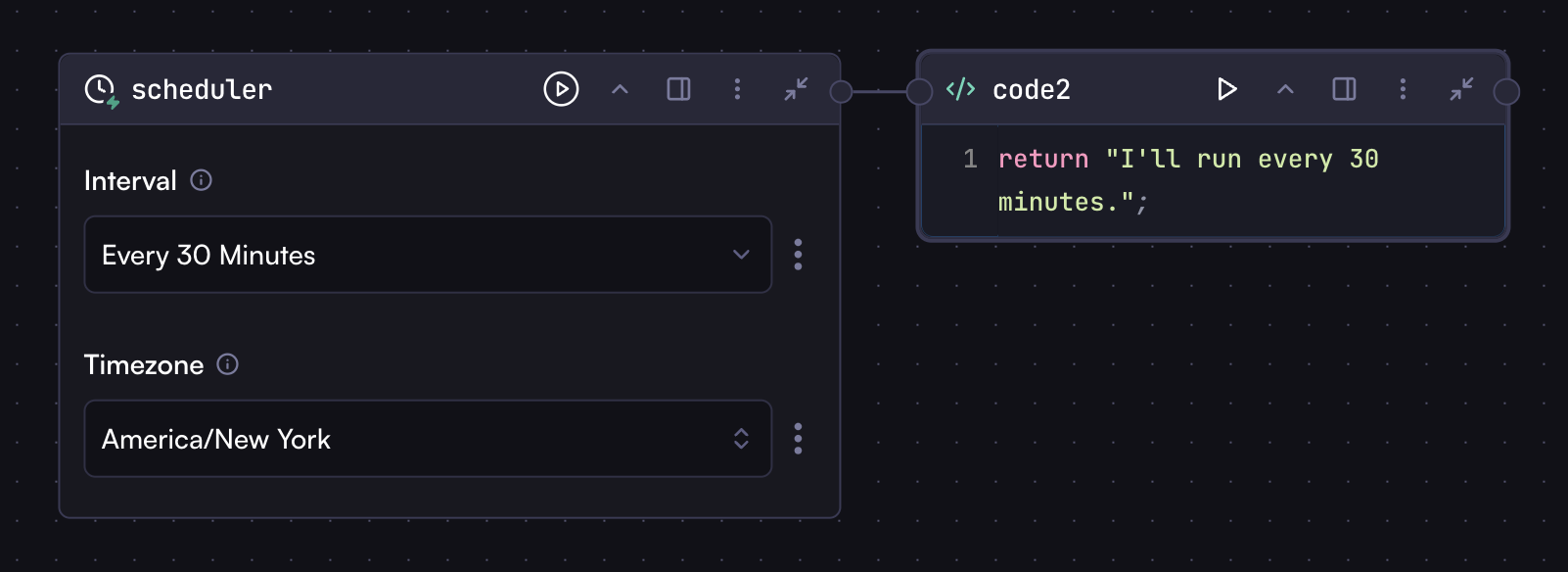 To enter a cron expression manually, click the three dots next to the field and select "Manual". This will convert the field from a selector to a text input where you can type your cron expression.
For example, you can enter `0 9 * * *` to schedule the workflow to run at 9:00 AM every day.
# Configuring
Source: https://docs.withcortex.ai/workflows/steps/triggers-and-actions/configuring
Learn how to add and configure trigger and action steps in your workflows.
## Adding Trigger and Action Steps
Adding trigger or action steps to your workflow follows the same process as adding any other step:
1. Click the step add button in the toolbar or drag a connection from an existing step
2. Search for the specific trigger or action step you need
3. Alternatively, explore the Integrations section in the modal and select your desired service provider
4. Choose the specific trigger or action from the available options
## Understanding Trigger and Action Step Structure
Trigger and action steps are sourced from integrations, with each integration offering its own set of triggers and actions. For example, Slack integration provides triggers like "On Message Sent" and "On Message Received," as well as actions like "Send Message" and "Reply Message."
When you add a trigger or action step, you'll notice they share a similar structure, with differences primarily in their input fields. You can also switch between different triggers or actions using the selector within the step.
To enter a cron expression manually, click the three dots next to the field and select "Manual". This will convert the field from a selector to a text input where you can type your cron expression.
For example, you can enter `0 9 * * *` to schedule the workflow to run at 9:00 AM every day.
# Configuring
Source: https://docs.withcortex.ai/workflows/steps/triggers-and-actions/configuring
Learn how to add and configure trigger and action steps in your workflows.
## Adding Trigger and Action Steps
Adding trigger or action steps to your workflow follows the same process as adding any other step:
1. Click the step add button in the toolbar or drag a connection from an existing step
2. Search for the specific trigger or action step you need
3. Alternatively, explore the Integrations section in the modal and select your desired service provider
4. Choose the specific trigger or action from the available options
## Understanding Trigger and Action Step Structure
Trigger and action steps are sourced from integrations, with each integration offering its own set of triggers and actions. For example, Slack integration provides triggers like "On Message Sent" and "On Message Received," as well as actions like "Send Message" and "Reply Message."
When you add a trigger or action step, you'll notice they share a similar structure, with differences primarily in their input fields. You can also switch between different triggers or actions using the selector within the step.
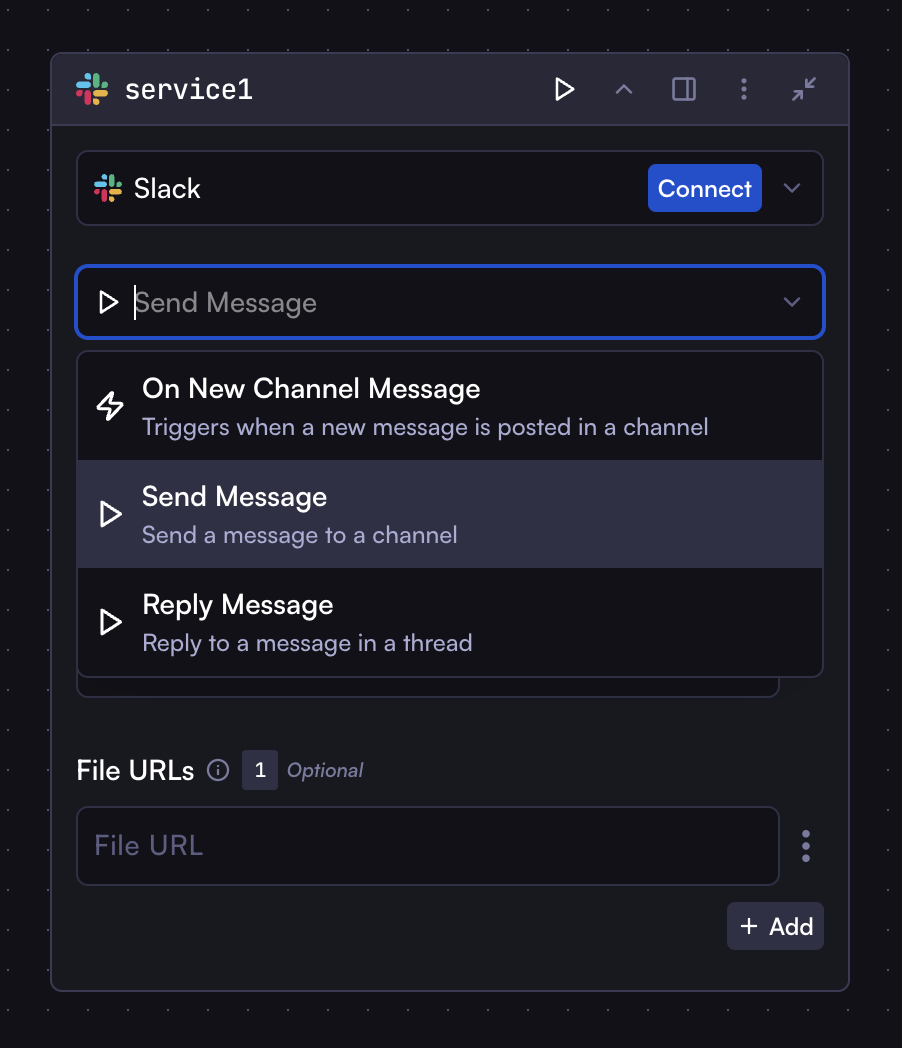 ### Connecting to Integrations
If you haven't yet connected to an integration, you'll see a "Connect" button within the step. Clicking this button allows you to establish a connection to the service. For instance, clicking "Connect" for Slack will prompt you to authenticate with your Slack account and give it a name.
You can connect to multiple accounts within the same service (e.g., multiple email addresses) and select which one to use from the integration selector at the top of the step.
All integration management—including adding, editing, and removing integrations—can be done through the [Integrations page](https://withcortex.ai/c/settings/integrations) in Cortex Settings.
### Integration Selector
The integration selector at the top of trigger and action steps displays all your available or connected integrations. It also allows you to connect to new integrations directly without navigating to the Integrations page by clicking on services marked with "New Connection."
### Connecting to Integrations
If you haven't yet connected to an integration, you'll see a "Connect" button within the step. Clicking this button allows you to establish a connection to the service. For instance, clicking "Connect" for Slack will prompt you to authenticate with your Slack account and give it a name.
You can connect to multiple accounts within the same service (e.g., multiple email addresses) and select which one to use from the integration selector at the top of the step.
All integration management—including adding, editing, and removing integrations—can be done through the [Integrations page](https://withcortex.ai/c/settings/integrations) in Cortex Settings.
### Integration Selector
The integration selector at the top of trigger and action steps displays all your available or connected integrations. It also allows you to connect to new integrations directly without navigating to the Integrations page by clicking on services marked with "New Connection."
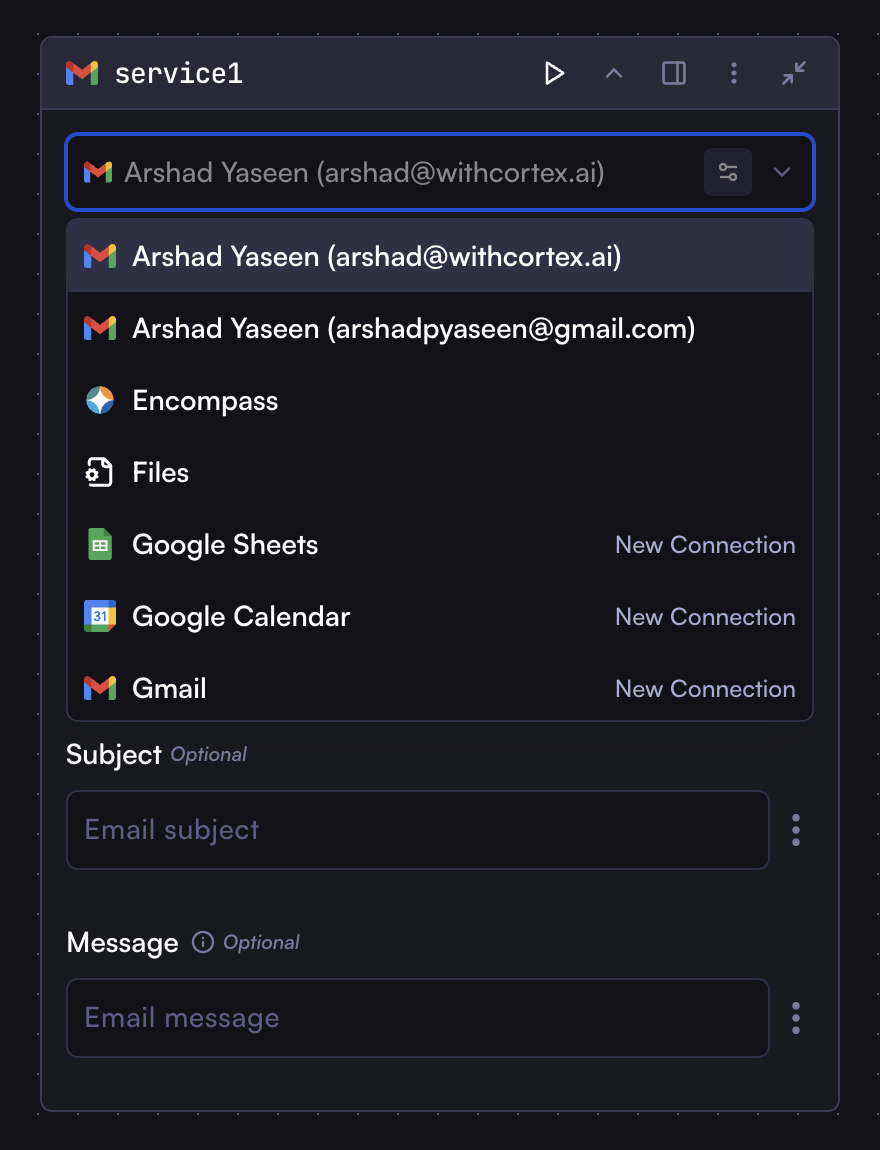 # Overview
Source: https://docs.withcortex.ai/workflows/steps/triggers-and-actions/overview
Introduction to trigger and action steps in Cortex workflows.
## What Are Trigger Steps?
Trigger steps initiate workflows based on specific events or conditions. They serve as the starting point of your workflow, activating when certain events occur.
### Types of Trigger Steps
There are many types of triggers available:
* **Slack**: On send message, On reply
* **Gmail**: On receive email, On send email
* **Google**: Sheets, Calendar, Drive
* **Notion**: Database and page triggers
* And many more...
We're constantly expanding our integration ecosystem, with new services and capabilities being added on a regular basis to help you build more powerful workflows.
### Identifying Trigger Steps
In the step selection modal, trigger steps are marked with a green zap icon overlay on the integration logo, making them easy to identify.
### How Trigger Steps Work
As the starting point of your workflow, trigger steps:
* Cannot have incoming step connections
* Execute all connected steps when their triggering event occurs
* Pass event data to connected steps
## What Are Action Steps?
Action steps interact with external services to perform specific operations. They complement trigger steps by enabling your workflow to not only respond to events but also take actions in various systems.
Examples of action steps include:
* Sending emails
* Posting Slack messages
* Creating Google Calendar events
* Updating spreadsheet data
* Creating content in Notion
## Building an Automated Email Reply System
Let's look at a practical example of how trigger and action steps work together:
1. An "On Received Email" trigger step detects new incoming emails
2. A Model step processes the email content and generates an appropriate reply
3. A "Send Email" action step sends the generated reply back to the sender
# Overview
Source: https://docs.withcortex.ai/workflows/steps/triggers-and-actions/overview
Introduction to trigger and action steps in Cortex workflows.
## What Are Trigger Steps?
Trigger steps initiate workflows based on specific events or conditions. They serve as the starting point of your workflow, activating when certain events occur.
### Types of Trigger Steps
There are many types of triggers available:
* **Slack**: On send message, On reply
* **Gmail**: On receive email, On send email
* **Google**: Sheets, Calendar, Drive
* **Notion**: Database and page triggers
* And many more...
We're constantly expanding our integration ecosystem, with new services and capabilities being added on a regular basis to help you build more powerful workflows.
### Identifying Trigger Steps
In the step selection modal, trigger steps are marked with a green zap icon overlay on the integration logo, making them easy to identify.
### How Trigger Steps Work
As the starting point of your workflow, trigger steps:
* Cannot have incoming step connections
* Execute all connected steps when their triggering event occurs
* Pass event data to connected steps
## What Are Action Steps?
Action steps interact with external services to perform specific operations. They complement trigger steps by enabling your workflow to not only respond to events but also take actions in various systems.
Examples of action steps include:
* Sending emails
* Posting Slack messages
* Creating Google Calendar events
* Updating spreadsheet data
* Creating content in Notion
## Building an Automated Email Reply System
Let's look at a practical example of how trigger and action steps work together:
1. An "On Received Email" trigger step detects new incoming emails
2. A Model step processes the email content and generates an appropriate reply
3. A "Send Email" action step sends the generated reply back to the sender
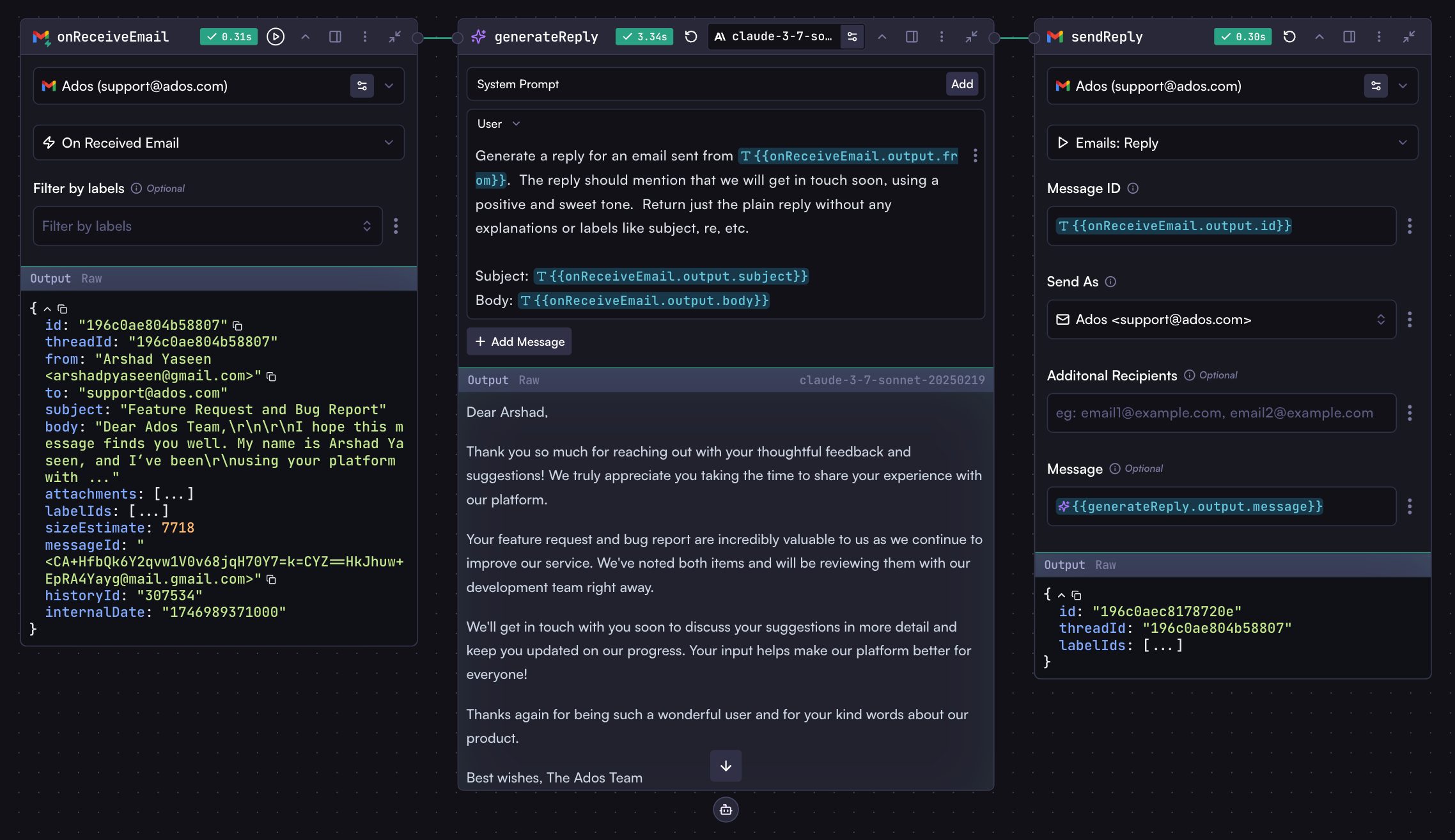 With just these three steps, you've created a complete automated email reply system. You could further enhance this workflow by adding a "Send Slack Message" action to notify your team when new emails arrive, including details like subject, body, and sender information.
# Working with Triggers
Source: https://docs.withcortex.ai/workflows/steps/triggers-and-actions/working-with-triggers
Learn how to use multiple triggers, test them, and manage trigger listening in your workflows.
## Using Multiple Triggers in One Workflow
You can incorporate multiple trigger steps within a single workflow. Each trigger operates independently, activating the connected steps when its specific event occurs.
### Testing Triggers
To test a trigger without waiting for its event to naturally occur:
1. Click the Play button in the trigger step header, just as you would with any other step
2. If your workflow has multiple triggers, select the specific trigger from the dropdown menu in the workflow run button, then click the run button
These methods simulate the trigger event, allowing you to test and debug your workflow efficiently.
## Activating Trigger Listening
For triggers to actively monitor and respond to events, you must first deploy your workflow:
1. [Deploy the workflow](/workflows/deploy) to activate all trigger steps
2. Triggers will begin listening for their respective events
3. When you make changes to the workflow, redeploy to apply those changes
## Pausing and Resuming Triggers
There may be times when you want to temporarily stop a workflow from responding to events. You can easily pause or resume trigger listening by toggling the switch in the workflows list:
1. Navigate to the [Workflows page](https://withcortex.ai/c/workflows)
2. Locate your workflow in the list
3. Toggle the switch to pause or resume all triggers in that workflow
With just these three steps, you've created a complete automated email reply system. You could further enhance this workflow by adding a "Send Slack Message" action to notify your team when new emails arrive, including details like subject, body, and sender information.
# Working with Triggers
Source: https://docs.withcortex.ai/workflows/steps/triggers-and-actions/working-with-triggers
Learn how to use multiple triggers, test them, and manage trigger listening in your workflows.
## Using Multiple Triggers in One Workflow
You can incorporate multiple trigger steps within a single workflow. Each trigger operates independently, activating the connected steps when its specific event occurs.
### Testing Triggers
To test a trigger without waiting for its event to naturally occur:
1. Click the Play button in the trigger step header, just as you would with any other step
2. If your workflow has multiple triggers, select the specific trigger from the dropdown menu in the workflow run button, then click the run button
These methods simulate the trigger event, allowing you to test and debug your workflow efficiently.
## Activating Trigger Listening
For triggers to actively monitor and respond to events, you must first deploy your workflow:
1. [Deploy the workflow](/workflows/deploy) to activate all trigger steps
2. Triggers will begin listening for their respective events
3. When you make changes to the workflow, redeploy to apply those changes
## Pausing and Resuming Triggers
There may be times when you want to temporarily stop a workflow from responding to events. You can easily pause or resume trigger listening by toggling the switch in the workflows list:
1. Navigate to the [Workflows page](https://withcortex.ai/c/workflows)
2. Locate your workflow in the list
3. Toggle the switch to pause or resume all triggers in that workflow
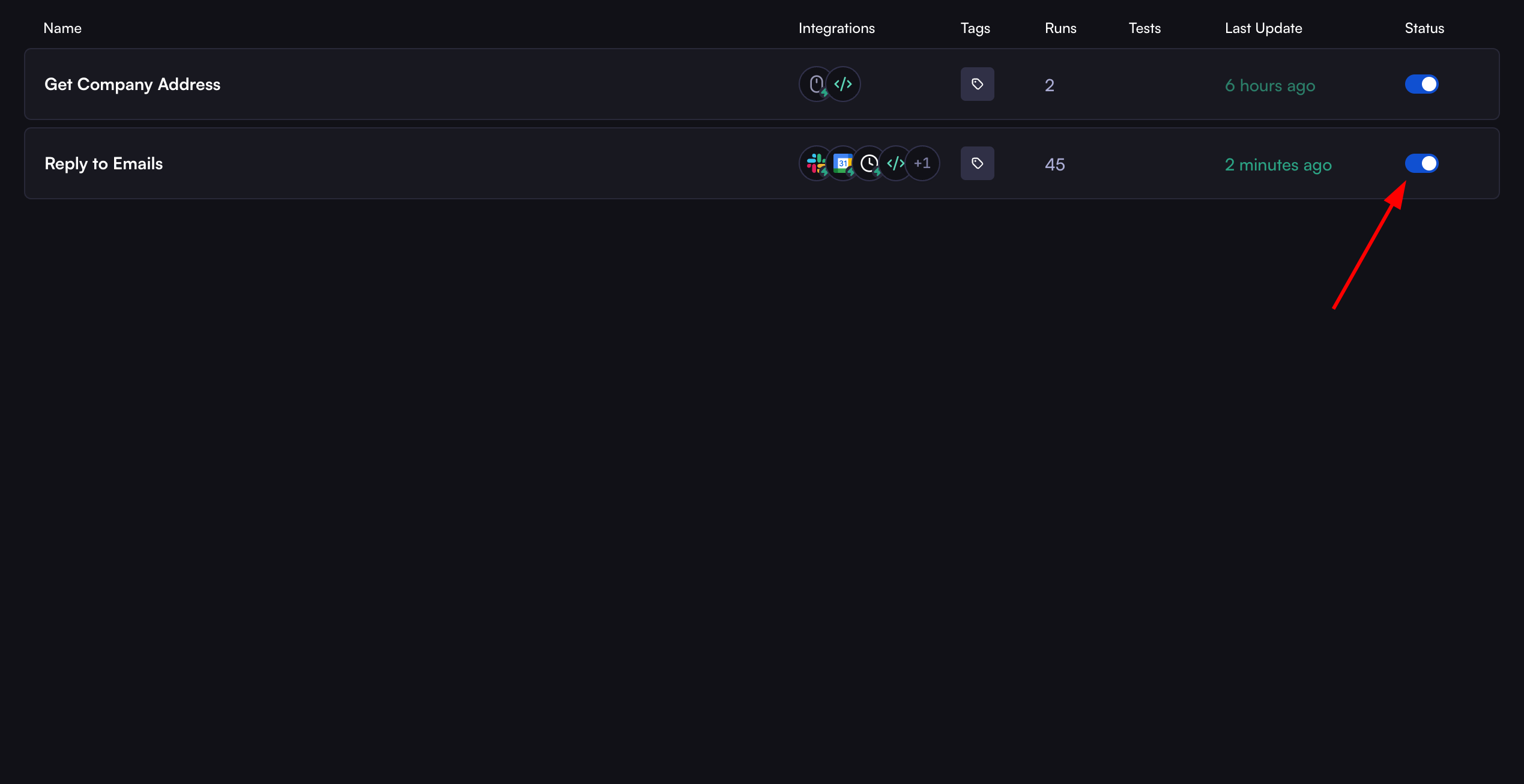 When paused, all triggers in the workflow become inactive and won't respond to events. Resume listening by toggling the switch again.
## Working with Trigger and Action Step Outputs
Like all steps in Cortex workflows, trigger and action steps produce outputs that can be accessed by connected steps:
* When a new email arrives, the trigger step's output includes the email content, sender information, subject, and other metadata
* You can reference these outputs in connected steps using the standard syntax: `triggerStep.output.body`, `triggerStep.output.from`, etc.
* Action steps also produce outputs containing information about the action's result
This consistent approach to accessing step outputs makes it easy to pass data between steps.
# Your First Workflow
Source: https://docs.withcortex.ai/workflows/your-first-workflow
Get familiar with the Cortex workflow by creating a simple workflow.
## Getting Started
We are going to create a workflow that will extract fields from a document. You will specify the fields to extract in natural language.
As in the [Introduction](/workflows/introduction), you already have a blank workflow created.
## Setting Up Inputs
To begin, we need to provide the workflow with two things: a document and the fields to extract. This is where **Input** steps come in. Input steps allow you to pass data (like files, text, etc) into your workflow for processing. When you share your workflow with others, they can provide their own inputs, and the workflow will process them accordingly. The same applies when calling the workflow through APIs or SDKs - you can pass the required data as body.
Let's add an **Input** step to the workflow.
1. Click the plus (+) button on the left toolbar to add a new step to your workflow.
2. Click the **Manual Input** step from the list of steps.
You should now see the **Input** step added to the workflow.
When paused, all triggers in the workflow become inactive and won't respond to events. Resume listening by toggling the switch again.
## Working with Trigger and Action Step Outputs
Like all steps in Cortex workflows, trigger and action steps produce outputs that can be accessed by connected steps:
* When a new email arrives, the trigger step's output includes the email content, sender information, subject, and other metadata
* You can reference these outputs in connected steps using the standard syntax: `triggerStep.output.body`, `triggerStep.output.from`, etc.
* Action steps also produce outputs containing information about the action's result
This consistent approach to accessing step outputs makes it easy to pass data between steps.
# Your First Workflow
Source: https://docs.withcortex.ai/workflows/your-first-workflow
Get familiar with the Cortex workflow by creating a simple workflow.
## Getting Started
We are going to create a workflow that will extract fields from a document. You will specify the fields to extract in natural language.
As in the [Introduction](/workflows/introduction), you already have a blank workflow created.
## Setting Up Inputs
To begin, we need to provide the workflow with two things: a document and the fields to extract. This is where **Input** steps come in. Input steps allow you to pass data (like files, text, etc) into your workflow for processing. When you share your workflow with others, they can provide their own inputs, and the workflow will process them accordingly. The same applies when calling the workflow through APIs or SDKs - you can pass the required data as body.
Let's add an **Input** step to the workflow.
1. Click the plus (+) button on the left toolbar to add a new step to your workflow.
2. Click the **Manual Input** step from the list of steps.
You should now see the **Input** step added to the workflow.
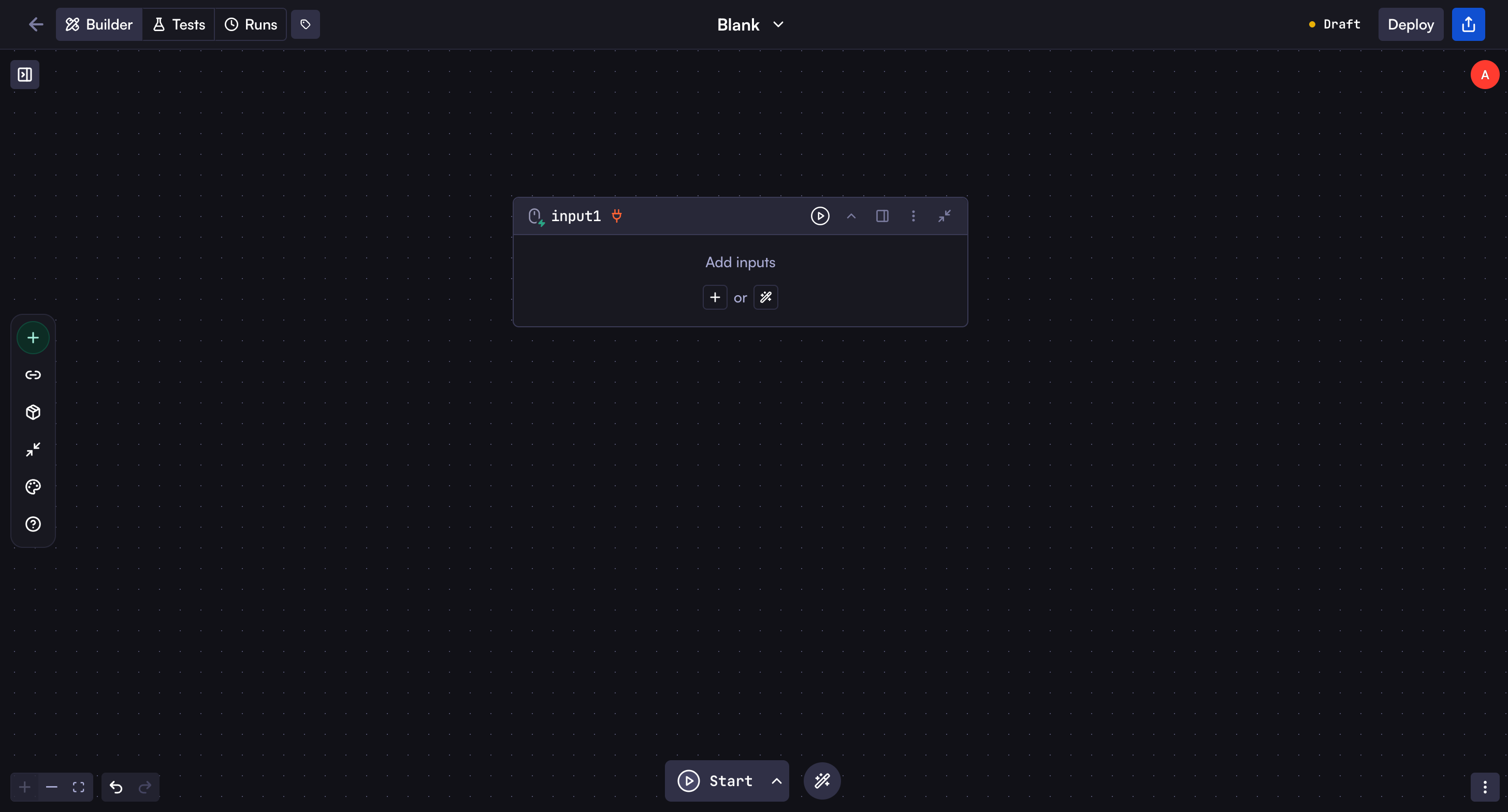 Now, let's rename the Input step key from **input1** to **form** to be more descriptive. Then, let's add two new fields to the input step:
* **Documents**: A file input that allows users to upload documents. We will enable multiple files to be uploaded.
* **Fields to extract**: A text input that allows users to specify the fields to extract from the documents.
Watch the video below to understand how to rename the step and add new fields to the input step:
As shown in the video, we created a new file field called **Documents** and assigned it the key name `documents`. We enabled multiple file uploads in the field settings and activated the **Extract images** option to automatically extract images from uploaded documents. These extracted images will be passed to the model step later in the workflow, which we'll cover in the upcoming sections.
We also added a text field called **Fields to extract** with the key name `fields_to_extract`. These key names are important as they allow you to reference these fields in subsequent steps of your workflow.
## Adding the Model Step
Now that we have the input step, we can add a **Model** step to the workflow to extract the fields from the documents.
Watch the video below to learn how to create a model step, update the user prompt, and set the response format to JSON:
1. Click and drag the small connection circle on the top right of the input step
2. Release the drag where you want to add the new step that connects to the input step
3. After releasing, a modal will appear with a list of steps similar to when we added the input step
4. Click on the **Model** step to add it to the workflow
After adding the model step, you will see it added to the workflow and connected to the input step.
This means the model step will receive the documents and fields to extract from the input step. This is the core concept of workflows - steps can be connected to each other to pass data between them.
Now, let's update the model step's user prompt to something like this:
```
Please extract these fields: {{form.output.fields_to_extract}}
From the following documents: {{form.output.documents:images}}
Return the extracted fields as a JSON object in the following format:
{
"field1": "value1",
"field2": "value2"
}
```
Feel free to customize the user prompt based on your specific needs. You can add more detailed instructions to guide the model in extracting the information accurately.
The model step will process the uploaded documents and extract the fields you specified, returning the results as a structured JSON object.
Let's understand the variables in the prompt:
* `{{form.output.fields_to_extract}}` - References the text input where users specify which fields to extract
* `{{form.output.documents:images}}` - References the images extracted from the uploaded documents
These variables follow a consistent pattern used throughout Cortex workflows:
* `stepKey.output` accesses any step's output (in this case, "form" is our input step's key)
* The `:images` suffix specifically retrieves images from the documents because we enabled the **Extract images** option in the field settings
* Similarly, a `:content` suffix can be used to access document text when the **Extract contents** option is enabled
Additionally, you should set the response format in the model step settings to **JSON**. This ensures the model returns a properly structured JSON object that can be easily used in subsequent steps.
For more details on input field types and accessing their data, see the [Input Step](/workflows/steps/input) documentation.
## Testing Your Workflow
**It's time to test the workflow 🚀**. Try uploading a document and entering the fields to extract. Then run the workflow either by clicking the workflow's **Run** button or clicking the run button on the Input step since the input step is the starting step of the fields extraction workflow.
You should see the workflow running and the extracted fields in the model step's output.
## Usage
You can interact with your workflow directly in the canvas by running it and providing inputs. However, there are additional ways to leverage your workflow:
Learn how to integrate your workflow with applications via API and SDKs
Learn how to share your workflow with others and integrate it in different
ways
## Next Steps
You now have a solid understanding of workflow steps, input steps, how to connect steps together, and how to access step outputs. Now you are able to try different use cases with workflows. But there are still more details to learn about steps and their configurations.
Deep dive into different step types, their configuration options, and working
with step outputs, step output formats of different step types.
Now, let's rename the Input step key from **input1** to **form** to be more descriptive. Then, let's add two new fields to the input step:
* **Documents**: A file input that allows users to upload documents. We will enable multiple files to be uploaded.
* **Fields to extract**: A text input that allows users to specify the fields to extract from the documents.
Watch the video below to understand how to rename the step and add new fields to the input step:
As shown in the video, we created a new file field called **Documents** and assigned it the key name `documents`. We enabled multiple file uploads in the field settings and activated the **Extract images** option to automatically extract images from uploaded documents. These extracted images will be passed to the model step later in the workflow, which we'll cover in the upcoming sections.
We also added a text field called **Fields to extract** with the key name `fields_to_extract`. These key names are important as they allow you to reference these fields in subsequent steps of your workflow.
## Adding the Model Step
Now that we have the input step, we can add a **Model** step to the workflow to extract the fields from the documents.
Watch the video below to learn how to create a model step, update the user prompt, and set the response format to JSON:
1. Click and drag the small connection circle on the top right of the input step
2. Release the drag where you want to add the new step that connects to the input step
3. After releasing, a modal will appear with a list of steps similar to when we added the input step
4. Click on the **Model** step to add it to the workflow
After adding the model step, you will see it added to the workflow and connected to the input step.
This means the model step will receive the documents and fields to extract from the input step. This is the core concept of workflows - steps can be connected to each other to pass data between them.
Now, let's update the model step's user prompt to something like this:
```
Please extract these fields: {{form.output.fields_to_extract}}
From the following documents: {{form.output.documents:images}}
Return the extracted fields as a JSON object in the following format:
{
"field1": "value1",
"field2": "value2"
}
```
Feel free to customize the user prompt based on your specific needs. You can add more detailed instructions to guide the model in extracting the information accurately.
The model step will process the uploaded documents and extract the fields you specified, returning the results as a structured JSON object.
Let's understand the variables in the prompt:
* `{{form.output.fields_to_extract}}` - References the text input where users specify which fields to extract
* `{{form.output.documents:images}}` - References the images extracted from the uploaded documents
These variables follow a consistent pattern used throughout Cortex workflows:
* `stepKey.output` accesses any step's output (in this case, "form" is our input step's key)
* The `:images` suffix specifically retrieves images from the documents because we enabled the **Extract images** option in the field settings
* Similarly, a `:content` suffix can be used to access document text when the **Extract contents** option is enabled
Additionally, you should set the response format in the model step settings to **JSON**. This ensures the model returns a properly structured JSON object that can be easily used in subsequent steps.
For more details on input field types and accessing their data, see the [Input Step](/workflows/steps/input) documentation.
## Testing Your Workflow
**It's time to test the workflow 🚀**. Try uploading a document and entering the fields to extract. Then run the workflow either by clicking the workflow's **Run** button or clicking the run button on the Input step since the input step is the starting step of the fields extraction workflow.
You should see the workflow running and the extracted fields in the model step's output.
## Usage
You can interact with your workflow directly in the canvas by running it and providing inputs. However, there are additional ways to leverage your workflow:
Learn how to integrate your workflow with applications via API and SDKs
Learn how to share your workflow with others and integrate it in different
ways
## Next Steps
You now have a solid understanding of workflow steps, input steps, how to connect steps together, and how to access step outputs. Now you are able to try different use cases with workflows. But there are still more details to learn about steps and their configurations.
Deep dive into different step types, their configuration options, and working
with step outputs, step output formats of different step types.